





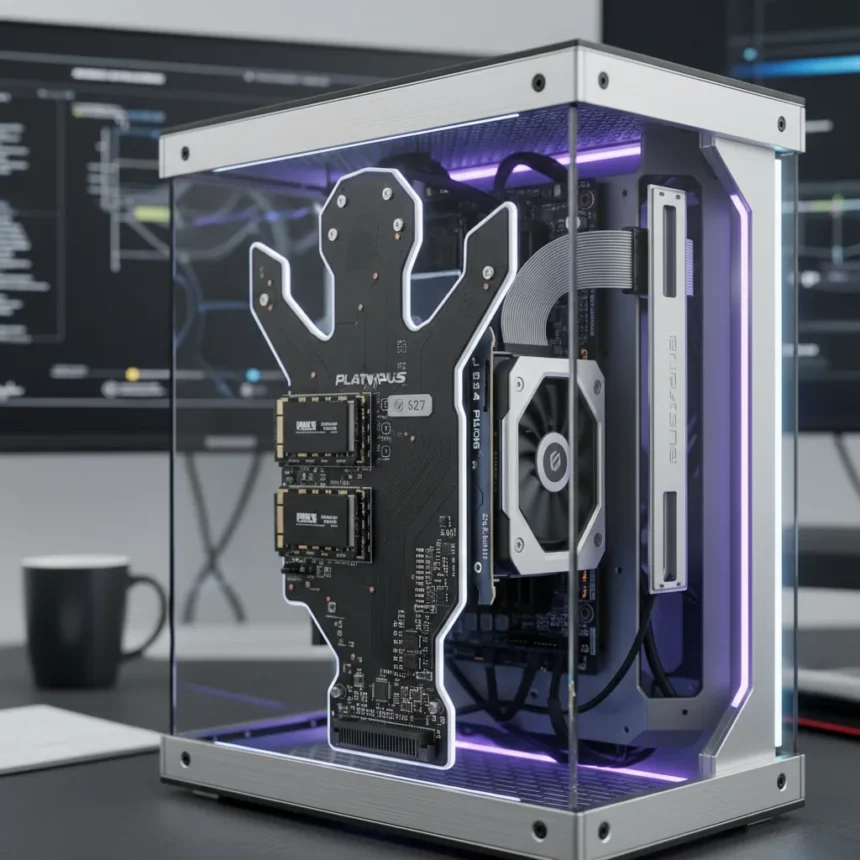
The Platypus PCIe adapter is a dual-function converter that transforms half-height graphics cards into full-height compatibility while simultaneously adding two M.2 SSD slots, all for $27. An enthusiast on Reddit recently demonstrated the adapter with a low-profile RTX 4060 paired with two SSDs, proving that compact GPU builds no longer require sacrificing storage expansion. The device leverages PCIe bifurcation—a feature supported by most modern motherboards—to split a single x16 slot into x8 lanes for the GPU and two x4 lanes for M.2 drives.
Key Takeaways
- The Platypus PCIe adapter costs $27 and serves dual purposes: GPU height conversion and storage expansion.
- Uses PCIe bifurcation to split x16 slots into x8 for GPU and two x4 lanes for SSDs.
- Demonstrated with a low-profile RTX 4060 and two M.2 drives in a space-constrained build.
- Requires motherboard BIOS support for x8/x4/x4 bifurcation splitting.
- Eliminates the need for separate GPU risers and M.2 PCIe add-in cards.
What Makes the Platypus PCIe Adapter Stand Out
Most small form factor PC builders face an awkward choice: squeeze a low-profile GPU into cramped quarters, or go without additional storage. The Platypus PCIe adapter eliminates that tradeoff. Unlike separate half-to-full-height GPU risers or standalone M.2 PCIe expansion cards that consume additional slots, this single $27 adapter performs both functions simultaneously. The design is pragmatic—it does not reinvent the wheel, but it solves a genuine pain point for enthusiasts building in space-constrained systems like SFF cases, servers, or specialty rigs where every millimeter and slot matters.
The adapter’s real innovation lies in how it handles bandwidth allocation. By leveraging PCIe bifurcation, it splits an x16 slot into x8 lanes for the GPU and two x4 lanes for M.2 drives. This approach means the graphics card still gets meaningful bandwidth—x8 PCIe lanes are sufficient for most consumer GPUs, including the RTX 4060 shown in the demo—while SSDs get their own dedicated lanes rather than sharing bandwidth with the graphics card.
How PCIe Bifurcation Makes This Work
PCIe bifurcation is the technical foundation that makes the Platypus PCIe adapter viable. Most modern motherboards support bifurcation in x16 slots, allowing them to split into multiple smaller lanes. In this case, the x16 slot becomes x8 (for the GPU) plus two x4 (for each M.2 drive). The RTX 4060 in the Reddit demo performed without obvious bottlenecks, suggesting that x8 lanes are adequate for this entry-level GPU. However, bifurcation support varies by motherboard BIOS, and not all systems enable it by default—users may need to look at BIOS settings to activate the feature.



The practical implication is significant for compact builds. Instead of daisy-chaining multiple adapters or sacrificing storage options, builders can now add two SSDs to their system in a single card slot. For small form factor enthusiasts and server administrators working with space constraints, this represents a meaningful efficiency gain. The adapter essentially performs the job of two separate components—a GPU riser and an M.2 expansion card—for less than the cost of either alone.
Real-World Build Demonstrated
The enthusiast demo on Reddit provides concrete proof of concept. A low-profile RTX 4060 paired with two M.2 drives showed that the Platypus PCIe adapter delivers on its promise. The RTX 4060 is an entry-level discrete GPU, so this demo does not stress the x8 bandwidth limit, but it demonstrates that the bifurcation approach works in practice. Builders considering this adapter should note that higher-end GPUs—such as the RTX 4070 or RTX 4080—may experience minor bandwidth constraints when running on x8 instead of x16, though real-world performance impact remains largely untested beyond this single demo.


Compatibility and Caveats
The Platypus PCIe adapter requires two specific conditions: a motherboard with an x16 slot that supports bifurcation, and BIOS settings that enable x8/x4/x4 splitting. Most modern gaming and workstation motherboards meet this requirement, but older systems or budget boards may lack bifurcation support. Additionally, while the $27 price point is compelling, the adapter’s origin and build quality remain unclear—products at this price from niche sources sometimes carry longevity or reliability concerns that are not addressed in public demos.
The adapter also assumes users have two M.2 SSDs on hand and understand how to configure bifurcation in BIOS. This is not a plug-and-play solution for casual users. For experienced builders working on compact systems, however, the combination of low cost, dual functionality, and proven compatibility makes it an attractive option.
Is the Platypus PCIe adapter worth buying for a compact build?
Yes, if your motherboard supports PCIe bifurcation and you need both GPU height conversion and M.2 storage expansion. At $27, it costs far less than buying separate adapters and consolidates two functions into one slot. However, verify your motherboard’s bifurcation support before purchasing.
Will the Platypus PCIe adapter slow down my GPU?
Running a GPU on x8 instead of x16 can reduce bandwidth, but the impact is minimal for entry-level GPUs like the RTX 4060. Higher-end graphics cards may see slight performance reduction in bandwidth-intensive scenarios, though most games and applications will not notice the difference.


Can I use the Platypus PCIe adapter with any M.2 SSD?
The adapter works with standard M.2 drives that fit the x4 PCIe protocol. Verify that your SSDs are NVMe PCIe drives rather than SATA M.2 drives, which use different electrical standards and will not be recognized by the adapter.
The Platypus PCIe adapter represents practical ingenuity in hardware design—it solves a real problem for a specific audience without unnecessary complexity or premium pricing. For small form factor PC enthusiasts and compact system builders, it is a clever way to pack more functionality into fewer slots. Just ensure your motherboard supports bifurcation and you are comfortable tweaking BIOS settings before committing to the purchase.
Where to Buy
converting a half-height GPU into full height while also adding M.2 slots for SSD storage expansion
This article was written with AI assistance and editorially reviewed.
Source: Tom's Hardware