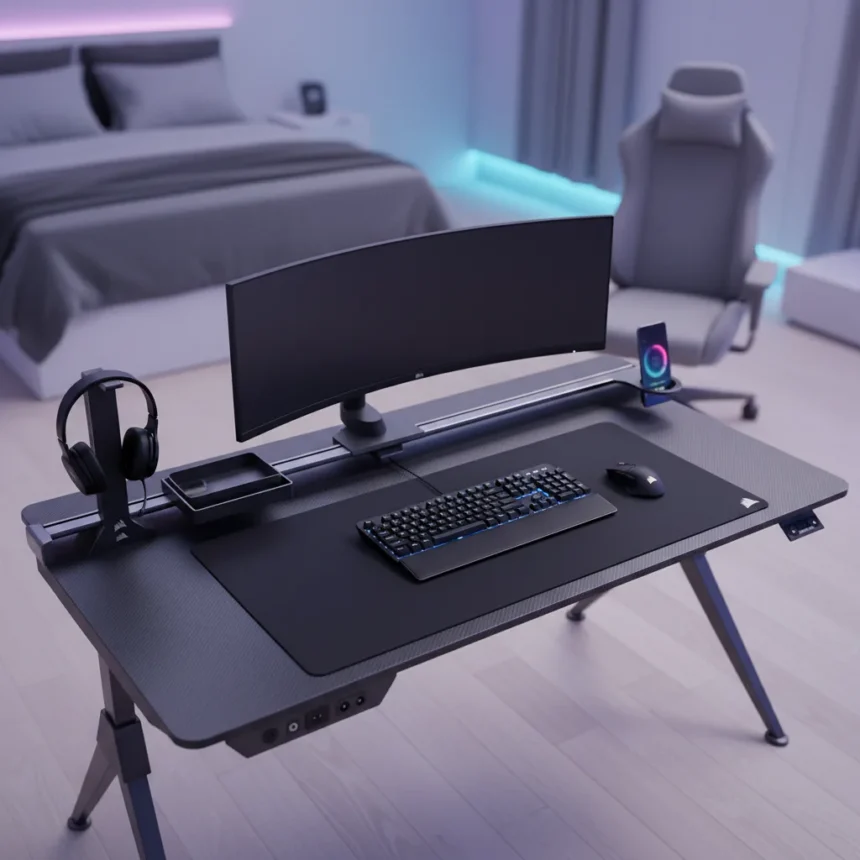
The Corsair Platform 4 Elevate is a premium sit-stand gaming desk made by Corsair, priced at $999, designed as a complete workspace solution that ships with a monitor arm, modular rail system, and integrated storage. After almost a year of testing, it has become the kind of desk that makes you question why you ever settled for anything else.
Key Takeaways
- The Corsair Platform 4 Elevate costs $999 and arrives with a monitor arm and modular T-channel rail system included in the box.
- Its 47-inch surface accommodates large gaming setups and supports optional side extensions for additional workspace.
- The rail-mounted monitor arm and T-channel system accept compatible accessories like Elgato prompters and key lights without additional clamping hardware.
- Built-in USB-A and USB-C ports on the left side enable direct device charging without separate power strips.
- The desk is especially suited for streamers and content creators who need a modular, expandable workspace.
What Makes the Corsair Platform 4 Elevate Different
Most premium gaming desks force you to assemble a frankenstein setup: buy the desk, then hunt for a monitor arm, then add a cable tray, then realize you need a separate charging solution. The Corsair Platform 4 Elevate skips that frustration. It arrives with a monitor arm already included, USB charging ports built into the left side, and a modular T-channel rail system that runs across the desktop surface. This isn’t a desk that makes you buy its ecosystem—it’s a desk that invites you into one if you want to.
The 47-inch model tested here sits at the sweet spot for gaming and content creation. It’s wide enough to handle multiple monitors, a mechanical keyboard, and still leave breathing room for a mouse pad, yet not so massive that it dominates a typical bedroom or office. The sit-stand mechanism works smoothly, and the height adjustment range accommodates everything from seated typing to standing work sessions without the jerky, slow behavior some budget standing desks suffer from.
The Rail System Is Where This Desk Wins
The modular T-channel rail system is the Corsair Platform 4 Elevate’s real differentiator. Instead of mounting accessories to the back of the desk with a clamp—the standard approach that limits positioning and looks clunky—compatible items attach directly to the rail. The monitor arm that ships with the desk uses this system, freeing up rear desk space and allowing you to adjust the arm’s position without removing and reinstalling it. Elgato’s Prompter and Key Light both work with this rail system, which matters if you stream or create video content. Third-party accessories also integrate with the rail, so you’re not locked into Corsair’s own product line.


This modular approach makes sense for streamers and content creators who constantly reconfigure their setups. You can move a light, swap monitor positions, or add a new accessory without the desk becoming a cable-management nightmare. The in-desk storage compartment handles smaller items like USB drives, cables, or headphone stands, keeping the surface clean.
Storage, Charging, and the Practical Details
The Corsair Platform 4 Elevate includes USB-A and USB-C ports positioned on the far left side of the desk. This placement matters more than it sounds—your phone and tablet charge without a separate power strip taking up floor space or creating a tangle of cables. The in-desk storage compartment adds real utility for anyone who accumulates small tech accessories, and the included cable tray prevents the usual rat’s nest of wires that builds up behind most setups.



Optional side extensions are available from Corsair if you need more surface area. The review unit tested did not include these extensions, but they’re sized appropriately for gaming PCs and additional peripherals, making them worth considering if your setup is particularly dense.
What You Might Want to Add
The Corsair Platform 4 Elevate ships complete enough that you won’t feel like you’re missing essential pieces. That said, the modular rail system’s real strength emerges when you start adding compatible accessories. If you stream, an Elgato Key Light mounted to the rail beats any desk lamp for color accuracy and positioning flexibility. The Elgato Prompter works equally well on the rail system, letting you read scripts without glancing away from the camera. These aren’t necessary to make the desk functional, but they transform it from a premium workspace into a professional content creation station.
The desk’s design invites this kind of gradual expansion. Unlike traditional gaming desks where adding accessories feels like an afterthought, the Corsair Platform 4 Elevate’s architecture makes each addition feel intentional and integrated.
Is the Corsair Platform 4 Elevate Worth $999?
The $999 price point positions this desk as a premium product, and it delivers on that positioning. You’re paying for the included monitor arm, the modular rail system, the USB charging ports, and the sit-stand mechanism all together out of the box. A comparable setup—buying a quality standing desk base, adding an aftermarket monitor arm, and integrating charging separately—would cost nearly as much or more while feeling less cohesive.


The real question is whether you value the modular ecosystem and the saved assembly time. If you’re building a gaming setup and want everything to work together without hunting for compatible parts, this desk answers that need directly. If you’re a streamer or content creator, the rail system’s flexibility justifies the investment even more. For a casual gamer who just needs a desk, a less expensive option might suffice—but you’d be sacrificing the thoughtful integration that makes the Platform 4 Elevate feel like an endgame purchase rather than a temporary solution.
How does the monitor arm compare to aftermarket alternatives?
The included monitor arm attaches to the modular rail system rather than clamping to the desk’s rear edge, which eliminates the usual space constraints and repositioning hassles. This approach is cleaner and more flexible than standard monitor arms, though the specific weight capacity and adjustment range depend on your monitor’s size and weight. The rail-mounted design means you can reposition the arm without tools or reinstalling hardware, a genuine convenience advantage over traditional clamp-style arms.
Can you expand the Corsair Platform 4 Elevate with third-party accessories?
The modular T-channel rail system accepts both Corsair’s own accessories and compatible third-party items. Elgato products like the Prompter and Key Light work with the rail, and the system’s design suggests broader compatibility with other manufacturers’ rail-mounted gear. This modularity is intentional—Corsair built the rail system to avoid vendor lock-in, letting you customize the desk around your actual needs rather than forcing you into a single brand’s ecosystem.
What’s the real advantage of built-in USB ports on a gaming desk?
Having USB-A and USB-C ports integrated into the desk’s left side eliminates the need for a separate power strip or extension cord for charging phones, tablets, and wireless peripherals. It’s a small feature that compounds over time—fewer cables on the floor, less desktop clutter, and faster charging access. For anyone who rotates between devices or streams content, this convenience adds up significantly.
The Corsair Platform 4 Elevate isn’t a desk for everyone, but it’s a desk for anyone serious about their gaming or content creation setup. After almost a year of testing, it remains the kind of purchase that justifies itself through daily use—not through flashy features, but through the quiet reliability of thoughtful design that anticipates what you actually need.
Where to Buy
Edited by the All Things Geek team.
Source: Tom's Guide