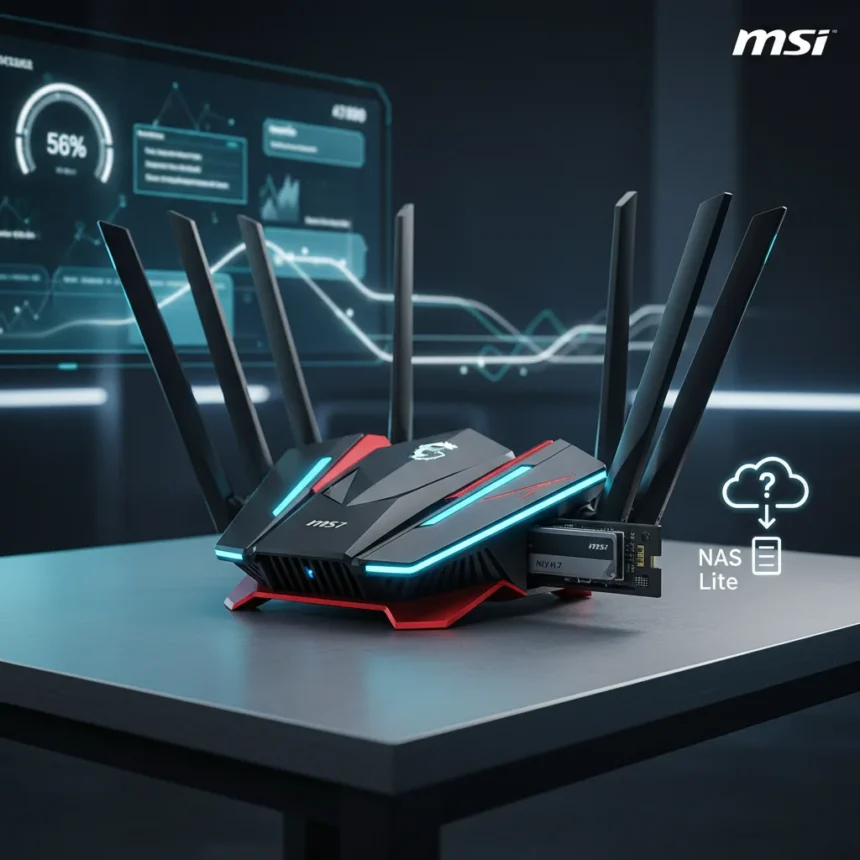
MSI has entered the Wi-Fi 7 gaming routers market with three new models at Computex, headlined by the RadiX BE19000, a flagship that promises up to 19 Gbps wireless speeds and a built-in SSD slot for what the company calls a “NAS Lite” experience. The move positions MSI alongside TP-Link and other gaming-focused router makers, though the addition of storage functionality raises as many questions as it answers about practical gaming use.
Key Takeaways
- MSI unveiled three new Wi-Fi 7 gaming routers at Computex, with the RadiX BE19000 as the flagship model.
- The RadiX BE19000 features a built-in SSD slot for lightweight network-attached storage functionality.
- Advertised wireless speeds reach 19 Gbps on the flagship model.
- The router sports a translucent, sci-fi-inspired design targeting gaming enthusiasts.
- Wi-Fi 7 gaming routers like MSI’s compete directly with TP-Link’s BE19000-class offerings in the high-end market.
MSI’s Wi-Fi 7 Gaming Routers Target Enthusiasts with Storage Integration
MSI’s three new Wi-Fi 7 gaming routers represent a deliberate push into the premium networking segment where performance and aesthetics matter equally to buyers. The RadiX BE19000 leads the charge with a sci-fi-esque translucent design that signals gaming heritage, but the real differentiator is the built-in SSD slot. This “NAS Lite” positioning suggests MSI is betting that gaming enthusiasts want to consolidate storage and routing, though it remains unclear whether this solves a genuine problem or adds complexity to devices already handling thermal demands from wireless transmission.
The 19 Gbps advertised speed aligns with other BE19000-class Wi-Fi 7 routers in the market, such as TP-Link’s Archer GE800, which also targets high-speed gaming and content creation workflows. However, raw throughput numbers tell only part of the story. Real-world performance depends on Wi-Fi 7 fundamentals like 320 MHz channel support and 4K QAM modulation, which enable the theoretical speeds but require compatible client devices and clean spectrum to deliver.
The NAS Lite Concept: Clever or Unnecessary?
Embedding an SSD slot into a gaming router is unconventional. Traditional network-attached storage (NAS) devices sit separately on a network, isolate storage workloads from routing duties, and offer redundancy and backup features that a router cannot replicate. MSI’s “NAS Lite” framing suggests lighter-weight use cases—perhaps fast file transfers between gaming PCs or temporary game file staging—but the brief does not detail what software or interface MSI provides for this functionality.


The risk is that users expecting true NAS capabilities will be disappointed, while those who just need fast wireless will find the SSD slot irrelevant. Gaming routers succeed by excelling at one job: delivering low-latency, high-bandwidth wireless to competitive players and streamers. Adding storage functionality could introduce thermal challenges, firmware complexity, or reliability concerns that distract from core routing performance. Without independent testing or user feedback, it is impossible to judge whether MSI has balanced these trade-offs effectively.
Wi-Fi 7 Gaming Routers in a Crowded Market
MSI’s entry into Wi-Fi 7 gaming routers comes as the market consolidates around a handful of premium models. TP-Link’s Archer GE800 represents the closest direct competitor, offering similar headline speeds and tri-band Wi-Fi 7 architecture with multiple multi-gig ports, including two 10G ports and four 2.5G ports. That port configuration matters for wired gaming setups, where a single bottleneck can undermine the router’s wireless speed advantage.



MSI has prior experience in gaming networking with its RadiX AXE6600 Wi-Fi 6E router, but the jump to Wi-Fi 7 and the addition of storage functionality represent a new strategic direction. The question is whether the NAS Lite feature becomes a selling point for a niche of users or a distraction that confuses positioning and adds cost without solving a real problem. Gaming routers succeed by being laser-focused on latency, throughput, and reliability—not by trying to be everything.
What We Do Not Know Yet
MSI has not disclosed pricing, exact availability, or the specifications of the two non-flagship routers in the new lineup. The RadiX BE19000 design looks striking, but translucent panels can trap dust and heat, and gaming aesthetics do not always translate to better performance. Until independent reviews test real-world speeds, SSD slot reliability, and thermal behavior under sustained use, it is premature to call this a breakthrough or a gimmick.
The Wi-Fi 7 standard itself is still ramping—client device adoption remains limited, and most users will not see the full 19 Gbps benefit until their gaming PCs, consoles, and phones support Wi-Fi 7 natively. Buying a flagship Wi-Fi 7 router today is an investment in future-proofing, not an immediate performance upgrade for most households.
Should You Buy an MSI Wi-Fi 7 Gaming Router?
If you are a competitive gamer or content creator with a wired network setup and Wi-Fi 7 client devices already in place, a high-end gaming router like the RadiX BE19000 makes sense. If the SSD slot genuinely integrates with your workflow—storing game replays, streaming assets, or large files locally—it could justify the premium. But if you are shopping for a general-purpose home router or do not yet have Wi-Fi 7 devices, MSI’s new lineup is probably overkill.



How does the RadiX BE19000 compare to TP-Link’s Archer GE800?
Both routers target the same market segment with 19 Gbps Wi-Fi 7 speeds and gaming-focused designs. The Archer GE800 emphasizes wired connectivity with multiple multi-gig ports, while the RadiX BE19000 adds an SSD slot for local storage. Without head-to-head testing, it is difficult to declare a winner—it depends on whether you value wired port flexibility or integrated storage more.
What is a “NAS Lite” experience on a router?
“NAS Lite” refers to lightweight network storage functionality built into the router itself, allowing users to attach an SSD for fast local file access without a separate NAS device. It is not a replacement for dedicated network-attached storage, which offers redundancy, backup, and more sophisticated management—it is a convenience feature for users who want faster file transfers without additional hardware.
Do I need a Wi-Fi 7 router right now?
Wi-Fi 7 routers are future-proofing purchases. Most households do not yet have Wi-Fi 7 client devices, so the speed advantage remains theoretical. If your current router handles your network demands, waiting for Wi-Fi 7 client adoption to mature is the practical choice. If you are building a new gaming setup or streaming studio, a Wi-Fi 7 model makes sense as a long-term investment.
MSI’s Wi-Fi 7 gaming routers are ambitious, but ambition without clarity is risk. The RadiX BE19000’s SSD slot is intriguing, but it feels like a feature added because it was technically possible, not because it solves a critical problem gamers face. Wait for reviews, pricing, and real-world testing before deciding whether the NAS Lite concept justifies the premium over conventional high-end gaming routers.
Edited by the All Things Geek team.
Source: Tom's Hardware