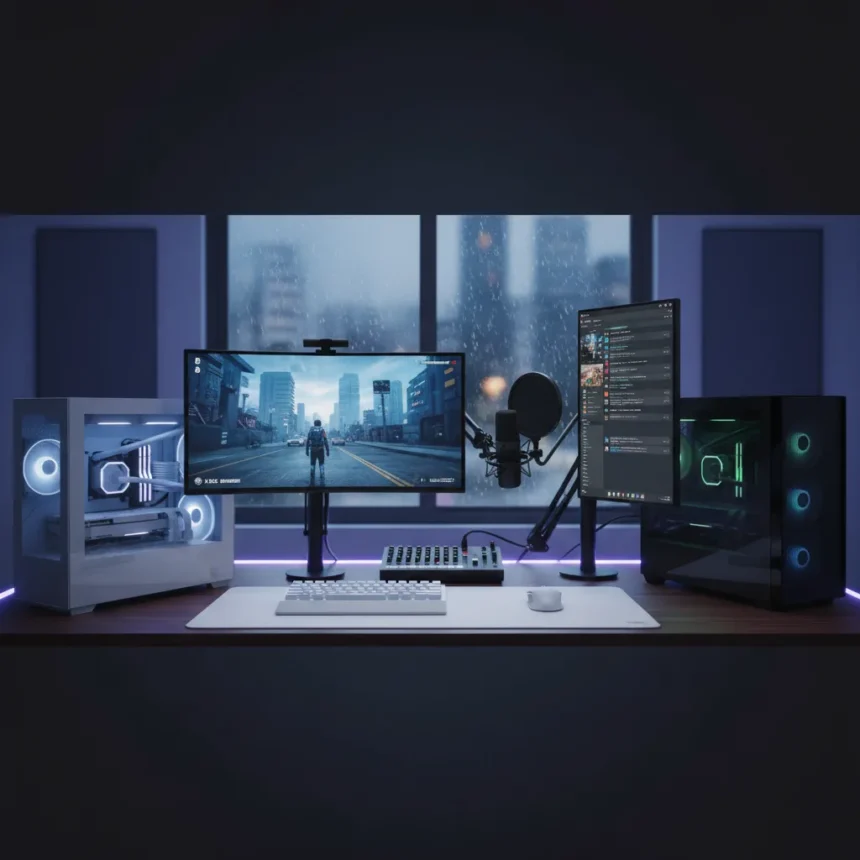
A dual-PC gaming setup represents a fundamental shift in how enthusiasts approach gaming and productivity on the same system. Rather than waiting indefinitely for Valve’s official Steam Machine, one builder took matters into their own hands, constructing a custom dual-PC arrangement that separates gaming from general computing. The result, according to the builder, is the best choice they’ve made in years.
Key Takeaways
- A dual-PC setup eliminates the performance trade-offs of trying to game and multitask on a single machine.
- Custom Steam Machine builds offer more flexibility than waiting for Valve’s official hardware release.
- Separating gaming and productivity workflows improves both performance and user experience.
- Capture card integration enables seamless streaming and content creation alongside gaming.
- DIY dual-PC solutions address the core problem Valve’s Steam Machine was meant to solve.
Why single-PC gaming and multitasking creates friction
Gaming and multitasking on a single PC creates genuine friction. Background applications consume CPU cycles and memory needed for smooth frame rates. Discord notifications interrupt focus. Browser tabs and email clients compete for system resources. The moment you launch a demanding game, everything else slows to a crawl. Conversely, stepping away from a game to handle work means closing applications, losing momentum, and accepting performance hits when you return.
This architectural problem is why the dual-PC model exists. One machine handles gaming exclusively. The other manages everything else—streaming, video capture, communication, productivity. They communicate through peripherals and capture hardware, creating a workflow that feels native rather than compromised. The gaming PC never throttles for background tasks. The productivity machine never stutters because a GPU is rendering at 120 frames per second.
How a dual-PC gaming setup differs from traditional single-machine gaming
A traditional single-PC gaming setup forces constant trade-offs. You either disable background applications before gaming, sacrificing convenience, or you accept degraded frame rates and stuttering. Streaming while gaming on one machine means your encoder steals GPU or CPU resources from the game itself, creating a bottleneck. Content creators face the harshest constraints—their gaming performance tanks the moment they enable capture.


The dual-PC gaming setup eliminates these compromises entirely. The gaming PC runs nothing but the game and essential system services. The capture and encoding workload moves to a second machine, connected via capture card. This second PC handles streaming, chat, Discord, email, and every other task without affecting gaming performance. The separation is clean and architectural, not just a matter of closing windows or adjusting settings. For anyone who games seriously while managing other responsibilities, this difference is transformative.
The appeal of building custom over waiting for Valve
Valve’s Steam Machine concept promised to bring PC gaming to living rooms with the polish of a console. Years of announcements, delays, and half-measures have left enthusiasts skeptical. The official Steam Machine ecosystem has stalled, and waiting for Valve to deliver a complete vision feels increasingly futile. Building a custom dual-PC setup sidesteps this problem entirely.



A DIY approach offers immediate gratification and total control. You choose every component, every software layer, every peripheral. You’re not constrained by Valve’s hardware decisions or software roadmap. You build exactly what solves your specific problem—whether that’s gaming with zero background interference, streaming without performance compromise, or content creation without bottlenecks. The builder who chose this path made the pragmatic choice: stop waiting, start building, and own the entire experience.
What a dual-PC gaming setup requires in practice
Setting up a functional dual-PC gaming setup requires more than two computers. A capture card bridges the gaming PC’s output to the second machine, allowing real-time video and audio capture without impacting gaming performance. Peripherals need to be shareable or duplicated—keyboard, mouse, and displays work across both systems. Some builders use KVM switches to control multiple PCs from a single input device. Others keep dedicated peripherals for each machine and simply switch focus.
The workflow becomes intuitive quickly. Gaming happens on the dedicated machine. Streaming, encoding, and chat happen on the secondary machine. If you need to step away from the game to handle urgent work, you switch to the productivity machine without touching the gaming setup. Performance remains consistent because neither machine is doing double duty. This separation of concerns is the core insight that makes the dual-PC gaming setup worth the complexity.
Is a dual-PC gaming setup worth the investment?
Whether a dual-PC gaming setup makes sense depends on your specific workflow. For casual gamers who play occasionally and don’t stream or create content, a single high-end PC remains simpler and more cost-effective. For serious gamers, streamers, and content creators, the dual-PC model solves real problems that no amount of single-machine optimization can fix. The builder profiled in this article clearly falls into the latter category—their gaming and multitasking demands made the dual-PC approach not just appealing but necessary.


The financial investment is real. You’re buying two capable machines instead of one. However, the performance gains and workflow improvements often justify the cost for power users. A gaming PC doesn’t need to be expensive if it’s dedicated to gaming—it can be optimized purely for frame rates. The secondary machine can be more modest, focused on CPU performance and storage rather than GPU horsepower. Spread the investment across two machines with specialized purposes, and the total cost becomes more reasonable than building one machine that tries to excel at everything.
Can a dual-PC setup work without a capture card?
Technically, yes, but a capture card transforms the dual-PC setup from interesting to genuinely useful. Without it, you’re managing two separate displays and peripheral sets, which adds complexity rather than solving it. A capture card creates a unified experience—the gaming PC’s output feeds into the secondary machine as a video input, allowing the productivity machine to access, stream, and record the gaming session without any performance impact on the game itself. This is the feature that makes the workflow feel seamless rather than fragmented.
What makes a dual-PC gaming setup better than just upgrading one PC?
Upgrading a single PC to handle gaming and streaming simultaneously hits hard limits. The best GPU and CPU can’t overcome the fundamental constraint: one machine doing two demanding jobs at once. Encoding video while rendering a game creates a bottleneck no amount of money can fully solve. A dual-PC setup doesn’t upgrade your way out of the problem—it eliminates the problem by design. Two specialized machines will always outperform one generalist machine when the workloads are genuinely demanding and simultaneous.
Final thought
The dual-PC gaming setup represents a pragmatic response to years of waiting for Valve to deliver. Rather than hope for an official Steam Machine that may never arrive in the form enthusiasts want, builders are taking control and creating their own solutions. The results speak for themselves: improved gaming performance, better streaming quality, and a workflow that actually respects the demands of serious gaming and productivity. If you’ve felt the friction of trying to do too much on one machine, this approach is worth considering.
Edited by the All Things Geek team.
Source: TechRadar