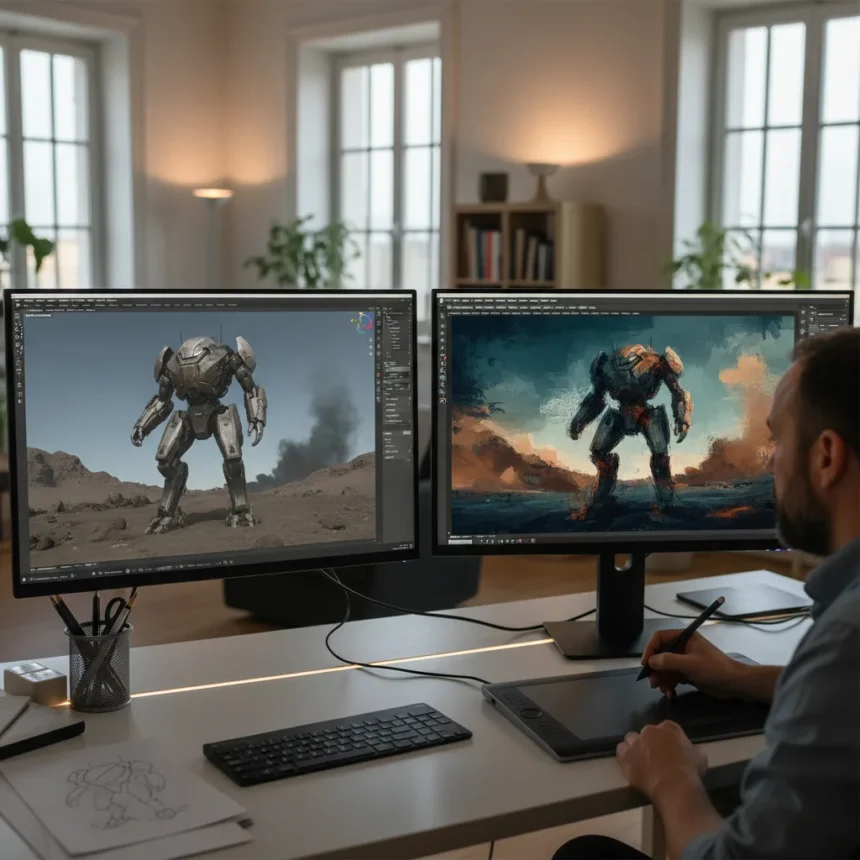
Thomas Osbourne, a digital artist specializing in painterly styles, demonstrates how combining Blender Photoshop concept art creates professional-grade visuals that bridge 3D precision and 2D artistic expression. His workflow prioritizes efficiency in production environments, allowing artists to iterate quickly while maintaining visual impact across game development and film concept work.
Key Takeaways
- Blender handles scene blocking, camera setup, and atmospheric rendering before Photoshop refinement.
- Photoshop layers photo textures and applies Dry Brush filters to soften the 3D appearance.
- Story-driven composition begins with reference gathering and mood establishment before any 3D work.
- Hue/Saturation adjustments in Photoshop fine-tune color balance between realism and painterly aesthetics.
- The hybrid approach reduces iteration time compared to painting from scratch or relying solely on 3D renders.
Why Story Comes Before Software
Osbourne’s process begins not in Blender but in conceptual thinking. Before opening either application, the artist considers what visual elements the shot needs to communicate the narrative. This story-first approach prevents wasted rendering cycles and ensures every element serves the composition. References establish mood and compositional frameworks, guiding decisions about camera placement, lighting, and atmospheric density.
Once the conceptual direction is locked, Osbourne moves into Blender to block out the scene. This phase focuses on spatial relationships and camera angles rather than detailed modeling. The goal is to find the strongest viewpoint and establish the overall atmosphere—fog, lighting direction, environmental context—before committing to rendering. This blocking stage is where most directional decisions happen, making it the critical foundation for everything that follows in Photoshop.
Blender’s Role: 3D Foundation and Atmosphere
In Blender, Osbourne builds the scene architecture and captures screenshots that will serve as the base layer for Photoshop work. The 3D software handles the heavy lifting of perspective, lighting consistency, and atmospheric effects that would take significantly longer to paint manually. He also generates a solid view pass—sometimes called a clown pass—which isolates individual objects for masking and selective editing later in Photoshop.


This approach differs from pure 3D rendering workflows that aim for photorealism in the engine itself. Instead, Blender provides the structural accuracy and lighting foundation that would otherwise require extensive reference work and manual perspective correction. The rendered output is deliberately treated as a starting point rather than a finished product, which is where Photoshop’s painterly intervention becomes essential.
Photoshop’s Painterly Intervention: Texture and Finish
Once Blender renders are imported into Photoshop, Osbourne layers in photo textures and fine details that ground the scene in tactile realism. The Dry Brush filter is applied strategically to break up the mechanical appearance of 3D geometry, softening edges and introducing organic irregularity. This filter is not applied uniformly—selective application ensures certain areas retain crisp definition while others gain painterly softness.



Color refinement follows through Hue/Saturation adjustment layers, allowing Osbourne to shift the overall palette without flattening the image or losing texture detail. This stage is where the final mood emerges—whether the concept reads as warm and inviting or cold and foreboding depends largely on these color decisions made in Photoshop after the 3D work is complete. The layering approach means individual adjustments can be isolated, refined, or toggled off without affecting the underlying render.
How This Workflow Compares to Other Approaches
Other concept artists on Creative Bloq use similar hybrid methods with variations. Grady Frederick’s approach to fantasy architecture emphasizes moving from standalone architecture pieces into mood illustration, following a comparable 3D-to-2D progression. Edward’s environment technique adds an intermediate thumbnailing stage before the 3D blockout, providing additional compositional exploration before committing to full renders.
Some artists extend the toolset further. Kyle Enochs incorporates Unreal Engine alongside Blender and Photoshop for characters, mechs, and environments, leveraging real-time rendering for faster feedback. This expanded workflow suits production pipelines where iteration speed justifies the additional software complexity. Osbourne’s two-tool approach is deliberately more streamlined, prioritizing accessibility and focused workflow over maximum rendering capability.
Why the Hybrid Matters for Production Timelines
The Blender Photoshop concept art workflow solves a specific production problem: concept artists need to explore ideas quickly without spending weeks on fully rendered 3D assets or entirely hand-painted illustrations. By using Blender to establish spatial accuracy and lighting, artists avoid the perspective errors and consistency issues that plague purely painted concepts. By finishing in Photoshop, they avoid the sterile, overly-polished look that pure 3D renders often produce.


This balance is critical in game development and film pre-production, where concept art must communicate both visual direction and technical feasibility. A purely painted concept might look beautiful but leave ambiguity about how a scene actually functions in 3D space. A pure 3D render might be technically accurate but fail to inspire the emotional response needed to greenlight a project. Osbourne’s method delivers both clarity and artistry, making it a practical choice for professional environments where time and creative impact are equally valuable.
Can beginners use this workflow?
Yes, though the approach requires baseline competency in both Blender and Photoshop. Beginners should start with simpler scenes—a single building, a landscape vista, a character in a basic environment—before attempting complex multi-element compositions. The foundational concept remains the same: use 3D for structure, use 2D for personality. Learning to block out scenes efficiently in Blender takes practice, but the payoff is faster iteration than painting from reference alone.
What if you don’t have Photoshop?
The workflow depends on layering, masking, and non-destructive adjustment capabilities. Photoshop is industry standard, but alternative applications like GIMP, Affinity Photo, or Krita offer similar features. The specific filters and adjustment layers may differ, but the principle—importing a 3D render and adding painterly texture and color refinement—translates across software. The Dry Brush filter equivalent might have a different name or require different settings, but the artistic outcome remains achievable.
How long does a concept using this method typically take?
Timeline depends on scene complexity, but the hybrid approach is designed to be faster than either pure painting or pure 3D. A simple environment concept might take one to two days from blocking to final Photoshop polish. Complex scenes with multiple assets, detailed texturing, and extensive color work could extend to three to five days. The efficiency gain comes from Blender handling perspective and lighting automatically, eliminating hours of manual correction that traditional painting requires.
Thomas Osbourne’s Blender Photoshop concept art workflow succeeds because it respects the strengths of each tool rather than forcing one tool to do everything. Blender excels at spatial reasoning and lighting consistency; Photoshop excels at texture, mood, and artistic refinement. The artists who master both gain a competitive advantage in production environments where speed and quality are equally demanded. For concept artists tired of either purely manual painting or sterile 3D output, this hybrid approach offers a pragmatic path forward.
Edited by the All Things Geek team.
Source: Creativebloq