





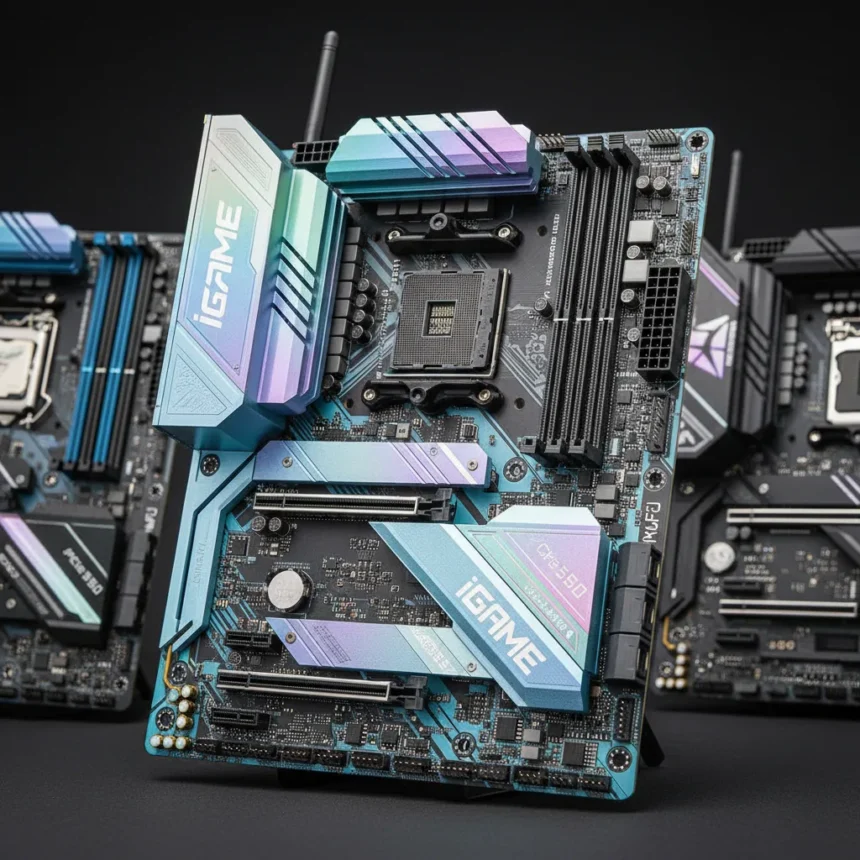
The Colorful iGame X870E Vulcan OC V14 is an ATX motherboard built for AM5 socket, designed by Colorful for high-end overclocking with robust power delivery, extensive cooling, and a feature-rich design targeting enthusiasts willing to spend under $700 for serious platform credibility.
Key Takeaways
- 18+2+2 Phase Enhanced Power Design with 110A Dr. MOS stages handles Ryzen 9 9950X at full PBO load without strain.
- Three PCIe 5.0 x4 M.2 slots on an ATX board is rare; two additional Gen4 x4 slots bring total to five M.2 options.
- Wi-Fi 7 and 5GbE LAN provide modern connectivity; integrated Smart Screen LCD display enables personalization and real-time monitoring.
- Vulcan Heatsink Armor with full-condensing plate and “Cyber God” cooling armor keeps power delivery and chipset cool under sustained load.
- Physical turbo button, instant X3D one-click overclocking, and AI X3D turbo mode streamline the OC workflow for both beginners and veterans.
Power Delivery That Doesn’t Compromise
The iGame X870E Vulcan OC V14 ships with an 18+2+2 Phase Enhanced Power Design where each phase uses 110A Dr. MOS stages, delivering substantial current capacity that exceeds the demands of a 16-core Ryzen 9 9950X running at full PBO load. This is not marketing theater—robust VRM architecture is the foundation of stable overclocking, and Colorful has committed to the design here. The dual 8-pin CPU power connectors ensure clean power delivery even during aggressive voltage adjustments. For comparison, many mid-range AM5 boards skimp on phase count or use lower-amperage stages; this board refuses that compromise.
The power delivery sits beneath the full-coverage Vulcan Heatsink Armor, which includes a full-condensing plate designed to dissipate heat from the VRM and surrounding components. The “Cyber God” cooling armor wraps the chipset and power stages, maintaining thermal stability during sustained overclocking sessions. This layered cooling approach is essential when pushing voltage and frequency—passive thermal management alone would throttle performance or force unnecessary fan speed increases.
Storage and Expansion: Future-Proofing Without Compromise
The iGame X870E Vulcan OC V14 offers three PCIe 5.0 x4 M.2 slots plus two additional Gen4 x4 M.2 slots, totaling five M.2 options. On an ATX board, this is exceptional—most competitors in this class offer one or two PCIe 5.0 M.2 slots. EZ release mechanisms on all M.2 slots make drive swaps painless, a small detail that improves usability significantly. The PCIe 5.0 x16 slot supports graphics cards and drops to x8 if you populate the second or third M.2 slot, a standard trade-off. A second PCIe 4.0 x16 slot operates at x4 speeds and sits under a plastic cover, preserving aesthetics while offering expansion flexibility.


The 10-layer PCB with 2 oz copper and silver plating enhances signal integrity, particularly important for the DDR5 memory configuration. The board supports DDR5-8600+ on Ryzen 9000 series, DDR5-10000+ on Ryzen 8000, and DDR5-8000+ on Ryzen 7000, with XMP and EXPO profiles for one-click optimization. The 1DPC (one DIMM per channel) configuration across two slots supports up to 128 GB total, though most overclocking rigs will run matched pairs.
Connectivity and Monitoring: Modern and Functional
Wi-Fi 7 and 5GbE LAN provide connectivity that won’t bottleneck modern gaming or content creation workflows. Bluetooth 5.4 rounds out wireless support, and the audio stack is respectable for a board at this price point. The standout feature is the integrated Vulcan Smart Screen—an onboard LCD display for personalization and real-time system monitoring. This is not a gimmick; the display shows boot codes, temperatures, clock speeds, and voltages, useful for debugging failed overclocks without needing a separate hardware monitor or software overlay.



RGB zones on the I/O plate and PCH add visual flair without overwhelming the design. The physical turbo button on the board itself provides one-touch access to performance profiles, bypassing BIOS menus entirely—a convenience feature that appeals to overclockers who frequently switch between stock and tweaked configurations.
Overclocking Features: Tools for the Serious Enthusiast
Colorful has equipped the iGame X870E Vulcan OC V14 with a serious OC toolkit: instant X3D one-click overclocking, AI X3D turbo mode, and smart AI overclocking features. These tools automate the tedious parts of overclocking—frequency ramping, voltage stepping, and stability testing—while leaving manual tuning available for those who want granular control. The one-click modes are entry points for newcomers; experienced overclockers will appreciate the BIOS depth and voltage adjustment granularity that the board offers.
The combination of robust power delivery, comprehensive cooling, and intelligent firmware creates an environment where overclocking feels less like fighting the hardware and more like a structured process. That said, overclocking results depend heavily on silicon lottery—not every chip will hit the same frequencies, regardless of board quality.
Where It Fits in the Market
The iGame X870E Vulcan OC V14 competes against other high-end AM5 boards in the sub-$700 segment, where feature density and overclocking headroom determine value. Compared to other premium ATX X870E options, the triple PCIe 5.0 M.2 configuration, Wi-Fi 7, and Smart Screen display justify the price for users building high-performance systems. For gamers, content creators, and overclockers, this board delivers the infrastructure to support flagship Ryzen 9000 and 8000 series processors without compromise.



Is the iGame X870E Vulcan OC V14 worth the price?
Yes, if you are building a high-end AM5 system and plan to overclock or simply want maximum feature density. The 18+2+2 phase VRM, three PCIe 5.0 M.2 slots, Wi-Fi 7, and Smart Screen LCD justify the cost for enthusiasts. If you are building a stock-clocked gaming rig, a mid-range X870E board will suffice and save you $200.
What memory speeds does the iGame X870E Vulcan OC V14 support?
The board supports DDR5-8600+ on Ryzen 9000 series, DDR5-10000+ on Ryzen 8000, and DDR5-8000+ on Ryzen 7000 with XMP and EXPO profiles. Maximum capacity is 128 GB across two DIMM slots, with 64 GB per slot.
How many M.2 slots does this motherboard have?
Five total: three PCIe 5.0 x4 M.2 slots and two PCIe Gen4 x4 M.2 slots. The PCIe 5.0 slots feature EZ release mechanisms for easy drive installation and removal.
The Colorful iGame X870E Vulcan OC V14 represents a genuine attempt to compete in the premium AM5 space with infrastructure that matters—power delivery, cooling, storage options, and overclocking tools. It is not the cheapest X870E board, but it delivers features and performance headroom that justify the investment for serious builders.
Edited by the All Things Geek team.
Source: Tom's Hardware




