The Keychron Q3 Ultra 8K is a premium 80% TKL wireless mechanical keyboard made by Keychron, featuring a full metal aluminum case, Keychron Silk POM switches, and wireless 8K polling capability. It represents the company’s latest push into high-end custom keyboards, but the expensive price tag raises a fundamental question: does wireless 8K polling justify a premium over more affordable alternatives?
Key Takeaways
- Full metal aluminum case with brass weight delivers heft and premium tactile feel.
- Wireless 8K polling at 2.4 GHz is rare for wireless keyboards and shows no perceptible lag in testing.
- 4,000mAh battery lasts up to 660 hours with backlight off, roughly three months of daily use.
- Keychron Silk POM switches offer a smooth, tactile typing experience without Hall effect complexity.
- High price tag is the primary barrier for most buyers relative to feature set.
Build Quality and Design: Metal Meets Excess Weight
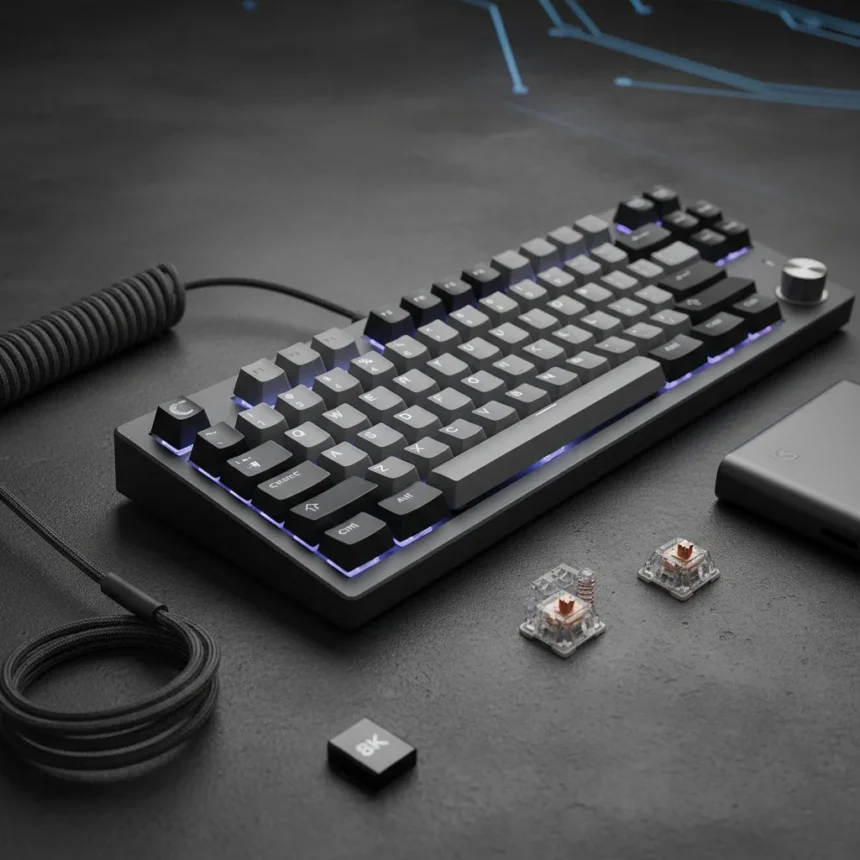
The Keychron Q3 Ultra 8K arrives in a hefty package. The full aluminum case paired with a brass weight creates a keyboard that feels substantial—2.1 to 2.5 pounds of deliberate heft. This is not a portable typing tool; it is a desktop anchor. The 80% TKL layout strips the numpad while keeping arrow keys and function row, striking a reasonable middle ground between compactness and functionality.
The design philosophy prioritizes acoustic engineering. Multiple dampening layers—sound-absorbing foam, IXPE foam, PET film, latex bottom pad, and a polycarbonate plate in gasket-mount configuration—work together to muffle the mechanical noise that plagues cheaper boards. The result is a keyboard that sounds premium without the sharp clack that alienates office mates. The bottom lip makes the keyboard easy to pick up despite its weight, a thoughtful detail often overlooked in keyboard design.
KSA double-shot PBT keycaps complete the package with matte texture and deep grooves that provide genuine tactile feedback during typing. The black and gray color scheme with turquoise accents avoids the garish RGB-obsessed aesthetic that dominates gaming peripherals. These keycaps feel durable and look intentional.


Keychron Q3 Ultra 8K Switches and Typing Experience
The Keychron Q3 Ultra 8K ships with Keychron Silk POM switches in a tactile brown variant. These are standard mechanical switches, not Hall effect or magnetic designs—a deliberate choice that simplifies the experience without sacrificing performance. The switches feel smooth and satisfying, with a gentle bump that registers without demanding aggressive keystroke force.
Hot-swappability means you can swap switches without soldering, appealing to enthusiasts who want to experiment without commitment. The keyboard supports VIA/QMK compatibility via ZMK firmware, enabling advanced customization for developers and power users. For most people, the stock brown switches deliver a solid typing experience that balances responsiveness with comfort during extended sessions.



Wireless 8K Polling: Impressive But Debatable
The standout feature is wireless 8K polling over 2.4 GHz connectivity. This is genuinely rare—most wireless keyboards top out at 1 KHz polling, and achieving 8000 Hz wirelessly requires careful hardware and firmware engineering. Testing revealed no perceptible lag or keystroke inconsistencies when using the 2.4 GHz connection at maximum polling rate. For competitive gamers chasing every millisecond, this is meaningful.
However, the practical benefit remains contested. A 1 KHz polling rate is adequate for nearly all users and gaming scenarios; the jump to 8K introduces diminishing returns that most people will never notice. The 2.4 GHz wireless mode is configurable via Keychron Launcher, where you can toggle between 8K and lower rates. Bluetooth connectivity, limited to 125 Hz polling, represents a significant step backward if you switch between devices—the keyboard supports up to three Bluetooth pairings, but the latency difference is noticeable when toggling between them.
The real question is whether this feature justifies a premium price. For the vast majority of typists and casual gamers, the answer is no. For esports competitors, the answer might be yes—but they represent a fraction of the potential customer base.
Battery Life: Legitimately Impressive
The 4,000mAh battery is the keyboard’s most compelling practical advantage. With backlight off, the Keychron Q3 Ultra 8K delivers up to 660 hours of runtime—roughly three months of eight-hour daily use without a charge. Even with RGB at lowest brightness, you get 200 hours, still respectable for a month-long work trip.



This is not marketing hyperbole. The combination of efficient ARM core processing, ZMK firmware optimization, and a genuinely large battery cell makes the Q3 Ultra 8K a rare wireless keyboard that you genuinely forget to charge. Compare this to competitors like the original Keychron Q3, which lacks the 660-hour capability, and the advantage becomes clear. For remote workers and travelers, this battery life eliminates the anxiety of a keyboard dying mid-workday.
RGB Backlighting: Functional But Compromised
Per-key RGB backlighting is fully adjustable via the all-new knob design or through Keychron Launcher software. Animation speeds and brightness levels offer granular control. However, the acoustic foam under the plate absorbs some RGB glow, dimming the visual impact compared to keyboards with less dampening. This is a deliberate trade-off—better sound at the cost of dimmer RGB—but it means the lighting feels less vibrant than cheaper boards that prioritize visual pop over audio quality.
Customization and Software Experience
Keychron Launcher divides customization into basic and advanced modes. Basic mode handles RGB brightness, animation speeds, and sleep mode settings—straightforward enough for casual users. Advanced mode unlocks polling rate configuration, bounce time adjustment, and per-key RGB customization, catering to developers and enthusiasts who want granular control.
The powerful ARM core with 1MB flash memory provides flexibility for custom firmware, and ZMK compatibility opens doors for users familiar with open-source keyboard ecosystems. For Mac, Windows, Linux, and iOS users, the keyboard works smoothly across operating systems. This cross-platform compatibility is valuable for people juggling multiple devices.
The Price Problem
Here is where the Keychron Q3 Ultra 8K stumbles. The exact price is not disclosed in available sources, but reviews consistently identify the cost as a significant barrier—described as expensive enough to deter most buyers. Without a specific figure, it is difficult to calculate value per feature, but the positioning suggests this keyboard competes with premium custom boards that cost hundreds of dollars.
The question becomes: what justifies this premium? The metal case and brass weight are nice but not unique. The battery life is genuinely excellent. The 8K polling is impressive but niche. The sound quality is good but not revolutionary. The Keychron V3 Ultra 8K, by comparison, uses a plastic case instead of metal, offers similar 8K polling and 660-hour battery life, and is positioned as more affordable—though some reviewers dismiss 8K polling itself as a gimmick when 1 KHz suffices for most gamers.
Should You Buy the Keychron Q3 Ultra 8K?
Buy this keyboard if you are a competitive esports player who demands the lowest possible latency, value exceptional battery life as a core feature, and can justify a premium price for a metal build and acoustic engineering. The Keychron Q3 Ultra 8K excels in these specific scenarios.
Skip it if you are a casual typist, office worker, or recreational gamer. The 8K polling offers no practical benefit. A cheaper mechanical keyboard with a plastic case will serve your needs just as well. The battery life advantage only matters if you travel frequently or work remotely without access to power outlets.
How does the Keychron Q3 Ultra 8K compare to the original Q3?
The original Keychron Q3 from 2022 lacks 8K polling, ZMK firmware support, and the 660-hour battery capability. The Q3 Ultra 8K adds wireless 8K polling, updated firmware, extended battery life, and refined acoustic design. If you own the original Q3, the upgrade is not essential unless you specifically need 8K polling or the battery life improvement.
Does the Keychron Q3 Ultra 8K work with Mac and Linux?
Yes. The keyboard supports Windows, macOS, Linux, and iOS. Cross-platform compatibility is built in, making it suitable for users who switch between operating systems or manage multiple devices.
Is wireless 8K polling actually necessary for gaming?
For most gamers, no. A 1 KHz polling rate is sufficient for virtually all gaming scenarios. Wireless 8K polling matters only for esports competitors playing at the highest level where every millisecond counts. For everyone else, the feature is nice but not necessary and does not justify a premium price on its own.
The Keychron Q3 Ultra 8K is a well-engineered keyboard that executes its design philosophy with competence. The metal build, acoustic tuning, battery life, and wireless 8K polling demonstrate genuine engineering effort. But premium price demands premium justification, and for most buyers, this keyboard offers incremental improvements over cheaper alternatives rather than transformative advantages. Unless you specifically need one of its niche strengths—esports-level latency, exceptional battery life, or metal aesthetics—you are paying for features you will not use.
Where to Buy
Check Amazon | $229 | $229
Edited by the All Things Geek team.
Source: Tom's Guide