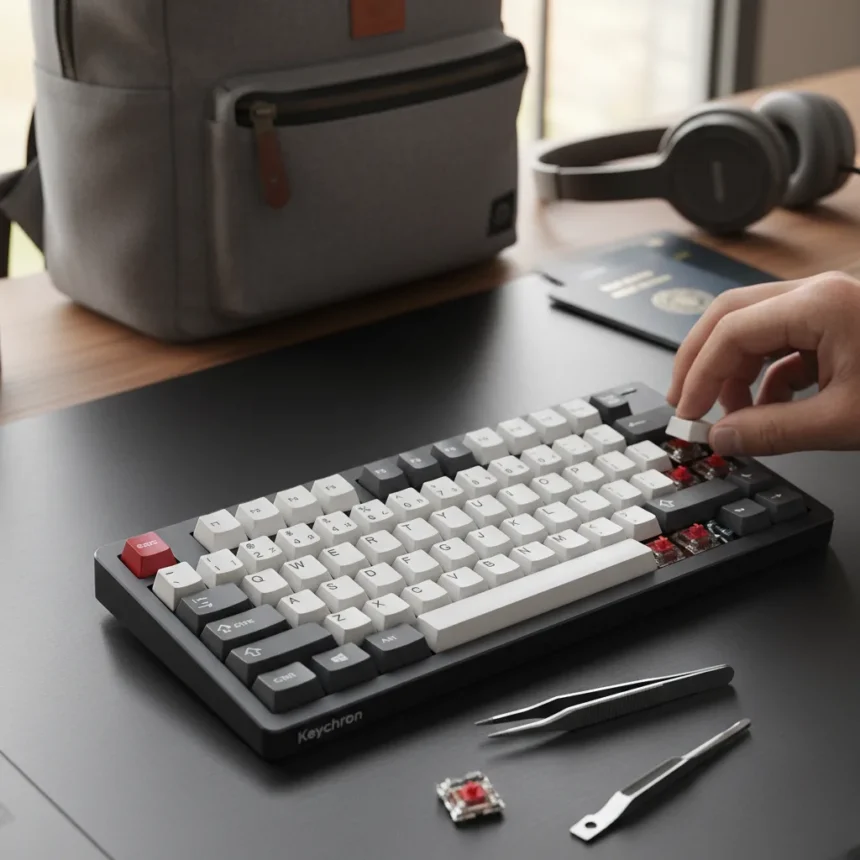
The Keychron K3 Ultra is an ultra-slim mechanical keyboard with a small footprint, low-profile design, and satisfying typing action comparable to much larger keyboards. It occupies a rare sweet spot in the 2026 keyboard market: a genuinely portable device that doesn’t feel like a compromise. With hot-swappable switches, tri-mode connectivity, and an attractive wooden design, the K3 Ultra stands out as the best portable low-profile mechanical keyboard available, despite some inherent trade-offs with traditional deeper-travel boards.
Key Takeaways
- Ultra-slim 75% layout with 2.5mm low-profile switch travel, ideal for travel and compact workspaces.
- Hot-swappable Gateron or Keychron Optical switches in soft, clicky, or resistive options for full customization.
- Tri-mode connectivity: wired USB-C with full NKRO, plus 2.4GHz wireless and Bluetooth with 6KRO support.
- Backlighting available in white or RGB for personalization.
- Optional $25 travel pouch makes portability even easier for frequent movers.
Design and Build: Form Meets Function
The Keychron K3 Ultra’s appeal starts with its industrial design. The keyboard feels like a high-end laptop keyboard but delivers the satisfying mechanical feedback that chiclet keys simply cannot match. The wooden aesthetic element—referenced in the review title—adds visual warmth without bulk. At just 75% layout, it occupies minimal desk real estate while retaining all essential keys, making it the keyboard equivalent of a well-designed carry-on bag.
What separates the K3 Ultra from competitors like the Keychron K2 is the commitment to thinness. The 2.5mm travel distance on low-profile optical switches is roughly half that of traditional Cherry MX switches at 4mm, yet typing doesn’t feel mushy or hollow. Mac and Windows keycaps ship included, so switching between ecosystems requires nothing more than a quick swap. The slim chassis remains durable despite its lightweight construction, proving that portable doesn’t mean fragile.
Customization Through Hot-Swappable Switches
The Keychron K3 Ultra’s hot-swappable design is where it truly separates itself from most competitors in the portable keyboard space. Users can choose between Gateron Mechanical or Keychron Optical switches without any soldering or specialized tools. Want a soft, quiet typing experience one day and clicky feedback the next? Swap the switches in minutes. This flexibility is unmatched by most keyboards in this category.


The optical switch options come in three distinct flavors: soft for office work, clicky for satisfying auditory feedback, and resistive for gaming. This means the K3 Ultra can genuinely serve multiple purposes—typing, coding, gaming—without requiring a second keyboard. Backlighting is available in white or RGB, allowing further personalization of the typing experience.
Connectivity: Wired, Wireless, and Everything Between
The K3 Ultra’s tri-mode connectivity gives users genuine flexibility. Plug in via USB-C for wired mode, which supports full N-Key Rollover (NKRO), meaning every key press registers simultaneously with no ghosting—critical for competitive gaming. Switch to 2.4GHz wireless for a lag-free connection without cables, or pair via Bluetooth for maximum portability.



There is one caveat: wireless mode supports only 6-Key Rollover (6KRO) rather than full NKRO. For most users, this limitation is invisible during daily typing and office work. Competitive gamers might notice, but they would likely prefer the Keychron V1 Ultra 8K anyway, which offers 8,000Hz wireless polling and true N-key rollover for gaming-focused builds.
The Trade-Off: Portability Versus Feel
Here is where honesty matters. Some users—particularly those accustomed to traditional mechanical keyboards with deeper travel—will find the K3 Ultra’s shallow keystroke less satisfying. The low-profile design inherently sacrifices the tactile depth that defines premium mechanical keyboards. If you have spent years on a Filco Majestouch 2 or similar high-end board, the K3 Ultra will feel different, even if it feels good.
But this is not a flaw; it is a choice. The K3 Ultra prioritizes portability and typing speed over the deeper, more deliberate feel of a traditional mech. Performance testing shows no typing slowdown or increased errors compared to larger keyboards, making it suitable for typing, office work, coding, and gaming alike. For travelers, remote workers, and anyone who moves their keyboard between locations regularly, this trade-off is a win.
Portability and Travel Credentials
Keychron markets the K3 Ultra as a travel keyboard, and it earns that designation. The compact footprint and light weight make it genuinely portable—something you would actually throw in a backpack without regret. The optional $25 travel pouch is recommended if you move frequently, protecting the keyboard from dust and minor impacts.



Compared to full-sized mechanical keyboards or even the larger Keychron K6, the K3 Ultra is in a different category entirely for mobility. It is the kind of keyboard that makes working from coffee shops, libraries, or co-working spaces genuinely pleasant rather than a compromise.
Who Should Buy the Keychron K3 Ultra?
If you travel regularly, work remotely from changing locations, or simply prefer a compact desk setup, the Keychron K3 Ultra is worth serious consideration. The hot-swappable switches mean you are not locked into a single typing experience—you can experiment and adapt as your preferences evolve. The tri-mode connectivity ensures compatibility with any device, from Mac to Windows to iPad to Android.
If you are a competitive gamer seeking 8K polling rates, look at the Keychron V1 Ultra 8K instead. If you need a full-sized keyboard for a permanent desk setup and rarely move it, a traditional mechanical board will feel more satisfying. But for the specific niche of portable, customizable, mechanical typing, the K3 Ultra is difficult to beat.
Does the Keychron K3 Ultra feel like a real mechanical keyboard?
Yes, but with caveats. The low-profile optical switches deliver genuine mechanical feedback—you feel each actuation, not a mushy keystroke. However, the shallower 2.5mm travel means it feels more like a premium laptop keyboard than a traditional Cherry MX board. If you have never used a deep-travel mechanical keyboard, you will love it. If you have, the difference is noticeable but not necessarily worse, just different.
Is the Keychron K3 Ultra good for gaming?
Yes, for casual gaming and esports titles where 6KRO wireless is sufficient. The tri-mode connectivity and customizable switches make it versatile. However, competitive players who need full NKRO wireless and high polling rates should consider the Keychron V1 Ultra 8K, which offers 8,000Hz wireless polling.
How much does the Keychron K3 Ultra cost?
Exact pricing for the K3 Ultra is not specified in available reviews, but Keychron’s comparable models are competitively priced. The optional travel pouch adds $25 if you need portable protection. For context, Keychron’s office-focused K5 Max tops out around $200, suggesting the K3 Ultra sits in a reasonable mid-range bracket.
The Keychron K3 Ultra proves that portable keyboards do not have to feel like compromises. It delivers the satisfying mechanical feedback, customization, and build quality that define premium keyboards, all in a frame small enough to fit in a backpack. For anyone who values mobility without sacrificing typing pleasure, it is worth the investment. The wooden design element and hot-swappable switches make it feel like a keyboard designed by someone who actually travels, not an afterthought for the road.
Where to Buy
Edited by the All Things Geek team.
Source: Tom's Hardware