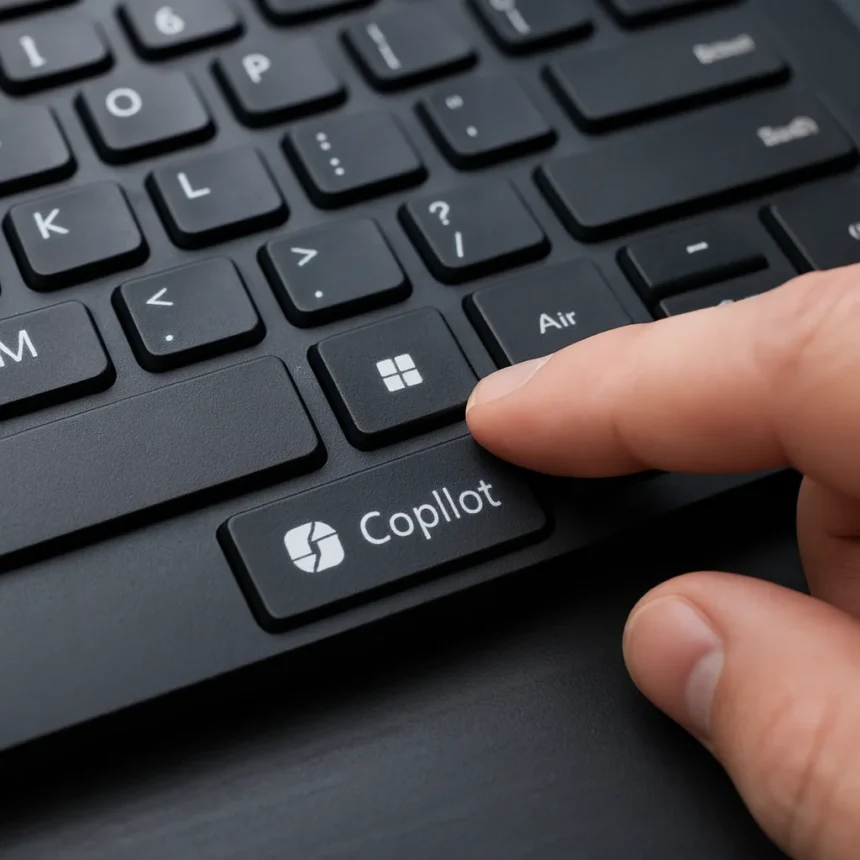
Microsoft’s dedicated Copilot key on Windows 11 Copilot+ PC keyboards is drawing serious pushback from developers and power users who say the company sacrificed essential functionality for an AI marketing push. The dedicated Copilot key, positioned where the right Menu key or right Control key traditionally sat, represents what Microsoft calls the most significant change to the Windows keyboard in 30 years. Instead, it feels like a step backward.
Key Takeaways
- Dedicated Copilot key replaces the right Control key on new Windows keyboards, breaking muscle memory for power users.
- Microsoft disabled the Win + C hotkey that previously opened Copilot, forcing reliance on the physical key.
- Free third-party apps now restore the lost Control key functionality, directly undermining Microsoft’s Copilot strategy.
- Power users rely on right Ctrl for shortcuts like Ctrl+arrow and Ctrl+P, making the change ergonomically problematic.
- Microsoft has scaled back broader Copilot integrations after privacy backlash, signaling a strategic retreat.
Why Microsoft Removed the Right Control Key
The dedicated Copilot key activates Copilot for Windows, a desktop app designed for natural language interaction similar to ChatGPT. Microsoft’s reasoning is straightforward: drive adoption of Copilot+ PCs by making the feature impossible to ignore. But the cost is steep. Microsoft removed the Win + C hotkey that previously opened the Copilot sidebar in Windows 11 versions 23H2 and 24H2, confirmed in Insider Preview build 22635.3785, forcing users to either accept the new key or remap it themselves.
This is not the first time Win + C has been repurposed. The hotkey previously launched Cortana, then Microsoft Teams during the work-from-home push. Each time, Microsoft simply reassigned it to whatever product needed promotion. This time, the physical key replacement goes further—it eliminates the option entirely for anyone using a new keyboard.
The Developer Backlash Is Real
Power users, coders, and anyone relying on muscle memory are hitting back. A developer created a free app that restores the lost Control key functionality on affected keyboards, directly challenging Microsoft’s push to make Copilot adoption mandatory through hardware design. The app targets users who depend on right Ctrl for shortcuts like Ctrl+arrow (word navigation), Ctrl+P (print), and dozens of other terminal and code-editor commands that require the key.



According to commentary from Tom’s Hardware, there is absolutely no reason for Microsoft to remove the Win + C hotkey, since this specific key combination is not being replaced by another utility. The physical key replacement compounds the problem—users cannot simply use an alternative hotkey. They must either accept accidental Copilot activations, remap the key using Microsoft PowerToys Keyboard Manager (which has reported inconsistencies in some applications), or turn to third-party solutions.
Microsoft’s Broader AI Retreat Signals Trouble
The Copilot key backlash arrives as Microsoft scales back its more aggressive Copilot integrations across Windows 11. The company had previewed injecting Copilot into notifications, the Settings app, and other core OS features, but none of these shipped by 2026. The delay of Windows Recall and the pullback on AI clutter suggest Microsoft is listening to privacy concerns and user frustration, yet the dedicated Copilot key remains—a stubborn artifact of a strategy the company is already abandoning elsewhere.



Copilot for Windows itself lacks features that power users expect. The app lacks long-term memory, meaning it cannot recall previous conversation contexts like prior statements or user preferences. It toggles between web and work modes but offers no persistent learning or integration with user workflows. For a feature that displaced a fundamental keyboard key, the functionality feels half-baked.
What Are Users’ Options?
Microsoft PowerToys Keyboard Manager allows remapping the Copilot key to right Ctrl or disabling it entirely, but users report inconsistent behavior in some applications. Lightweight third-party utilities and command-line tools offer alternatives, though security-conscious users prefer open-source, audited options over closed-source workarounds. A free app addressing this exact problem now exists, and its popularity underscores how badly Microsoft misjudged this change.
The irony is sharp: Microsoft had no physical constraint preventing both the Copilot key and the Control key from coexisting. Win + E still launches File Explorer, proving that app-specific hotkeys do not require physical key removal. The decision to displace Control was pure strategy—force hardware manufacturers to include the key, drive Copilot adoption through friction, and lock users into the ecosystem. The plan backfired the moment a developer offered a free escape route.
Is the Copilot key really a 30-year keyboard change?
Microsoft’s marketing calls it the most significant keyboard change in 30 years, but that overstates the innovation. Adding a new key is not revolutionary—removing a standard key that millions of users depend on daily is disruptive. The change benefits Copilot adoption metrics, not user productivity or ergonomics.



Can I disable the Copilot key on my keyboard?
Yes. Microsoft PowerToys Keyboard Manager lets you remap or disable the Copilot key, though some users report inconsistencies in certain applications. Third-party utilities and the free app addressing this issue offer alternatives, though results vary by application and Windows build.
Why did Microsoft remove Win + C?
Microsoft disabled the Win + C hotkey to force reliance on the physical dedicated key, driving adoption of Copilot on Windows 11 Copilot+ PCs. The company has a history of repurposing this hotkey—it previously launched Cortana and Teams—but physical key removal is a more aggressive strategy.
Microsoft bet that hardware-level friction would drive Copilot adoption. Instead, it unified power users around a common complaint and handed developers a rallying point. The dedicated Copilot key is a textbook example of how corporate strategy divorced from user needs backfires. A free app now lets users reclaim what Microsoft took away, and that says everything about whether this keyboard change was actually worth it.
Edited by the All Things Geek team.
Source: Windows Central