





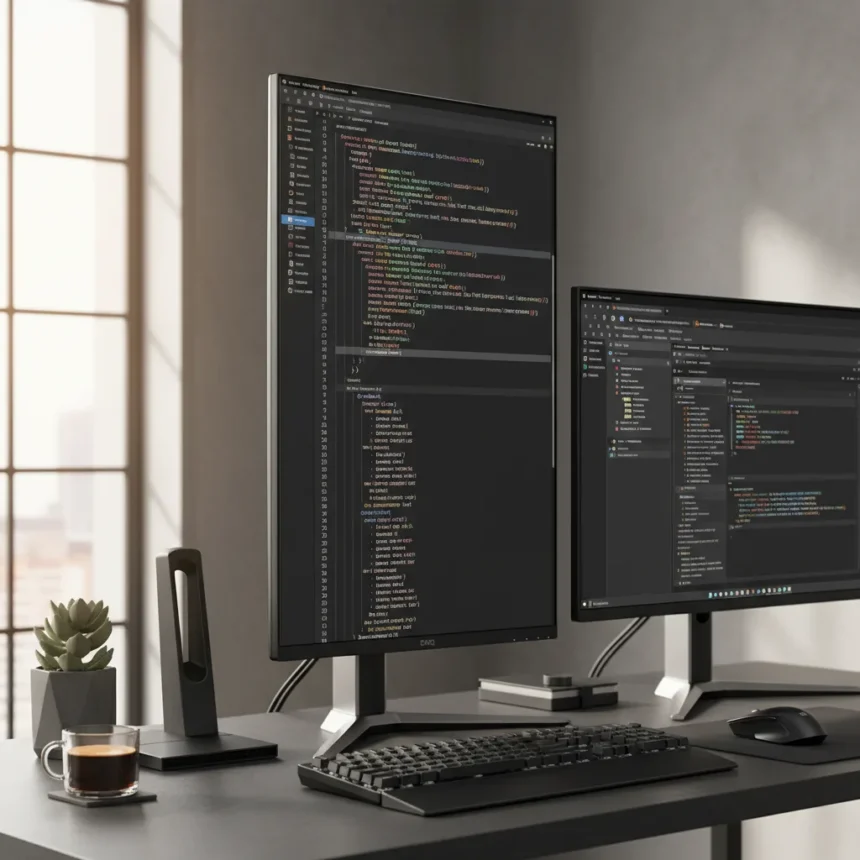
The BenQ RD280UG is a 28.5-inch monitor with a 3:2 aspect ratio and 5120 x 2160 resolution, designed specifically for coding and productivity workflows. Launched in early 2025, it costs around 1,199 USD (1,149 GBP / AU$1,899) and is available globally through BenQ, Amazon, and retailers like B&H Photo. This is not a monitor that tries to be everything—it is engineered for programmers who spend eight hours a day staring at lines of code.
Key Takeaways
- BenQ RD280UG fits approximately 20% more lines of code vertically than standard 16:9 monitors, reducing constant scrolling in IDEs like VS Code.
- 3:2 aspect ratio is a deliberate design choice that prioritizes vertical workspace over the horizontal stretch most gamers and content creators demand.
- 90W USB-C power delivery, KVM switch, and built-in USB hub eliminate cable clutter for multi-device setups common in hybrid work environments.
- Specialized coding modes (Dark Room, White Text on Black, Coding preset) and ambient lighting reduce eye strain during long programming sessions.
- 60Hz refresh rate and 400 nits brightness make this unsuitable for gaming or HDR film work, but irrelevant for its actual target audience.
Why Tall Matters More Than Wide for Coders
The vertical real estate argument is not new, but the BenQ RD280UG makes it impossible to ignore. A standard 27-inch 16:9 monitor forces developers to scroll constantly through function definitions, test suites, and documentation. The 3:2 aspect ratio here—sometimes called 5K vertical—reclaims that vertical space without sacrificing horizontal width. You get roughly 20% more lines of code visible at once, which means fewer context-switching moments and faster cognitive flow. This is not a marketing gimmick; it is basic ergonomics applied to how programmers actually work.
Compared to the Dell UltraSharp U3223QE (a 32-inch 4K monitor favored by designers), the BenQ is narrower but taller. The Dell forces you to crane your neck sideways; the BenQ keeps your eyes centered. The Samsung ViewFinity S9 offers similar vertical space in a 27-inch package, but its glossy finish and higher price point make it less practical for extended coding sessions where anti-glare coatings matter. The Apple Studio Display is premium and beautiful but lacks the USB-C hub, KVM switch, and coding-specific modes that make the BenQ immediately productive.
Build and Connectivity That Actually Serves Developers
The BenQ RD280UG does not just adjust vertically—it adjusts everywhere. Height adjustment spans 150mm, tilt ranges from +25° to -5°, swivel covers ±20°, and the entire panel pivots 90° if you want portrait mode (useful for reading documentation). The stand is rock-solid, and the monitor itself weighs approximately 8kg, making repositioning effortless without feeling flimsy.


Connectivity is where the BenQ earns its price. The 90W USB-C port handles power delivery for most laptops, eliminating the need for a separate power brick. The built-in USB hub provides four USB-A ports and Ethernet, so your desk becomes a docking station the moment you plug in one cable. The KVM switch means you can control multiple machines (MacBook and Windows PC, for example) without physically swapping cables or reaching for a separate device. This is not flashy, but it is exactly what someone working across multiple projects needs.
The IPS panel covers 99% sRGB and 95% DCI-P3, which is more than adequate for coding. The 400 nits brightness (HDR400 certified) is respectable for office environments, though it will not blow you away in direct sunlight. Flicker-free technology and low blue light mode reduce eye fatigue, and the anti-glare coating prevents reflections that plague glossy panels during long sessions. The built-in 2x 3W speakers are functional but unremarkable—most developers will use headphones anyway.



The Coding Modes Are Not Marketing Theater
BenQ includes four distinct display presets: Dark Room, White Text on Black, Gray, and a specialized Coding mode. These are not just color filters. Dark Room dims the entire image while preserving contrast, useful when your office lights are off and you are deep in debugging. White Text on Black inverts the traditional IDE look for those who prefer light text on dark backgrounds (a popular choice among night-shift developers). The Coding mode optimizes contrast and color temperature specifically for syntax highlighting, making variable names, functions, and keywords visually distinct without eye strain.
There is also an M-Book mode for Mac color matching, which matters if you are syncing work across Apple and Windows ecosystems. These presets exist because BenQ interviewed actual developers about what they needed, not because they were guessing at a market. The ambient lighting bar built into the bottom of the monitor is a small touch that makes a real difference in low-light coding sessions—it illuminates your desk without adding glare to the screen.
What the BenQ RD280UG Is Not
Do not buy this monitor if you play competitive games. The 60Hz refresh rate is a dealbreaker for anything faster than a turn-based strategy game. The 400 nits brightness, while adequate for coding, falls short of what serious HDR content demands. If you edit 4K video or grade color-critical work, the DCI-P3 coverage is good but not exceptional, and you would be better served by a reference monitor from EIZO or BenQ’s own SW series.
The 3:2 aspect ratio is a feature and a limitation. It is perfect for code, documents, and spreadsheets. It is awkward for watching movies (black bars on top and bottom) and less ideal for photo editing, where you might want more horizontal space for toolbars. This monitor is not trying to be a jack-of-all-trades. It is a specialist, and it owns that role completely.



Is the BenQ RD280UG worth 1,199 USD?
For a full-time developer or technical writer, absolutely. The vertical space alone saves hours of scrolling per week, and the connectivity features (USB-C, KVM, hub) eliminate frustration in multi-device setups. The price is steep, but it is comparable to other premium productivity monitors and considerably cheaper than buying a separate docking station plus a mid-range 4K display. If you spend eight hours a day in VS Code or similar IDEs, the investment pays for itself in reduced neck strain and faster workflow within months.
Does the BenQ RD280UG support portrait mode?
Yes. The 90° pivot allows you to rotate the monitor into portrait orientation, which is useful for reading long documents, code reviews, or documentation without scrolling. Most developers do not use portrait mode full-time, but the option is there if your workflow demands it.
Can I use the BenQ RD280UG with a Mac and Windows PC simultaneously?
Yes, the built-in KVM switch lets you toggle between multiple devices with a button press or keyboard shortcut. You can control both machines from a single keyboard and mouse, making it seamless to switch between a MacBook and Windows workstation without reaching for cables.
The BenQ RD280UG does not reinvent monitors, but it does something more valuable: it listens to what developers actually want and delivers it without compromise. In a market dominated by 16:9 gaming monitors and ultra-wide productivity displays, a 3:2 specialist screen feels like a breath of fresh air. Tall is not the new wide—tall is simply the right choice for code.
Where to Buy
Check Amazon | £1,399 at Amazon | £548.95 at Amazon | £1,249 at Amazon
Edited by the All Things Geek team.
Source: Creativebloq




