






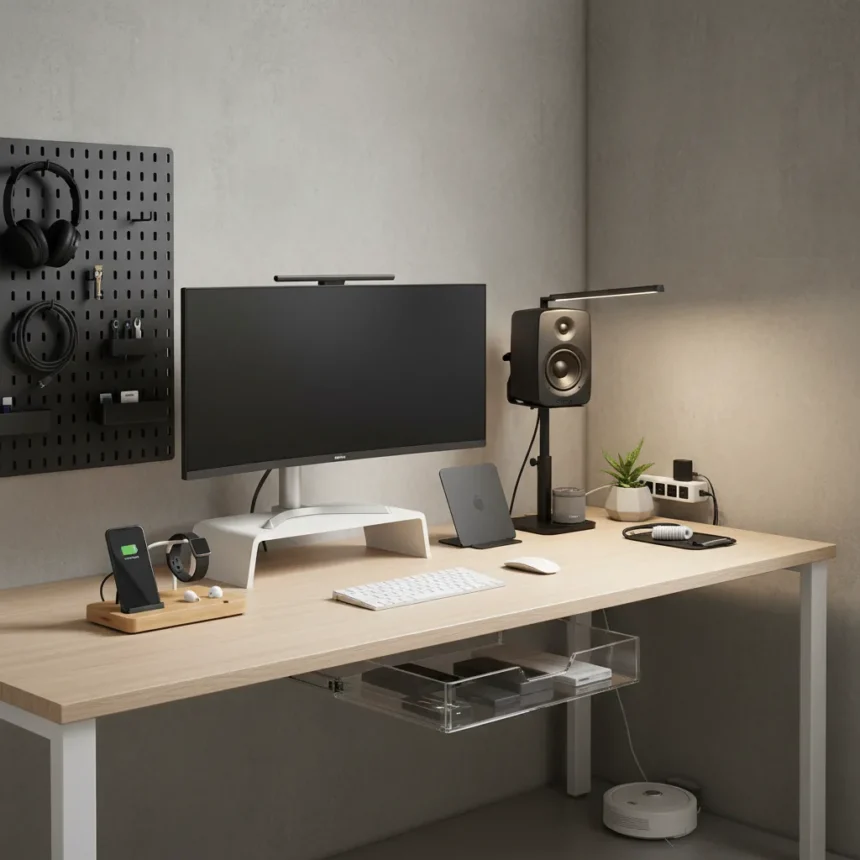
PC and desk accessories matter more than most people realize. A cluttered workspace kills focus, and dust buildup inside your tower shortens component lifespan. After testing hundreds of gadgets, the difference between a chaotic desk and a functional one often comes down to choosing the right organizational tools and cleaning gear. Spring cleaning season is the perfect time to invest in these essentials.
Key Takeaways
- Pegboards and storage solutions eliminate visual clutter and keep gear accessible.
- Speaker stands and monitor arms free up desk real estate and reduce vibration noise.
- Vertical laptop stands save space while improving airflow around electronics.
- Ergonomic keyboards and mice paired with proper stands reduce strain and desk sprawl.
- Dedicated cleaning kits extend hardware longevity by removing dust buildup.
Storage and Organization: The Foundation of a Clean Desk
A tidy desk starts with vertical storage. The Corsair Multi Frame Pegboard at $299 offers modular shelving that transforms wasted wall space into organized zones for speakers, cables, and accessories. Unlike basic shelving, pegboards let you customize compartments based on what you actually use, reducing the temptation to leave items scattered across the surface. Pairing this with a standing desk that includes built-in T-channel rail systems (like the Corsair Platform:4 Elevate at $999) creates an integrated ecosystem where accessories snap into place rather than pile up.
Vertical laptop stands like the Omoton model, now priced at $23 after dropping from $35, solve two problems at once: they reclaim desk space and improve airflow around your machine, which helps prevent thermal throttling during long work sessions. When your laptop sits flat, heat accumulates underneath. A tilted stand lets air circulate, keeping components cooler and extending their operational life.
Speaker Stands and Acoustic Discipline
Most people plunk speakers directly on their desk, where vibrations transfer into the surface and create unwanted resonance. The Kanto S2 Tilted Desktop Speaker Stands at $29 solve this with isolation mounts that decouple speakers from the desk, reducing vibration noise and improving audio clarity. This is a micro-investment that pays dividends if you spend hours at your desk—cleaner sound means less fatigue, and speakers stay in one place instead of migrating across your workspace.


Keyboards and Mice: Ergonomics Without Sprawl
Compact mechanical keyboards eliminate the desk footprint of full-size boards while maintaining typing comfort. The Logitech MX Mechanical Mini keyboard excels here, offering excellent typing feel and weeks-long battery life in a form factor that doesn’t dominate your workspace. For those who prefer something different, the Monsgeek Fun 60 Ultra at $80 delivers magnetic switches and an all-white aesthetic that fits minimalist setups. A proper keyboard stand keeps your board at the correct angle, reducing wrist strain and preventing it from sliding around during intense typing sessions.
Mice deserve the same attention. The Logitech MX Master 3S and 4 models are industry standards for productivity, offering ergonomic sculpting that reduces hand fatigue and precision tracking that eliminates the need for large mouse pads. Pair these with a dedicated mouse pad like the Razer Strider Chroma 35.5-inch hybrid RGB extended pad, which provides a large, stable surface that keeps your mouse from wandering off the desk.


Cleaning and Dust Prevention
Hardware doesn’t stay clean on its own. Dust buildup inside your PC throttles performance and shortens component lifespan by trapping heat. Dedicated cleaning kits are non-negotiable if you want your gear to last. While the research brief does not specify the exact 12 accessories in the original article, related setups mention cleaning solutions as core maintenance tools. A good cleaning kit includes microfiber cloths, compressed air, and specialized brushes for tight spaces like heatsinks and fan blades.
The principle is simple: clean gear runs cooler, lasts longer, and performs better. Spring cleaning becomes a ritual rather than a chore when you have the right tools on hand. Schedule quarterly cleanings—once every three months is aggressive enough to prevent thermal issues but infrequent enough to not feel burdensome.
Monitor Arms and Lighting
A monitor arm mounted to your desk via T-channel or VESA mounts eliminates the need for a chunky monitor stand, freeing up valuable desk space. Mounting your display also lets you position it at eye level, reducing neck strain during long work sessions. Pair this with a monitor light bar designed for eye care, which reduces glare and blue light exposure during evening work.
Frequently Asked Questions
What is the cheapest way to organize a PC desk?
Start with a vertical laptop stand ($23-35) and a pegboard ($299 for the Corsair Multi Frame) to eliminate surface clutter. These two items address 80% of desk disorganization without breaking the bank. Add speaker stands ($29) if you have audio gear, and you’ve built a functional setup for under $400.



How often should I clean the inside of my PC?
Quarterly cleanings are ideal for most setups—every three months using compressed air and soft brushes to remove dust from heatsinks, fans, and filters. If you live in a dusty environment or have pets, increase frequency to monthly. Dust buildup directly impacts thermals and longevity, so regular maintenance is cheaper than replacing a failed component.
Do monitor arms really save desk space?
Yes. A monitor arm eliminates the base footprint of a standard monitor stand, typically reclaiming 6-12 inches of depth on your desk. When combined with a vertical laptop stand and pegboard storage, you can reduce desk clutter by 40-50% without sacrificing accessibility or ergonomics.
A clean desk and a clean PC aren’t luxuries—they’re investments in your focus and your hardware’s lifespan. The 12 accessories tested in this guide prove that spending $300-500 on organization and cleaning tools pays for itself in productivity gains and extended equipment life. Spring cleaning season is your reminder to make these purchases now, before summer heat compounds thermal issues and dust accumulation becomes a real problem.
Where to Buy
33% OFFWOLFBOXMF50 Compressed Air Duster$39.99$59.99shop now | METROVACComputer Duster & Cleaner$119.99shop now | WHOOSHTV Screen Cleaner & Microfiber Cloth$19.99shop now | GOLD DEERKeycap and Switch Puller Kit$5.39shop now | 5% OFFLOGITECHDesk Mat$21.84$22.99shop now
This article was written with AI assistance and editorially reviewed.
Source: Tom's Guide