





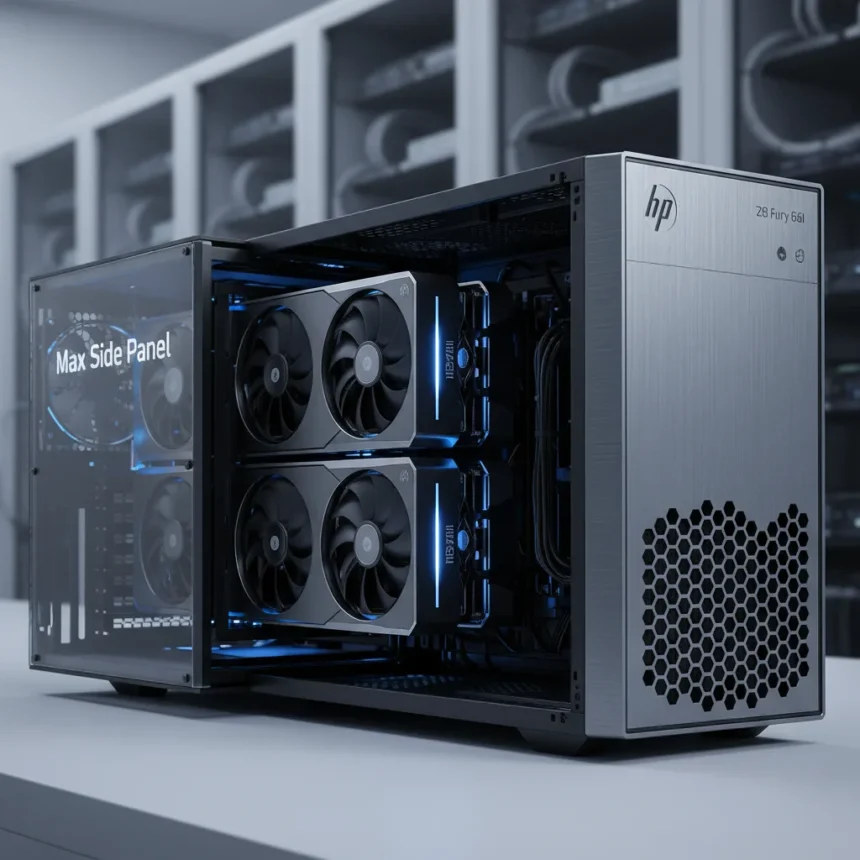
The HP Z8 Fury G6i is a new AI-focused workstation designed for demanding compute and AI workloads, including advanced AI development, visual effects, and simulations. What sets this machine apart is its optional Max Side Panel—an alternate chassis configuration that expands internal volume horizontally by 15% while adding enhanced active cooling to handle the thermal demands of modern AI accelerators.
Key Takeaways
- Max Side Panel expands internal volume by 15% compared to standard Z8 Fury G6i configuration
- Supports up to quad-wide, 600W graphics GPUs including NVIDIA RTX PRO 6000 Blackwell with 96GB VRAM per card
- Single-socket Intel Xeon 600 series processor up to 86 cores with 9 PCIe Gen5 slots
- Up to 2TB DDR5 ECC RAM and 136TB total storage capacity
- Dual power supplies up to 2250W aggregate with 92% efficiency
Why the Max Side Panel Matters for AI Teams
The optional Max Side Panel delivers expanded thermal capacity and extra space for up to quad-wide and 600W graphics cards, directly addressing a critical pain point for AI researchers and engineers. As GPU workloads grow more demanding, thermal management becomes a bottleneck—the standard chassis can only handle so much heat density before performance throttles. By expanding horizontally and adding more active cooling, HP lets teams pack serious compute density without sacrificing stability.
The 15% volume increase might sound modest, but in a workstation context it translates to room for multiple high-power accelerators that would otherwise require external enclosures or multi-machine setups. This consolidation reduces latency between components and simplifies system administration for teams managing AI infrastructure.
GPU and Processor Muscle: What Changed from G5 to G6i
The HP Z8 Fury G6i represents a generational shift in architecture. The prior G5 model topped out at 56-60 cores using older Sapphire Rapids Xeons and supported prior-generation GPUs like the NVIDIA RTX A6000. The G6i jumps to a single-socket Intel Xeon 600 series processor with up to 86 cores, paired with next-generation NVIDIA RTX PRO 6000 Blackwell accelerators capable of 96GB VRAM per card.


This shift from multi-socket to single-socket design is deliberate—it reduces latency between the CPU and GPUs while simplifying the PCIe topology. The G6i includes 9 PCIe Gen5 slots, doubling the bandwidth of Gen4, which matters when you are shuffling terabytes of training data between storage and accelerators.
Memory, Storage, and Expansion for Data-Intensive Work
For teams training large language models or processing massive datasets, the Z8 Fury G6i offers substantial headroom. The workstation supports up to 2TB of DDR5 ECC RAM across 16 DIMM slots, essential for models that don’t fit in GPU memory. Storage scales to 136TB total, including 4 front-accessible hot-swap NVMe bays in M.2, U.2, and U.3 form factors. This front-facing design means you can swap drives without opening the chassis—critical for production environments where uptime matters.



Power delivery is equally robust. Dual PSUs can deliver up to 2250W aggregate at 92% efficiency, with options scaling to 2700W for extreme configurations. This redundancy ensures that a single PSU failure doesn’t crash your training job at hour 72 of a 100-hour run.
How the Z8 Fury G6i Compares to Standard Workstations
Most general-purpose workstations target content creators and engineers running CAD, rendering, or visual effects software. Those machines prioritize single-GPU performance and modest thermal output. The Z8 Fury G6i, by contrast, is purpose-built for multi-GPU AI workloads where you need thermal headroom, massive memory bandwidth, and redundant power. The Max Side Panel underscores this focus—it is not a feature you see on consumer-grade or mid-market workstations because those use cases do not demand it.
The G5 model, HP’s previous flagship, maxed out at quad-wide 300W GPUs. The G6i with its Max Side Panel can handle quad-wide 600W accelerators, doubling power density per GPU slot. For teams choosing between building a custom multi-machine cluster or consolidating onto a single Z8 Fury G6i with the Max Side Panel, the latter offers simpler management and lower latency.
Cooling and Thermal Management
The Max Side Panel is not just about volume—it includes more active cooling than the standard configuration. HP has optimized airflow paths and integrated smart fan control to keep quad-wide 600W GPUs running within thermal limits. Operating temperature range is 5°C to 40°C, and the tool-less chassis design allows technicians to access components without disrupting airflow ducting.



Pricing and Availability
HP has not published a specific price for the Z8 Fury G6i or its Max Side Panel option. The workstation is available through HP’s official configurator, where customers can build custom configurations starting with entry-level Intel Xeon Silver processors and modest GPU options, scaling up to the full 86-core, quad-GPU, 2TB RAM configurations. Regional availability spans US and Canadian markets, though no specific launch date or stock details have been announced.
Is the Max Side Panel worth the investment?
If your team is running multi-GPU AI workloads and currently managing multiple machines or external GPU enclosures, the Max Side Panel consolidation is worth evaluating. The 15% volume expansion and enhanced cooling enable configurations that would otherwise require separate hardware. For smaller teams or single-GPU workflows, the standard Z8 Fury G6i chassis is sufficient.
What GPUs does the HP Z8 Fury G6i support?
The Z8 Fury G6i supports the latest NVIDIA RTX PRO 6000 Blackwell accelerators with up to 96GB VRAM per card, as well as prior-generation options like the RTX A6000 or AMD Radeon Pro W6800. The Max Side Panel specifically enables quad-wide 600W GPU configurations, a capacity constraint that the standard chassis cannot accommodate.
How much storage can you fit in the Z8 Fury G6i?
The Z8 Fury G6i scales to 136TB total storage, including 4 front-accessible hot-swap NVMe bays supporting M.2, U.2, and U.3 drives. This front-facing design eliminates the need to open the chassis to swap storage, a practical advantage for production systems.
The HP Z8 Fury G6i with its Max Side Panel is not a machine for every workstation buyer—it is built for teams serious about AI and compute-intensive work who need the thermal headroom and GPU density that a standard chassis cannot provide. The 15% volume expansion is the headline, but the real story is consolidation: fewer machines, less complexity, and more GPU power in a single box.
Edited by the All Things Geek team.
Source: Tom's Hardware




