





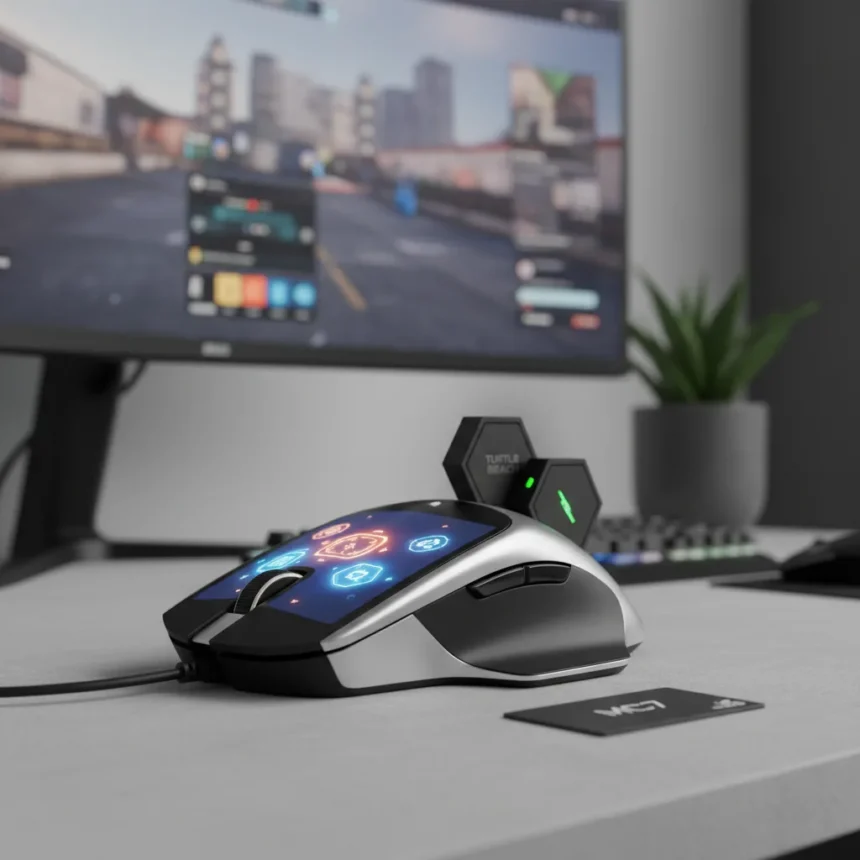
The Turtle Beach MC7 gaming mouse replaces the side buttons you’ve used for a decade with a 2.25-inch LCD touchscreen mounted where your thumb rests. It sounds absurd. It probably is. But Turtle Beach is betting that gamers, streamers, and productivity obsessives will pay $160 to control DPI, launch apps, mute their microphone, and switch OBS scenes without touching a keyboard.
Key Takeaways
- 2.25-inch Command Touch Display lets you control DPI, macros, and apps directly from the mouse thumb rest.
- Dual 1000 mAh hotswap batteries last 15 hours each; charging dock doubles as the wireless receiver.
- 8K wireless polling (8,000 Hz) delivers 0.125ms latency—up to eight times faster than standard mice.
- Owl-Eye 30K DPI optical sensor with 750 IPS tracking speed works on nearly any surface.
- Priced at $160 USD as the flagship of Turtle Beach’s new Command Series ecosystem.
What Makes the Turtle Beach MC7 Different
The Turtle Beach MC7 gaming mouse is not just a peripheral with a screen bolted on—it is a control surface. The touchscreen sits flush under your thumb, letting you swipe between profiles, adjust sensitivity on the fly, and trigger macros without breaking aim or reaching for your keyboard. For streamers juggling OBS controls, this is genuinely useful. For casual players, it is a $160 novelty.
The real innovation is the battery system. Instead of charging overnight and hoping your mouse survives a tournament, the MC7 ships with two 1000 mAh batteries that swap in seconds. Each lasts 15 hours in standard mode, or roughly 10 hours if you run the RGB lighting and touchscreen at full brightness. The charging dock also houses your wireless receiver, so you are not losing a USB port on your PC.
Hardware That Actually Matters
Strip away the touchscreen and the Turtle Beach MC7 gaming mouse packs serious specs. The Owl-Eye 30K DPI sensor tracks at 750 inches per second with 70g acceleration, handling glass surfaces and nearly any material without calibration. The 8K wireless connection runs at 8,000 Hz polling with 0.125ms latency—roughly eight times faster than the 125 Hz standard most mice still use. Titan Optical Switches handle the clicks with 150 million lifecycle durability.



The 4D scroll wheel is the unsung hero here. It shifts from tactile steps for precise scrolling to smooth free-spin for rapid navigation, plus it clicks left and right. Eleven programmable buttons, Easy-Shift macros (adding a secondary function layer to each button), and customizable RGB round out the feature set. You get tri-mode connectivity: 2.4 GHz wireless, Bluetooth, and USB wired.
How the Turtle Beach MC7 Stacks Against Alternatives
Turtle Beach’s own MC5 sits one tier below at $119.99. It ditches the touchscreen and hotswap batteries in favor of a single internal battery lasting up to 40 hours, but keeps the Owl-Eye sensor, Titan switches, 8K wireless, and 4D thumbwheel. If you want the ecosystem without the gimmick, the MC5 is the smarter buy. The MC7 is for people who stream, create content, or genuinely benefit from on-mouse macro control.



Against traditional gaming mice from Logitech or Corsair, the MC7’s touchscreen is a differentiator, not a universal win. Those competitors offer proven reliability, deeper software ecosystems, and lower prices in the $80–$120 range. The Turtle Beach MC7 gaming mouse asks you to trust a new interaction model—and pay a premium for it.
Should You Actually Buy This Thing?
If you stream or produce content and spend half your time alt-tabbing to OBS, the touchscreen saves real friction. Muting your mic without looking at the screen, switching scenes mid-game, and launching apps from your mouse hand is legitimately convenient. The hotswap batteries are a quality-of-life win for anyone who games or works long hours.
If you are a pure gamer chasing frames and consistency, the touchscreen is overhead you do not need. The Turtle Beach MC7 gaming mouse costs $40 more than the MC5 for a feature that distracts from aim. The 8K wireless and sensor are excellent, but so are cheaper competitors.
Does the touchscreen actually improve gaming performance?
No. The touchscreen is a productivity and streaming tool, not a competitive advantage. In-game, you will still use your keyboard for ability casts and chat. The real benefit is reducing alt-tabs during content creation—switching OBS scenes or adjusting stream settings without leaving your game window.



How long do the Turtle Beach MC7 batteries really last?
Each battery lasts 15 hours in standard mode with the screen and RGB off. With the touchscreen and RGB lighting active, expect closer to 10 hours per battery. Since you carry two batteries and swap them in seconds, downtime is zero—one charges while the other runs.
Is the Turtle Beach MC7 worth $160?
For streamers, content creators, and productivity-focused gamers, yes. The hotswap batteries alone eliminate a daily frustration, and the touchscreen genuinely reduces friction in multi-window workflows. For pure gamers, the MC5 at $120 offers nearly identical performance without the premium. Buy the MC7 if you create content. Buy the MC5 if you just want to win.
The Turtle Beach MC7 gaming mouse is an ambitious swing—a control surface disguised as a peripheral. It will not replace your keyboard, and the touchscreen will not make you a better player. But for the specific job of reducing friction between gaming and streaming, it works. Whether that justification is worth $160 depends entirely on your workflow.
Edited by the All Things Geek team.
Source: Tom's Hardware




