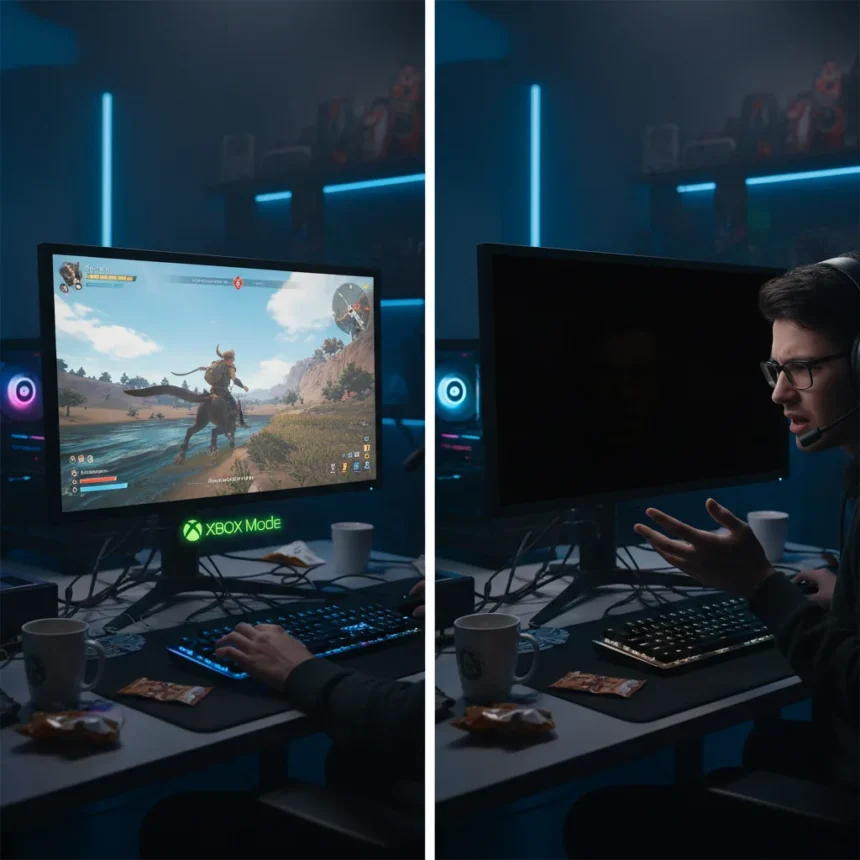
Xbox Mode on Windows 11 with dual monitors is exactly what you should expect—and that’s precisely the problem. Xbox Mode essentially puts the Xbox App in full screen on your PC and reduces background tasks to give a more console-like experience, but when you connect multiple displays, secondary monitors simply go blank. For PC gamers accustomed to running guides, Discord, YouTube, or Netflix on a second screen while playing, this design choice feels like a step backward.
Key Takeaways
- Xbox Mode blanks secondary monitors while the primary display runs the Xbox App in full screen.
- Designed for single-display setups like consoles and TVs, not multi-monitor PC gaming.
- Performance gains don’t justify locking down extra displays for multitasking gamers.
- Steam’s Big Picture Mode allows normal PC operation outside the console interface on secondary monitors.
- Multitasking features exist but leave extra screens displaying empty space.
The Console-First Design That Ignores PC Reality
Xbox Mode’s core problem is architectural: it’s built for TVs and handhelds, not desktop gaming setups. Microsoft designed this feature to mimic traditional console behavior, where a single display is the norm. That design philosophy makes sense for someone gaming on a living room television or a portable device. It makes no sense for the millions of PC gamers running dual, triple, or even quad monitor configurations. When you enable Xbox Mode, your second, third, or fourth monitor—if you’re committed to that setup—will simply display a blank screen while your primary display runs Xbox Mode. It’s not a technical limitation; it’s a deliberate choice that treats secondary monitors as obstacles rather than assets.
The frustration runs deeper than aesthetics. Many PC gamers have built workflows around multiple displays over years of use. A guide on one screen, the game on another, Discord for team communication on a third—this is how modern PC gaming actually works. Xbox Mode doesn’t acknowledge this reality. Instead, it forces you into a console-like bubble where everything outside the primary display ceases to exist. For users who’ve invested in multi-monitor setups specifically to enhance their gaming experience, this feels like a punishment for choosing a more sophisticated configuration.
Performance Gains Don’t Justify the Trade-Off
Microsoft’s argument for Xbox Mode centers on performance: reducing background tasks and system overhead to deliver a smoother gaming experience. That’s a reasonable goal. But here’s the catch—Xbox Mode doesn’t improve performance enough to justify completely locking down secondary displays, especially for PC users who are used to multitasking. If the feature delivered a dramatic 20, 30, or 50 percent performance boost, the sacrifice might be worth considering. The research brief doesn’t specify exact performance metrics, but the criticism itself suggests the gains are marginal enough that they don’t offset the usability cost.



This is where the comparison to Steam’s Big Picture Mode becomes instructive. When you put Steam in Big Picture Mode, you can still operate your PC normally outside of that experience. You get a console-like interface on your primary display while retaining full access to your secondary monitors and the rest of your system. Steam proves that you don’t have to choose between a streamlined gaming interface and functional multitasking. Microsoft could have implemented Xbox Mode the same way, but it didn’t.
The Multitasking Band-Aid That Doesn’t Work
Microsoft is aware of the secondary monitor problem. The company included a multitasking feature that allows quick app switching, but it’s a band-aid on a fundamentally flawed design. Yes, you can switch between apps using this feature, but having a big empty space on whatever extra display you have is exactly the wrong solution. It’s acknowledging the problem while refusing to actually fix it. A true fix would allow secondary monitors to function independently of Xbox Mode, displaying whatever content you want while the primary display runs the Xbox App.



The multitasking feature also adds friction. Instead of glancing at your second monitor to check a guide or read a Discord message, you now have to actively switch apps, wait for the interface to load, and then switch back. For competitive gaming or any activity requiring constant reference to external information, this is a significant workflow interruption. It’s the difference between passive awareness and active task-switching—and for most gamers, passive awareness is far superior.
A Design Philosophy Mismatch
The real issue is that Xbox Mode represents Microsoft’s vision of blurring the line between PC and console gaming, but it’s doing so by imposing console limitations on PC hardware. A PC with multiple monitors isn’t trying to be a console; it’s trying to be a more powerful, more flexible gaming platform. Xbox Mode ignores that distinction entirely. It’s like installing a car with an engine that only works if you remove the passenger seats—technically it might run slightly better, but you’ve lost something essential in the process.
This design choice suggests that Microsoft either doesn’t understand how PC gamers actually use their hardware, or it doesn’t care. Neither option is reassuring. If the company wanted Xbox Mode to be genuinely useful on Windows 11 PCs, it would allow secondary monitors to function normally. That would give users the option to embrace the console-like experience on their primary display while maintaining the flexibility that makes PC gaming appealing in the first place.
Should I use Xbox Mode on my multi-monitor setup?
If you regularly use secondary monitors for gaming-adjacent activities like guides, Discord, or streaming, Xbox Mode isn’t worth the trade-off. The performance gains don’t compensate for losing access to your secondary displays. If you game on a single monitor, Xbox Mode might offer some benefit, but even then, the modest performance improvements probably aren’t worth the reduced flexibility.



How does Xbox Mode compare to Steam’s Big Picture Mode?
Steam’s Big Picture Mode provides a console-like interface on your primary display while allowing your secondary monitors to function normally. Xbox Mode blanks secondary displays entirely. For multi-monitor setups, Steam’s approach is significantly more practical.
Will Xbox Mode ever support secondary monitors properly?
The research brief doesn’t specify Microsoft’s plans for future updates. Based on the current design philosophy, secondary monitor support would require a fundamental rethinking of how Xbox Mode works, which seems unlikely without significant user pressure or a shift in Microsoft’s vision for PC gaming.
Xbox Mode on Windows 11 with dual monitors represents a missed opportunity. Microsoft had the chance to create a feature that enhances PC gaming while respecting the hardware choices gamers make. Instead, it built something designed for a different device entirely and forced it onto desktop setups where it doesn’t belong. Until Xbox Mode allows secondary monitors to function independently, it remains a feature to avoid for anyone with a multi-monitor configuration.
Edited by the All Things Geek team.
Source: Windows Central