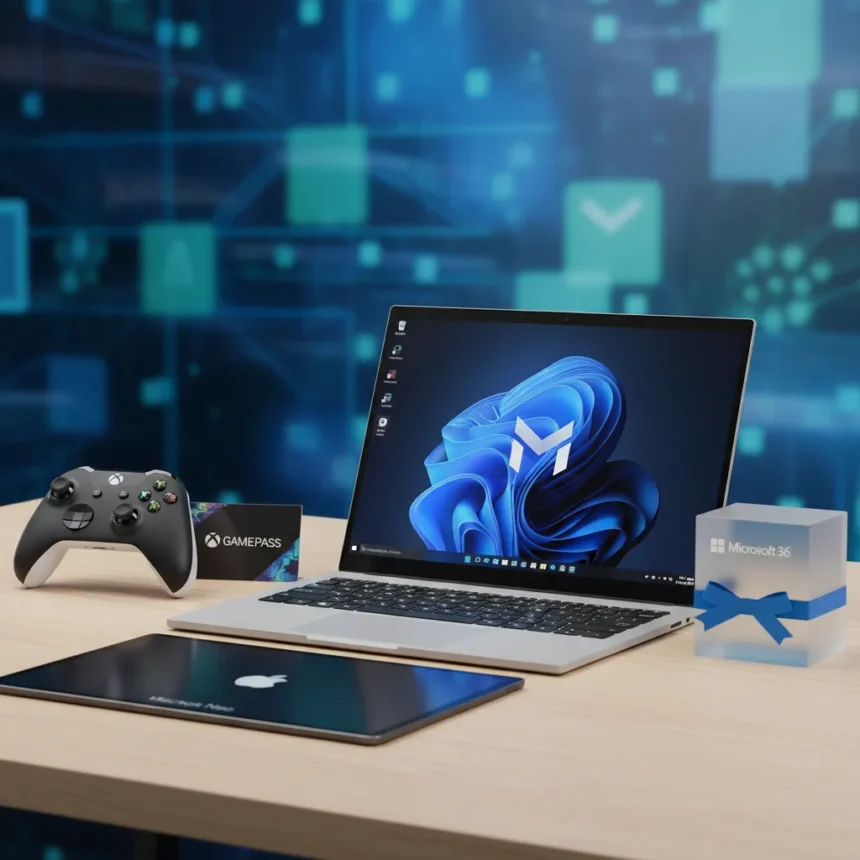
Microsoft’s student bundle pairs an Xbox Controller, one year of Microsoft 365, and Xbox Game Pass with select Windows 11 PCs in a direct challenge to Apple’s MacBook Neo. The promotion targets students during back-to-school season, bundling roughly $200 worth of subscriptions and hardware into the purchase of a new Windows machine.
Key Takeaways
- Microsoft bundles Xbox Controller, Microsoft 365 (1 year), and Xbox Game Pass (1 year) with select Windows 11 PCs for students.
- Xbox Game Pass includes 200+ games on console and PC, with new titles added within 12 months of launch.
- Xbox Controller typically retails for $49–$80 USD; Xbox Game Pass Ultimate costs roughly $17/month after promotional period.
- Bundle positions Windows laptops as gaming and productivity alternatives to MacBook Neo.
- Promotion applies to select new Windows 11 PCs through Microsoft channels.
What Microsoft Is Offering in the Student Bundle
The Microsoft student bundle bundles three components into one promotional package: an Xbox Wireless Controller (standard pricing $49–$80), a full year of Microsoft 365 subscription (normally $70–$100 annually), and a full year of Xbox Game Pass, likely the Ultimate tier. Game Pass Ultimate provides access to over 200 games playable on Xbox consoles, Windows PCs, and supported devices, with new Xbox releases added within 12 months of their launch. The bundle applies specifically to purchases of select new Windows 11 PCs, making it a hardware-plus-software play designed to increase the perceived value of a Windows laptop purchase.
This is not Microsoft’s first bundled approach. Similar promotions have paired Xbox controllers with Game Pass trials—for instance, the PDP Neon Series Wired Controller bundles one month of Xbox Game Pass Ultimate with official Xbox licensing for Series X/S, One, and Windows machines. What distinguishes the student bundle is the inclusion of Microsoft 365 and the full year of Game Pass, extending the value proposition significantly beyond a typical controller-and-trial combo.
How Microsoft Student Bundle Compares to MacBook Neo
Microsoft’s bundle directly positions Windows 11 PCs against Apple’s MacBook Neo, though the two devices serve different audiences. The MacBook Neo remains unverified in publicly available specifications, making direct technical comparison impossible. However, the bundle strategy itself reveals Microsoft’s intent: rather than compete on raw hardware specs, Microsoft is leveraging its subscription ecosystem—Game Pass for gaming, Microsoft 365 for productivity—to sweeten the Windows laptop proposition for students who might otherwise default to MacBook.


The bundled value works in Microsoft’s favor for students interested in gaming. Xbox Game Pass delivers hundreds of titles without per-game purchases, while MacBook users typically buy games individually or rely on limited native Mac gaming libraries. Microsoft 365, meanwhile, provides Office applications (Word, Excel, PowerPoint) that function identically on Windows and Mac, so the subscription advantage is neutral on that front. The Xbox Controller adds tangible hardware value—a $50+ accessory included free—that MacBook bundles typically do not match.
Pricing and Availability of the Microsoft Student Bundle
The Xbox Wireless Controller component typically sells for $49.06 to $79.99 USD depending on sales and retailer. Microsoft 365 subscriptions run approximately $69.99–$99.99 annually, while Xbox Game Pass Ultimate costs roughly $17 per month after any promotional period. Bundled together, the three components represent a retail value exceeding $200 USD. The promotion applies to select new Windows 11 PCs available through Microsoft channels, with availability focused on the US market. No specific expiration date or participating PC models were confirmed in available sources, making it essential for interested students to check Microsoft’s official promotions page for current terms and eligible devices.



One consideration: Xbox Game Pass Ultimate typically requires a recurring subscription after the promotional year concludes, with auto-renewal enabled by default. Students should verify whether the bundled year converts to a paid subscription automatically or requires manual renewal.
Why Microsoft Positioned This as a MacBook Alternative
The bundle’s positioning reflects a broader competitive reality: students frequently choose MacBooks based on brand perception and ecosystem integration, not necessarily because Windows PCs lack capability. By bundling high-value services—particularly Game Pass, which appeals to student gamers—Microsoft is attempting to shift the value equation. A student who games benefits immediately from Game Pass access; one who needs productivity software gets Microsoft 365 included; and one who owns or wants an Xbox console gains a wireless controller at no additional cost.
This strategy acknowledges that raw hardware comparisons favor neither platform decisively at the student price point. Instead, Microsoft is betting on subscription lock-in and gaming appeal. Game Pass in particular attracts younger audiences; the service’s inclusion of day-one Xbox releases and extensive back catalog creates ongoing engagement that a standalone laptop purchase does not guarantee.
Is the Microsoft Student Bundle Actually Better Than MacBook Neo?
Whether the bundle is superior depends entirely on use case. Students who game heavily will find Game Pass immediately valuable. Those who rely on Microsoft Office will appreciate the included subscription. Students seeking a pure content-creation machine—video editing, music production, design work—may find MacBook’s ecosystem (Final Cut Pro, Logic Pro native optimization) more cohesive, though none of this is addressed in the bundle’s positioning. The bundle does not guarantee superior hardware; it guarantees better bundled value for Windows buyers who want gaming and productivity in one package.


Does the Microsoft student bundle include cloud storage?
Yes. Microsoft 365 subscriptions include OneDrive cloud storage (typically 1 TB per account), allowing students to sync documents, photos, and files across devices. This storage is integrated with Office applications, making collaboration and backup automatic for Word documents, Excel sheets, and other Office files.
Can you use Xbox Game Pass on a MacBook?
Xbox Game Pass Ultimate is available on Windows PCs and select supported devices via cloud streaming, but it is not natively available on macOS. Mac users can access Game Pass titles through web-based Xbox Cloud Gaming, though performance and game library differ from native Windows or console play. This limitation reinforces why Microsoft’s bundle targets Windows users specifically.
What games are included in Xbox Game Pass?
Xbox Game Pass provides access to over 200 games on console and PC, with new Xbox releases added within 12 months of launch. The library rotates monthly, with older titles removed and new ones added to maintain variety. Specific titles depend on the current month and subscription tier, so students should check the Game Pass app or website for the current catalog before committing.
Microsoft’s student bundle is a calculated bet that bundled value beats individual appeal. For Windows buyers who game, it is difficult to refuse a year of Game Pass, Microsoft 365, and a controller for the cost of a new laptop. For MacBook-focused students, the bundle does little to change the equation—ecosystem preference and design language matter more than subscription value. The real winner here is Microsoft’s ability to lock students into Windows and Game Pass during their educational years, betting that habit and subscription momentum will carry into their working lives.
Edited by the All Things Geek team.
Source: Windows Central