





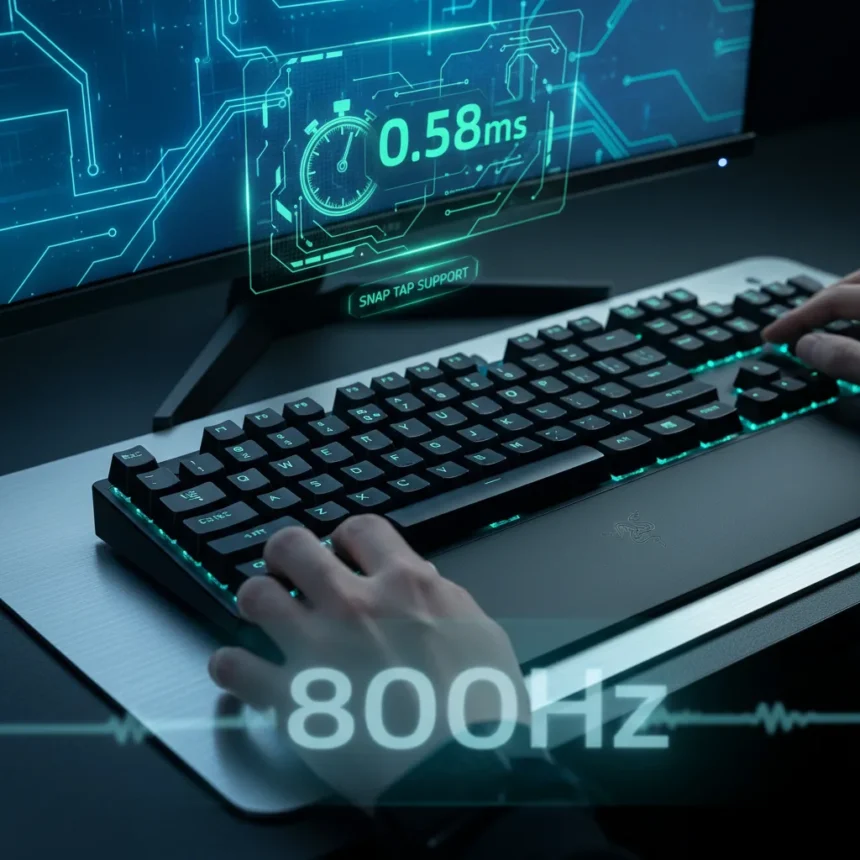
The Razer Huntsman V3 Pro TKL 8KHz is a tenkeyless competitive gaming keyboard that cuts latency from 1.7ms at 1KHz down to 0.58ms at 8,000Hz polling. That’s a 66% improvement in response time on paper, but the real question is whether Razer’s latest polling upgrade actually changes how esports players perform in matches.
Key Takeaways
- 8,000Hz polling reduces latency to 0.58ms, down from 1.7ms at standard 1KHz speeds
- Actuation range narrows to 0.1mm–4.0mm, matching magnetic-switch competitors like Wooting and NZXT
- Snap Tap and Rapid Trigger support enable faster directional inputs for esports
- Higher polling rates increase CPU usage and may impact frame rates, per Razer’s own software warnings
- Tenkeyless form factor removes the numpad for a more compact desk footprint
The Razer Huntsman V3 Pro TKL 8KHz Fixes What Held Back Earlier Versions
The previous Huntsman Pro V3 generation had an actuation range of 0.4mm to 3.6mm, which left it behind magnetic-switch keyboards from competitors. The new 8KHz model narrows that gap by supporting a 0.1mm to 4.0mm actuation range, matching the precision of Wooting and NZXT’s esports-focused platforms. That extra granularity matters for players who want to dial in exactly how quickly a keystroke registers.
What makes this keyboard genuinely relevant for esports, though, is the combination of Snap Tap and Rapid Trigger support. Snap Tap lets players register direction changes instantly without releasing the previous key, cutting out the dead time between switching movement directions. Rapid Trigger lets the keyboard recognize partial key presses and releases mid-actuation. Together, these features tighten the feedback loop between input and action.
The tenkeyless form factor means no numpad, so your mouse hand sits closer to the keyboard and your desk stays less cluttered. For esports players who need every millimeter of mouse space, that’s not a minor convenience—it’s a competitive advantage.

8,000Hz Polling Sounds Great Until You Check CPU Usage
Here’s where Razer’s own software throws cold water on the hype: higher polling rates increase CPU usage and may impact frame rates. That’s not a bug; it’s a trade-off. Doubling your polling rate from 1KHz to 8KHz means your keyboard is reporting its state eight times more often, and your CPU has to handle that constant stream of input data.
For players on high-end rigs with spare CPU headroom, that 0.58ms latency is a genuine win. But if you’re gaming on a mid-range system or streaming while playing, the frame rate hit might outweigh the latency gain. The keyboard lets you adjust polling rates in software, so you’re not locked into 8KHz—but the fact that Razer felt compelled to warn users about the cost suggests this is a real consideration, not paranoia.
How the Razer Huntsman V3 Pro TKL 8KHz Compares to Competitors
Wooting and NZXT already offer magnetic-switch keyboards with adjustable actuation ranges similar to what the 8KHz model now provides. The Huntsman V3 Pro TKL 8KHz matches them on the hardware side but brings Razer’s Snap Tap and Rapid Trigger software implementation into play. Whether that software advantage matters depends on which games you play and how much you trust Razer’s implementation versus the alternatives.
Within Razer’s own lineup, the older Huntsman V2 Tenkeyless already supported 8,000Hz polling, but the V3 Pro 8KHz adds the narrower actuation range and updated feature set. This is an iterative upgrade rather than a revolutionary leap—Razer is catching up to magnetic-switch keyboards on the actuation side while keeping its proprietary analog optical switch technology.
Should You Buy the Razer Huntsman V3 Pro TKL 8KHz?
If you’re a competitive esports player with a system that can handle 8KHz polling without frame rate loss, this keyboard gives you one of the lowest-latency input devices available. The adjustable actuation range and Snap Tap support are genuinely useful for fast-paced games. The tenkeyless layout saves desk space without sacrificing functionality.
If you’re a casual gamer or your CPU is already maxed out, the latency gains won’t be noticeable, and the CPU cost might actually hurt your frame rates. Save your money for a lower-polling-rate alternative or invest in a faster CPU first.

Is the Razer Huntsman V3 Pro TKL 8KHz worth upgrading from an older keyboard?
If you’re using a keyboard with 1KHz polling, the latency improvement is measurable and could matter in competitive matches. If you’re already on a high-end gaming keyboard with 4KHz or 8KHz polling, the upgrade is less critical. Test the CPU impact on your specific system before committing.
Can you adjust the actuation range on the Razer Huntsman V3 Pro TKL 8KHz?
Yes. The keyboard supports adjustable actuation from 0.1mm to 4.0mm, and you can change it on the fly without needing to swap switches or reinstall firmware. This lets you dial in the exact trigger point that feels right for your playstyle.
Does higher polling rate affect game performance?
It can. Razer’s software explicitly warns that higher polling rates increase CPU usage and may impact frame rates. On a system with spare CPU headroom, the impact is negligible. On a mid-range PC or while streaming, you might see measurable frame rate loss that outweighs the latency gain.
The Razer Huntsman V3 Pro TKL 8KHz is the most aggressive version of Razer’s competitive keyboard platform, and it delivers the latency cuts it promises. Whether those cuts matter depends on your CPU headroom, your game, and how much you’re willing to optimize for milliseconds. For esports players chasing every advantage, it’s worth testing. For everyone else, a solid 4KHz keyboard probably gets you 90% of the way there at a lower cost and CPU toll.
Where to Buy
$169.99 at Amazon | $169.99 at Amazon | $169.99
Edited by the All Things Geek team.
Source: Windows Central




