





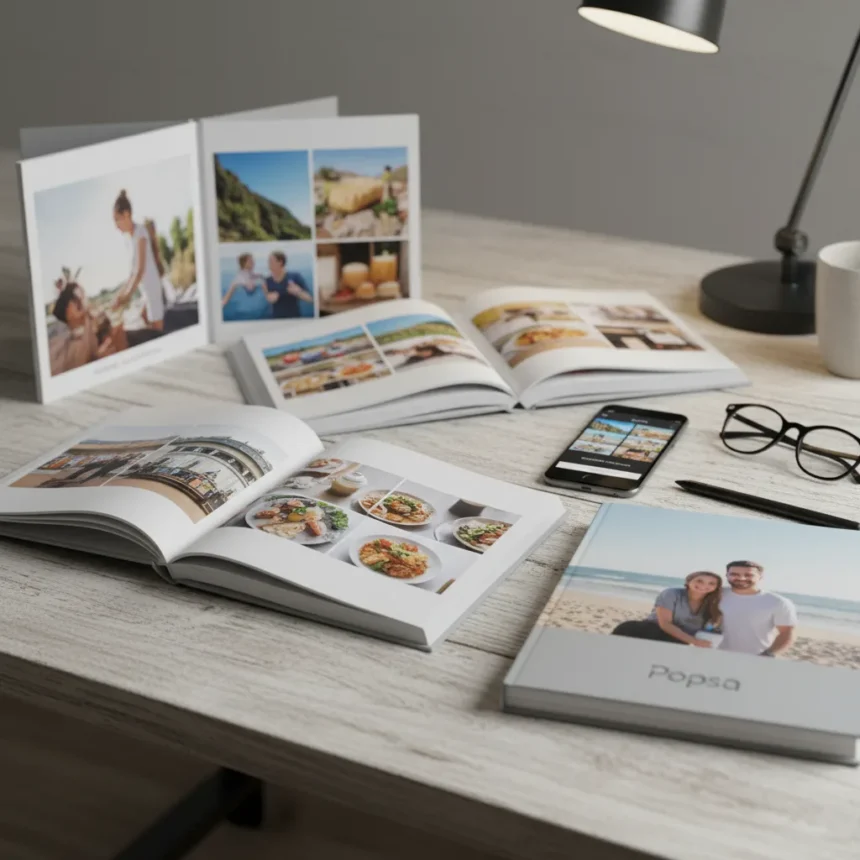
Popsa photo books are a customizable print service that lets you turn digital images into physical hardcover or softcover volumes in minutes. The company has sold more than 4,800,000 photo books, positioning itself as a fast, accessible alternative to traditional photo printing services. Hardcover editions start at $44 for a 20-page book with matte paper, expandable to 150 pages, while softcover options offer similar flexibility at different price points.
Key Takeaways
- Hardcover books start at $44 with 20 pages, expandable to 150 pages maximum
- AI-powered automatic layout generation creates designs in minutes without design skills
- Integration with Facebook, Google Photos, and Dropbox streamlines photo importing
- Customization includes colored borders, captions, foil embossing, and layflat binding
- Paper options include 135 lb. matte or gloss finishes for hardcover editions
What Makes Popsa Photo Books Stand Out
The core appeal of Popsa photo books lies in their speed and simplicity. Unlike traditional photo printing services that require design experience or lengthy customization workflows, Popsa uses automatic layout generation to transform your photos into a finished book design with a single tap. This removes friction for users who want a polished product without learning design software or hiring a designer.
The service connects smoothly to cloud photo libraries—Facebook, Google Photos, and Dropbox integration means you can pull images directly from where you already store them. For most casual users creating family albums or travel memories, this ecosystem approach eliminates the tedious step of exporting and uploading individual files. The entire creation-to-personalization process can happen in minutes rather than hours.
Customization and Paper Quality
Popsa photo books offer genuine customization depth despite their simplicity. Hardcover editions use 135 lb. matte paper as standard, with a gloss upgrade available. You can add colored borders, include captions on individual photos, apply foil embossing for premium finishes, and choose layflat binding—a feature that matters if you want pages to lie completely flat when opened. Softcover options come in Medium or Large sizes with 200gsm matte or gloss paper, expanding flexibility for different use cases.
The 20-to-150-page range accommodates everything from a slim keepsake to a comprehensive archive. This flexibility is rare in budget-friendly services, where page limits often feel restrictive. However, the real question is whether Popsa’s paper quality matches premium competitors. The brief does not provide direct quality comparisons, so users evaluating this against higher-end services should request samples before committing to large orders.
Pricing and Value Proposition
At $44 for a hardcover book, Popsa positions itself at the accessible end of the photo book market. The entry price is competitive, but the real cost depends on how many pages you add and which customization options you select. A 150-page book with foil embossing and gloss paper will cost significantly more than the base price, though exact pricing tiers are not detailed in available information.


For comparison, Popsa’s speed and cloud integration appeal to users who prioritize convenience over boutique quality. The automatic layout system works well for straightforward albums but may frustrate designers who want granular control over every page. If you need pixel-perfect layouts or have specific design requirements, a service offering manual design tools might serve you better—though those typically require more time and expertise.
Who Should Buy Popsa Photo Books?
Popsa photo books work best for casual creators: families making memory books, travelers documenting trips, or anyone who wants a finished product without design overhead. The AI-assisted workflow and cloud integration eliminate common pain points. If you have hundreds of photos and want to create a polished album in under an hour, Popsa delivers.
Conversely, professional photographers, scrapbooking enthusiasts, or anyone needing fine-grained control over layout and typography should evaluate whether Popsa’s automation serves or limits their vision. The one-tap design system is convenient, but convenience sometimes means fewer options. Test the service with a small order before committing to larger projects.
Is Popsa worth the price?
For the $44 entry point, Popsa photo books offer genuine value, especially if you value speed and ease of use. The automatic layout system and cloud integration justify the price for casual users. However, if you need extensive customization or require professional-grade paper and binding, you may find premium services worth the extra investment.



Can you customize every page in a Popsa photo book?
Popsa allows customization including captions, colored borders, and foil embossing, but the extent of page-level control is not fully detailed in available documentation. The automatic layout system suggests some design choices are made for you, though you can personalize individual pages with captions and other options.
What file formats does Popsa accept?
Popsa integrates directly with Facebook, Google Photos, and Dropbox, so you can pull images from those services without manually uploading files. The service does not specify which file formats work for direct uploads, so check Popsa’s support documentation if you plan to upload images from your computer directly.
Popsa photo books deliver what they promise: fast, affordable custom prints powered by AI-assisted design. They excel for casual creators who prioritize speed and simplicity over granular control. The $44 starting price, cloud integration, and 20-to-150-page flexibility make them accessible to a wide audience. However, serious photographers and design-conscious users should test the service before committing to large orders, since the automatic layout system may not match your creative vision. For family albums and travel memories, Popsa removes enough friction to justify the investment.
Edited by the All Things Geek team.
Source: Tom's Guide




