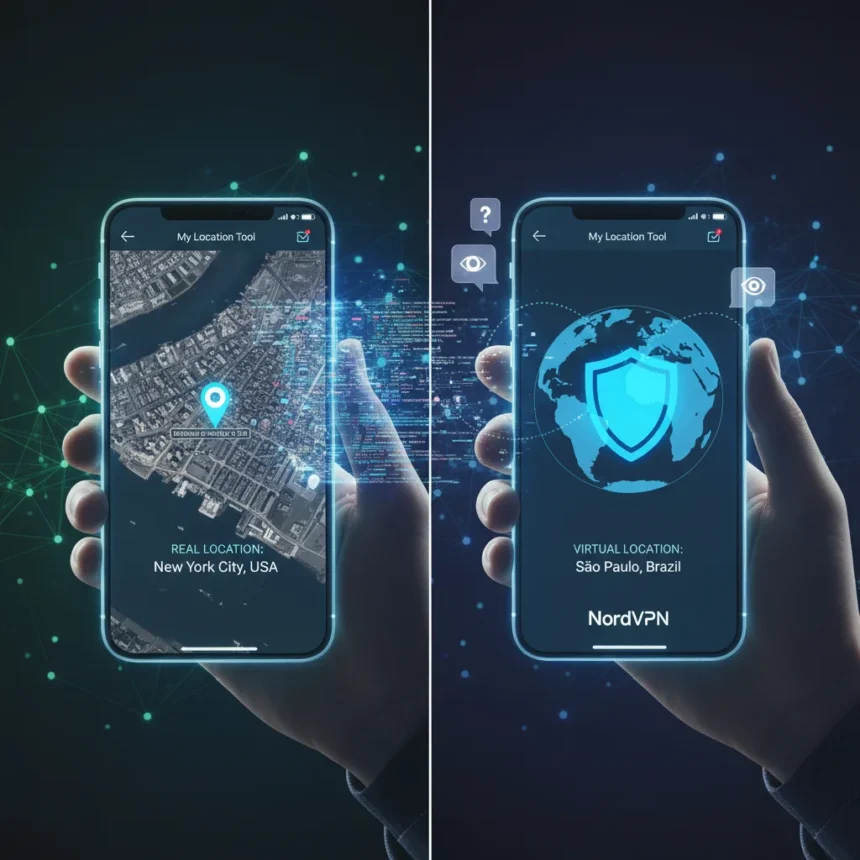
NordVPN’s My Location tool is a free browser-based application launched in April 2026 that lets users compare their real physical location with the virtual location visible to websites via IP address. The tool operates entirely in your browser without logging or storing any location data, making it an instant way to understand how much the internet actually knows about where you are.
Key Takeaways
- My Location is a completely free tool requiring no VPN subscription to use.
- Shows both real location (via browser geolocation) and virtual IP-based location on a map.
- Operates at browser level with no data logging or storage by NordVPN.
- Reveals daily location patterns that websites can infer from IP tracking.
- Launched April 1, 2026, addressing rising concerns about online location privacy.
What NordVPN’s My Location Tool Actually Does
The tool displays two distinct locations side by side. Your real location comes from the browser’s geolocation API, which uses GPS, WiFi signals, or device-based positioning methods to pinpoint your actual physical position. Your virtual location is the IP-based estimate that websites see by default—often inaccurate but revealing enough to identify your city, ISP, and browsing patterns. The difference between these two locations illustrates a fundamental privacy gap most users never visualize.
According to Marijus Briedis, CTO at NordVPN, “Location is one of the most sensitive types of personal information because it can reveal where you are as well as patterns about your daily life”. That insight drives the tool’s core value—it transforms abstract privacy concerns into a concrete, visual comparison. You see immediately which websites can infer about your movements without ever installing a VPN.
Why This Matters More Than Other IP Lookup Tools
NordVPN already offers free IP lookup and “What is my IP” tools that show your public IP, geolocation, ISP, and hostname. Those are useful for technical troubleshooting. My Location tool goes further by adding the real location dimension, creating a privacy education moment rather than just a technical readout. You understand not just what your IP reveals, but what it fails to reveal—and what your device’s geolocation API exposes instead.


The comparison exposes a critical privacy reality: disabling location sharing in your browser settings does not hide your IP-based location, and using a VPN to mask your IP does not prevent websites from requesting browser geolocation permission. Most users assume one or the other solves location privacy. My Location shows why both matter.
How the Tool Protects Your Data
The tool operates entirely at the browser level, meaning no location data passes to NordVPN servers or gets stored anywhere. You run the geolocation check locally, compare it to your public IP location, and see the results instantly. There is no account creation, no tracking, no hidden logging. This architecture distinguishes it from many free privacy tools that monetize user data collection.



For users concerned about privacy, this transparency is essential. You are not trading location visibility for another form of data harvesting. The tool exists to educate, not to build a profile.
Free Access, No VPN Required
My Location is completely free and requires no NordVPN subscription. You access it via any web browser globally without signing up or paying anything. This approach differs from many VPN companies that offer free tools as conversion funnels—the tool stands alone as a public service, though obviously NordVPN hopes users will consider a paid VPN subscription after understanding their location exposure.
The free-with-no-strings approach makes it genuinely useful for anyone curious about location privacy, regardless of whether they ever become a paying customer.
Does My Location Tool Replace a VPN?
No. The tool reveals the problem; a VPN solves it. My Location shows you that websites can see your IP-based location. A VPN masks that IP address by routing your traffic through servers in different countries. The tool is educational. A VPN is protective. Using My Location to understand your exposure is the logical first step before deciding whether to invest in a VPN service.



NordVPN operates over 7,000 servers across 118 countries, giving paid users granular control over which virtual location they appear to be in. My Location helps you decide if that control is worth the subscription cost.
Can websites block or bypass the My Location tool?
Websites cannot block the My Location tool because it operates on your device, not against any website. The tool simply reads your browser’s geolocation API and compares it to your public IP address—both of which are standard web technologies. Websites do not interact with the tool itself.
Does My Location work on mobile browsers?
The tool is browser-based, so it functions on any device with a web browser and geolocation support, including smartphones and tablets. Mobile browsers typically have more reliable geolocation data via GPS, so the comparison between real and virtual location may be even more striking on a phone than on a desktop.
What is the difference between My Location and a standard IP lookup?
A standard IP lookup shows only your virtual location—the geolocation estimate derived from your IP address. My Location adds your real physical location from the browser’s geolocation API, creating a direct comparison that illustrates the privacy gap. You see what websites know (IP-based location) versus what they could know if you grant location permission (GPS-level precision).
NordVPN’s My Location tool arrives at a moment when location tracking has become routine and largely invisible. Websites track your IP constantly; many also request geolocation permission, often with vague explanations. This free tool makes that tracking visible, concrete, and impossible to ignore. Whether you decide to act on that visibility—by enabling a VPN, tightening browser permissions, or simply accepting the trade-off—is up to you. But at least you will know exactly what is at stake.
Edited by the All Things Geek team.
Source: TechRadar