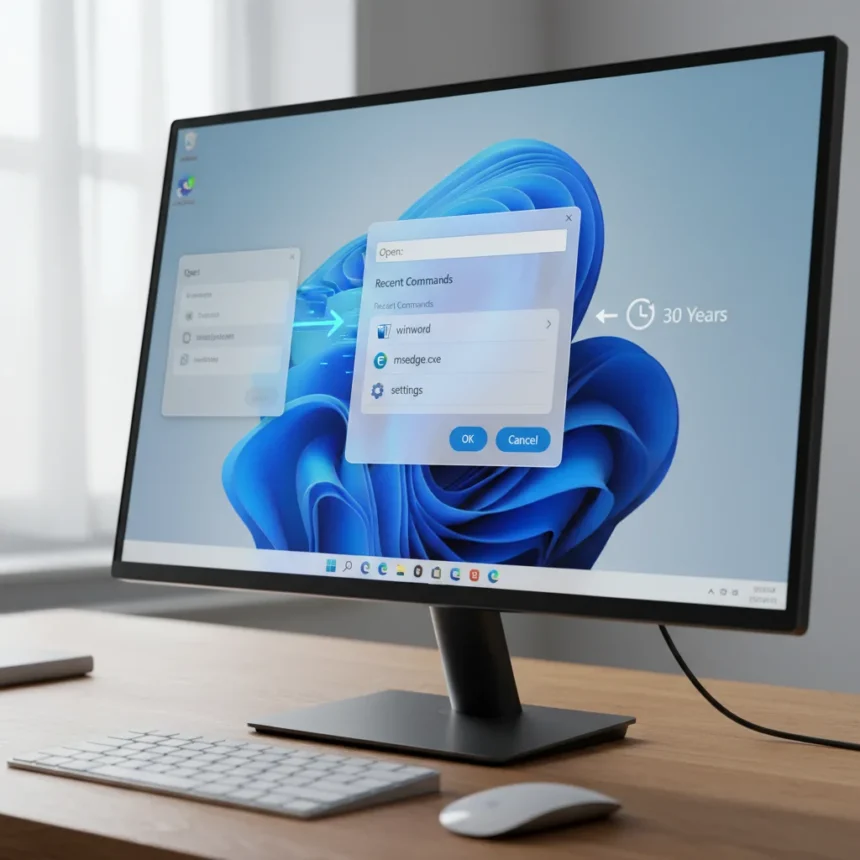
The Windows 11 Run Box is getting a complete visual overhaul after three decades of visual neglect, replacing the legacy dialog that has looked essentially identical since Windows 95. Microsoft discovered this redesign in Windows 11 Build 26534 in early December 2025, signaling a rare moment when the company actually bothered to modernize one of its most-used system utilities. The new interface aligns with Windows 11’s Fluent design language and adds functional improvements that make the Run dialog feel less like a relic and more like something built in the 2020s.
Key Takeaways
- Windows 11 Run Box remains unchanged for over 30 years since Windows 95 era
- New design discovered in Build 26534 with modern Fluent interface styling
- Recent commands display above textbox with app icons for quick access
- Optional feature; users must enable via Settings or ViveTool to activate
- Browse button removed; core functionality preserved with visual modernization
Why This Matters: Breaking 30 Years of Visual Limbo
The Run dialog box (opened with Windows key + R) is one of the most frequently accessed tools in Windows, yet it has looked essentially identical since 1995. That disconnect became increasingly jarring as Windows 11 rolled out its contemporary Fluent design across the rest of the operating system. The legacy Run box sat there—gray, boxy, utterly inconsistent with everything surrounding it. Microsoft’s decision to redesign it demonstrates something rare: acknowledgment that even utility dialogs deserve modern treatment.
This is not a minor cosmetic tweak. The redesign reflects a philosophy shift within Microsoft‘s Windows team. Rather than leaving the Run dialog frozen in time, the company chose to bring it into alignment with Windows 11’s overall visual language. That consistency matters more than most users realize. When every other system dialog feels modern and responsive, the legacy Run box stands out as a jarring throwback—a visual reminder that Windows still carries decades of accumulated cruft.
What’s New in the Windows 11 Run Box Redesign
The new Windows 11 Run Box introduces several functional improvements alongside its visual refresh. Recent commands now display above the textbox in a seamless window design, making it faster to re-run frequently used utilities without retyping. App icons render for applications you are launching, providing immediate visual feedback about what you are about to execute. The interface itself adopts Windows 11’s contemporary aesthetic, rendering cleanly in both light and dark modes.


One notable trade-off: the Browse button is gone. The legacy Run dialog allowed users to navigate the file system to locate and run executables manually. The new design removes this functionality entirely, betting that most users either remember their command names or can search for them through other means. Whether this is a genuine improvement or a loss depends on your workflow. Power users who occasionally need to hunt down an executable may miss it; casual users who type winver or msinfo32 will never notice.
How to Enable the New Windows 11 Run Box
The new Run dialog is optional, not enabled by default. Microsoft is rolling this out gradually through preview builds, meaning most Windows 11 users do not yet have access. To enable it, navigate to Settings > System > Advanced and toggle on the Run dialog option. This approach lets Microsoft test the feature with enthusiasts before pushing it to the broader user base.



For users without the Settings toggle available, an alternative exists. Open Command Prompt as administrator, navigate to your ViveTool folder, and run the command: vivetool /enable /id:58381341,58527096,57156807,57259990. This manually activates the feature using Windows feature IDs, though it requires technical familiarity and is not the recommended path for average users.
Windows 11 Run Box vs. the Legacy Design
Comparing the new design to its 30-year-old predecessor is almost unfair. The legacy Run dialog represents the Windows 95 aesthetic: a plain gray window with a text field, an OK button, and a Cancel button. Functional? Yes. Visually coherent with modern Windows? Absolutely not. The new Windows 11 Run Box adopts rounded corners, refined typography, and the subtle depth cues that define Fluent design. It feels like it belongs in the same operating system as the Settings app, File Explorer, and other modernized Windows 11 components.
This redesign is exclusive to Windows 11. Windows 10, which is approaching end-of-life, receives no equivalent modernization. That decision underscores Microsoft’s strategy: push users toward Windows 11 by making it visually and functionally superior. The Run dialog redesign is a small piece of that larger puzzle, but it matters. It signals that Windows 11 is the platform receiving investment and care, while Windows 10 is being left to age gracefully into obsolescence.
Why Microsoft Took 30 Years to Care
The Run dialog redesign raises an obvious question: why did it take three decades? The answer lies in how Microsoft prioritizes development resources. System utilities that work reliably often get ignored because they do not generate user complaints—they just quietly do their job. The Run dialog worked in Windows 95, and it still works today. From a pure functionality standpoint, there was no urgent need to change it.



But user experience is not purely functional. Visual consistency matters. A user launching the Registry Editor via the Run dialog should not feel like they have stepped backward in time. The redesign acknowledges that principle. It also reflects broader shifts in how software companies think about design. In 2025, leaving a user-facing tool unchanged for 30 years is inexcusable, even if that tool works perfectly.
Frequently Asked Questions
When will the new Windows 11 Run Box roll out to all users?
The feature is currently in preview builds and not yet available to all Windows 11 users. Microsoft typically tests features in Insider Preview builds for several weeks or months before wider rollout. No official launch date has been announced.
Will the new Run dialog work on Windows 10?
No. The redesign is exclusive to Windows 11. Windows 10 will continue using the legacy Run dialog until the operating system reaches end-of-life.
Can I still use common Run commands like winver and msinfo32 with the new design?
Yes. The new Windows 11 Run Box preserves all core functionality. Commands like winver (to check Windows version), msinfo32 (for system information), control (to open Control Panel), and regedit (for Registry Editor access) all work identically. The only functional removal is the Browse button.
The Windows 11 Run Box redesign is a small but meaningful example of Microsoft taking care with details that matter. After 30 years of visual stagnation, the Run dialog finally feels like it belongs in a modern operating system. It is not revolutionary—it is just a dialog box—but it represents something larger: acknowledgment that consistency and care matter, even for utilities most users interact with only occasionally. That philosophy, applied across Windows 11, is what separates it from the accumulated cruft of earlier Windows versions.
Edited by the All Things Geek team.
Source: Windows Central