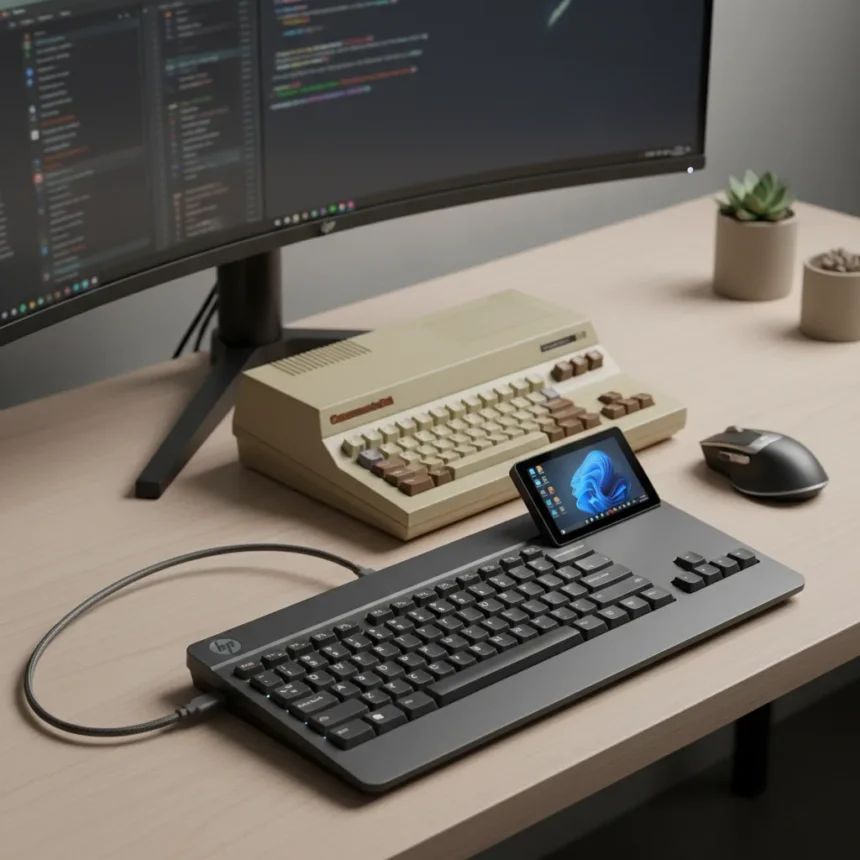
The HP EliteBoard G1a keyboard PC is a full Windows computer built directly into a keyboard form factor, representing an unusual attempt to revive the all-in-one computing concept that defined the Commodore 64 in 1982. After hands-on testing, the device delivers on its core promise—a genuinely functional PC that occupies minimal desk space—but reveals significant practical compromises that limit its appeal beyond niche use cases.
Key Takeaways
- The HP EliteBoard G1a integrates a complete Windows PC into a keyboard, echoing the Commodore 64’s all-in-one design philosophy.
- Designed for compact office setups and portable computing scenarios where space is severely constrained.
- Functional for basic productivity tasks but limited by its form factor for typing comfort, gaming, and intensive workloads.
- Comparable modern alternatives include the Raspberry Pi 400, which similarly embeds a full computer inside a keyboard.
- Not a mainstream consumer product; success depends entirely on matching the device to specific use cases.
What Makes the HP EliteBoard G1a Different
The HP EliteBoard G1a keyboard PC stands apart from traditional peripherals because it eliminates the separation between input device and computing hardware. Unlike a standard keyboard that connects to a separate tower, laptop, or mini-PC, the EliteBoard G1a contains the entire Windows system within its chassis. This architectural choice directly echoes the Commodore 64, which pioneered the integrated keyboard-computer form factor four decades ago.
The appeal is straightforward: you plug in a monitor, connect power, and have a functional Windows PC that occupies roughly the footprint of a keyboard. For professionals working in space-constrained environments—compact apartments, shared office spaces, or mobile setups—this eliminates the need for a separate computer tower or laptop dock. It’s a legitimate solution to a real problem, even if that problem affects only a narrow slice of users.
Performance and Practical Limitations
Testing reveals the device functions adequately for basic productivity—web browsing, document editing, video conferencing, and light spreadsheet work execute without significant lag. However, the keyboard form factor introduces ergonomic and thermal constraints that become apparent during extended use. Typing on an integrated keyboard that doubles as a computer chassis means less distance between your hands and the processing hardware, which generates heat during operation.


Heavy gaming, video editing, or sustained compilation tasks push the device beyond its comfort zone. The form factor also limits cooling options compared to traditional desktop cases, which can accommodate larger heatsinks and fan arrays. For users accustomed to mechanical gaming keyboards or ergonomic office peripherals, the EliteBoard G1a requires adjustment—you’re not just typing, you’re balancing input comfort against the thermal and structural constraints of a computer chassis.
How It Compares to Modern Alternatives
The Raspberry Pi 400 offers a conceptual parallel—a complete computer embedded in a keyboard—but targets different users entirely. The Raspberry Pi 400 runs Linux and costs significantly less, making it ideal for education, hobbyists, and retro computing enthusiasts. The EliteBoard G1a, by contrast, delivers a genuine Windows environment, which matters for users requiring specific Windows software or corporate compatibility.



Mini-PCs like the Intel NUC or AMD Ryzen embedded systems provide more processing power in a compact form, but they still require a separate keyboard and mouse. They’re more flexible for gaming and intensive tasks but sacrifice the all-in-one convenience that defines the EliteBoard G1a. The trade-off is clear: you gain form-factor simplicity at the expense of performance headroom and upgrade options.
Apple’s patent for a Magic Keyboard with integrated macOS hardware suggests the concept may expand to other ecosystems, though no shipping product exists yet. If realized, it would give macOS users a similar integrated option, but the EliteBoard G1a remains the only production Windows keyboard-PC hybrid currently available for testing and review.
Who Should Actually Buy This
The HP EliteBoard G1a succeeds only when matched to specific scenarios. Corporate environments with strict space limitations—think trading floors, control rooms, or compact kiosks—represent legitimate use cases. Travelers who want a single compact device that serves as both keyboard and computer might find value, though the need to carry a monitor and power adapter reduces the portability advantage. Educational institutions exploring alternative computing form factors could experiment with it, though cost and support matter more than novelty.
For mainstream consumers, gaming enthusiasts, or anyone planning to spend eight hours daily typing, this device is a poor fit. The ergonomic compromises and thermal limitations make it a specialist tool, not a general-purpose replacement for a laptop or desktop. Recognizing this constraint is crucial—the EliteBoard G1a is not a failure because it’s limited; it’s successful precisely because it’s honest about its limitations and targets users for whom those limits don’t matter.



Is the HP EliteBoard G1a worth buying?
Only if your primary constraint is physical space and you accept the ergonomic and thermal trade-offs that come with an integrated keyboard-computer design. For niche professional and educational use cases, it delivers genuine value. For everyone else, traditional form factors remain superior.
How does the EliteBoard G1a compare to a mini-PC and separate keyboard?
A mini-PC plus keyboard setup offers more processing power, better cooling, and superior ergonomics, but requires more desk space and multiple cables. The EliteBoard G1a sacrifices performance flexibility for physical compactness—choose based on your priorities.
Can you upgrade components in the HP EliteBoard G1a?
The integrated form factor severely limits upgrade options compared to traditional desktops. Most components are soldered or proprietary, making expansion difficult or impossible—a significant drawback for users expecting long-term hardware evolution.
The HP EliteBoard G1a keyboard PC represents a bold experiment in reviving a computing form factor abandoned decades ago. It works, it’s genuinely innovative, and it solves real problems for a specific audience. But it is not a product for everyone, and that’s entirely intentional. In a market saturated with generic laptops and interchangeable mini-PCs, the EliteBoard G1a’s willingness to be deliberately niche is perhaps its most honest quality.
Edited by the All Things Geek team.
Source: Tom's Guide