

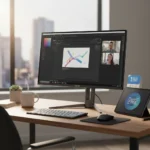



Smart TV vs dedicated media player for digital signage is not a simple choice between two equivalent options. The decision hinges on your deployment’s reliability requirements, app ecosystem needs, and budget constraints. Digital signage involves displaying tailored messages, media, or content on screens for public or organizational use, often requiring reliable playback, remote management, and 24/7 operation.
Key Takeaways
- Dedicated media players like Apple TV 4K and Chromecast with Google TV typically outperform built-in TV apps in speed and responsiveness.
- Smart TV platforms vary significantly: Android TV offers extensive apps but cluttered interfaces, while webOS and Tizen prioritize simplicity with app gaps.
- Built-in TV apps can deliver superior audio quality when connected to home theater systems compared to external players.
- Digital signage software like NoviSign enables multi-screen remote management and custom templates, working with both Smart TVs and dedicated players.
- App availability differs by platform—some models lack key services like Disney+ or Apple TV+, forcing reliance on external hardware.
Smart TV vs Dedicated Media Player: Performance and Speed Differences
Dedicated media players consistently deliver faster app performance than built-in Smart TV systems. Many streaming devices work faster than the software baked into television sets, particularly when running multiple apps or switching between services. This speed advantage matters for digital signage, where sluggish interfaces disrupt viewer experience and increase operational friction during content updates or troubleshooting. The performance gap stems from hardware architecture: external players like Apple TV 4K and Chromecast with Google TV are purpose-built for streaming, while Smart TV chipsets must balance streaming, television tuning, and display processing simultaneously.
However, the audio quality story complicates this narrative. Built-in TV apps can outperform dedicated players in audio quality when connected to home theater systems—an LG C4 OLED’s native streaming apps, for example, may deliver superior sound compared to routing audio through an Apple TV 4K. For signage applications in retail or hospitality environments where audio quality matters less than uptime and interface responsiveness, dedicated players edge ahead. For installations prioritizing audiovisual fidelity in premium environments, the TV’s native apps warrant serious consideration.
App Ecosystem and Platform Fragmentation
Smart TV platforms fragment across incompatible ecosystems, creating app availability headaches. Android TV and Google TV offer extensive app libraries and gaming support but suffer from cluttered interfaces that confuse non-technical users. WebOS, Tizen, and Roku prioritize minimalist design and faster navigation but carry significant app gaps—Disney+ may not appear on Panasonic models, and Apple TV+ remains absent from some Sony and Panasonic sets. These gaps force organizations to purchase external hardware just to access missing services, undermining the convenience argument for built-in apps.
Dedicated media players solve this fragmentation by providing consistent app support across all connected televisions. Google Chromecast, Apple TV 4K, and Amazon Fire Stick each maintain their own app ecosystems independent of the display hardware. For digital signage deployments spanning multiple locations with mixed TV models, this consistency reduces support burden and ensures content reaches every screen reliably. The trade-off: you add a second device to manage and power, increasing complexity and cost per installation.
Digital Signage Software and Remote Management
Neither Smart TVs nor dedicated players alone handle enterprise digital signage requirements without specialized software. Digital signage platforms like NoviSign pair with both hardware types to deliver customizable templates, real-time broadcasting to infinite screens, and interactive media capabilities. NoviSign’s business tier costs approximately $20 per screen monthly (or $18 annually), with a 30-day trial available but no free tier or volume discounts explicitly offered. This software layer abstracts away the hardware choice somewhat—your signage software works across both Smart TV apps and external players, provided the underlying device supports the platform’s requirements.

The practical advantage tilts toward dedicated players in signage deployments because they maintain consistent software platforms across locations. A retail chain rolling out 200 screens can standardize on Chromecast or Apple TV hardware, ensuring identical performance and support across all locations. Smart TVs from different manufacturers introduce platform variables that complicate deployment, even with unified signage software managing the content layer.
Cost, Reliability, and 24/7 Operation
Smart TVs cost more upfront but eliminate the need for additional hardware. A 55-inch 4K Smart TV typically costs less than a TV plus a dedicated media player. However, digital signage deployments prioritize reliability over initial purchase price. Consumer-grade Smart TVs are not engineered for 24/7 operation—thermal management, software stability, and component longevity assume typical home use patterns of 4-6 hours daily. Dedicated media players, though designed for consumer streaming, better tolerate continuous operation due to simpler hardware and more focused software stacks.
For organizations planning long-term deployments, the hidden costs of Smart TV failures—service calls, replacement units, content interruption—often exceed the savings from buying integrated hardware. Dedicated players offer modularity: if a Chromecast fails, you replace the $40-80 device, not the entire $400-800 display. This economics shifts the cost-benefit calculation in favor of external hardware for professional signage use.
When to Choose Smart TV Built-In Apps
Smart TV built-in apps make sense for small, budget-constrained deployments where reliability pressure is low. A single-screen installation in a coffee shop or small office benefits from the simplicity of navigating apps directly on the TV remote. If your signage content streams from Netflix, Disney+, or Amazon Prime Video exclusively, and your TV model supports all required services, the built-in app approach eliminates hardware clutter and reduces power consumption. Environments prioritizing audio quality—such as restaurants or gyms with home theater audio—may justify the built-in TV app route despite slower performance.


When to Choose Dedicated Media Players
Dedicated media players suit enterprise deployments, multi-screen rollouts, and locations requiring app flexibility. If your organization needs consistent performance across mixed TV models, plans to scale beyond five screens, or requires apps missing from certain Smart TV platforms, external hardware is the pragmatic choice. Media players enable voice control integration (Alexa on Fire Stick, Google Assistant on Chromecast), travel portability, and future upgrades without replacing entire displays. For digital signage specifically, the combination of dedicated hardware plus NoviSign or similar software delivers the reliability and scalability that professional deployments demand.
Does a Smart TV vs dedicated media player choice matter for digital signage?
Yes, significantly. Digital signage requires 24/7 reliability, remote management, and consistent app support across multiple locations. Dedicated media players outperform built-in Smart TV apps in speed and app availability, while Smart TVs offer upfront cost savings and superior audio in some scenarios. For professional signage deployments, dedicated players paired with management software like NoviSign provide the operational consistency and scalability that consumer-grade Smart TVs cannot guarantee.
Can I use a Smart TV’s built-in apps for commercial digital signage?
You can, but it is not ideal for deployments beyond a single screen or requiring high uptime. Smart TVs lack the thermal engineering and software stability for 24/7 operation, and app availability varies by manufacturer, complicating multi-location rollouts. If cost is the primary constraint and reliability pressure is low, built-in apps suffice; otherwise, dedicated hardware minimizes operational risk.
What is the best media player for digital signage?
The best choice depends on your app requirements and ecosystem preferences. Apple TV 4K excels in audio quality and Apple ecosystem integration; Chromecast with Google TV offers the broadest app library and Google Assistant integration; Amazon Fire Stick provides Alexa voice control and tight Amazon ecosystem ties. All three outperform Smart TV built-in apps in speed and consistency. Pair your chosen player with digital signage software like NoviSign for enterprise-grade remote management and multi-screen deployment.
The smart TV versus dedicated media player debate for digital signage ultimately favors dedicated hardware for professional use. Consumer Smart TVs prioritize entertainment convenience; dedicated media players prioritize performance, reliability, and ecosystem flexibility. For single-screen vanity deployments, built-in apps suffice. For any organization planning to scale or requiring consistent uptime, external hardware paired with professional signage software delivers the operational control and peace of mind that modern deployments demand.
This article was written with AI assistance and editorially reviewed.
Source: TechRadar