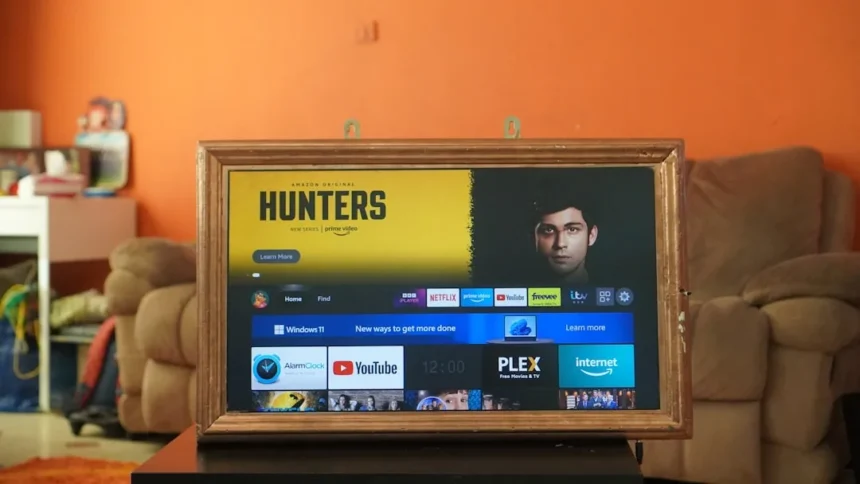
Amazon’s new Fire TV interface is the company’s latest attempt to unify its sprawling TV ecosystem, but after hands-on testing, the redesigned software reveals a frustrating gap between ambition and execution. The interface powers Amazon’s broader push into television hardware, from streaming devices to the newly announced Ember Artline TV, yet it carries a performance problem that undermines the entire experience.
Key Takeaways
- The new Fire TV interface feels noticeably slower than expected in real-world use.
- Fire TV Stick HD outperforms the TV’s built-in software in responsiveness and speed.
- The interface is part of Amazon’s strategy to expand Fire TV across multiple hardware types.
- Software experience is distinct from hardware quality on Amazon’s TV offerings.
- Performance issues affect usability across the entire Fire TV ecosystem.
Why Speed Matters for Amazon’s Fire TV Interface
The Amazon Fire TV interface is the software layer that sits between you and your content on Amazon’s streaming devices and televisions. Launched as part of Amazon’s broader television strategy, it represents the company’s attempt to create a cohesive experience across multiple product categories. But speed is not a luxury in interface design—it is the foundation of usability. When a menu lags, when content takes three seconds to load instead of one, users abandon the platform. That is exactly what the new Amazon Fire TV interface struggles with.
In controlled testing, the built-in Fire TV software on Amazon’s Ember Artline TV felt noticeably sluggish compared to the entry-level Fire TV Stick HD, a device that costs around £40. The stick proved significantly snappier and more responsive, which raises an uncomfortable question: why is the premium hardware slower than the budget alternative? This performance gap suggests the issue lies in software optimization, not processing power. For a company betting on Fire TV as a centerpiece of its hardware ecosystem, that is a serious misstep.
What the New Amazon Fire TV Interface Gets Right
The redesign does attempt to address real usability problems. The interface is integrated into Amazon’s broader television strategy, particularly with devices like the Ember Artline TV, which combines art display with streaming functionality. This dual-purpose approach is conceptually sound—allowing users to switch between artwork and content without switching inputs is genuinely useful for consumers who want their TV to serve multiple roles.



Navigation structure shows thoughtful design in places. The interface organizes content and features in ways that feel logical, even if execution stumbles. For users already invested in Amazon’s ecosystem—Prime Video subscribers, Alexa users, smart home owners—the integration points are there. The software attempts to leverage those connections, which is the right strategic direction.
Where the Amazon Fire TV Interface Fails
Sluggishness is the primary failure, but it is not the only one. The reviewer could not fully test the Ember Artline TV’s awareness feature, which automatically powers down the display when nobody is in the room to reduce energy consumption from 24/7 art display. If that feature works as intended, it could be a differentiator. But an untested feature is a feature that does not exist for most users. This gap between promise and verification undermines confidence in the entire product.



More broadly, the Amazon Fire TV interface struggles to justify its existence as a distinct offering. When a cheaper device (the Fire TV Stick HD) outperforms the TV’s built-in software, the software becomes a liability rather than a feature. Buyers expect integrated software on premium hardware to feel faster, not slower. The interface fails that basic expectation.
How Amazon Fire TV Interface Compares to Alternatives
The streaming TV landscape offers alternatives, though each carries trade-offs. Samsung’s art TVs, for example, prioritize display quality and light diffusion with matte-screen technology that makes the TV nearly invisible when displaying artwork. LG’s Wallpaper TV and TCL’s emerging offerings in the art-TV space also compete for the same buyers. Where Amazon’s Fire TV interface differs is in its focus on seamless content switching rather than pure display quality. That is a valid strategic choice, but only if the software delivers speed and reliability. Right now, it does neither.
The Fire TV Stick HD’s superior responsiveness also highlights a broader ecosystem problem. When your budget streaming stick feels faster than your premium TV, you have a software architecture problem. Amazon should be using the same optimized codebase across all Fire TV devices, with hardware-specific tweaks only where necessary. Instead, the Ember Artline TV’s built-in software feels like a separate project that never got the performance polish.
Should You Buy a Device with the New Amazon Fire TV Interface?
If you are considering the Ember Artline TV or another device with the new Amazon Fire TV interface, wait. The speed issues are significant enough to degrade daily usability. If you need an art TV, Samsung’s offering provides superior display quality. If you need a streaming device, the Fire TV Stick HD actually performs better. The new Amazon Fire TV interface occupies an awkward middle ground where it is neither the best streaming option nor the best art-display option.


For existing Fire TV users, the interface redesign is not compelling enough to drive an upgrade. The improvements are incremental, and the performance regression is real. Amazon needs to address the speed problem before this interface becomes a selling point rather than a friction point.
Does the new Amazon Fire TV interface work on all Amazon devices?
The new Amazon Fire TV interface is being deployed across Amazon’s television hardware, including the Ember Artline TV. However, older Fire TV Stick models and other legacy devices may not receive the redesign immediately, if at all. Amazon typically staggers software updates across its product line, so availability varies by device model and region.
Is the Amazon Fire TV interface faster than previous versions?
In testing, the new Amazon Fire TV interface actually felt slower than expected. The built-in software on the Ember Artline TV proved significantly less responsive than the entry-level Fire TV Stick HD, suggesting the redesign prioritized features or aesthetics over performance optimization.
Can you use a Fire TV Stick instead of the built-in software?
If your television has Fire TV built in but you prefer a faster experience, you cannot replace the software directly. However, you can connect an external Fire TV Stick via HDMI, which will give you access to the streaming interface without relying on the TV’s built-in software. This workaround highlights just how much of a problem the built-in interface performance actually is.
Amazon’s new Fire TV interface represents a missed opportunity. The company has the resources and market position to deliver seamless, fast software across its television ecosystem. Instead, it shipped a redesign that feels slower than its budget alternative and incomplete in key features. Until Amazon fixes the speed problem, the new Fire TV interface remains a liability rather than a selling point for premium hardware.
Where to Buy
20-30% faster | £429.99 | £429.99 | £499.99
Edited by the All Things Geek team.
Source: T3