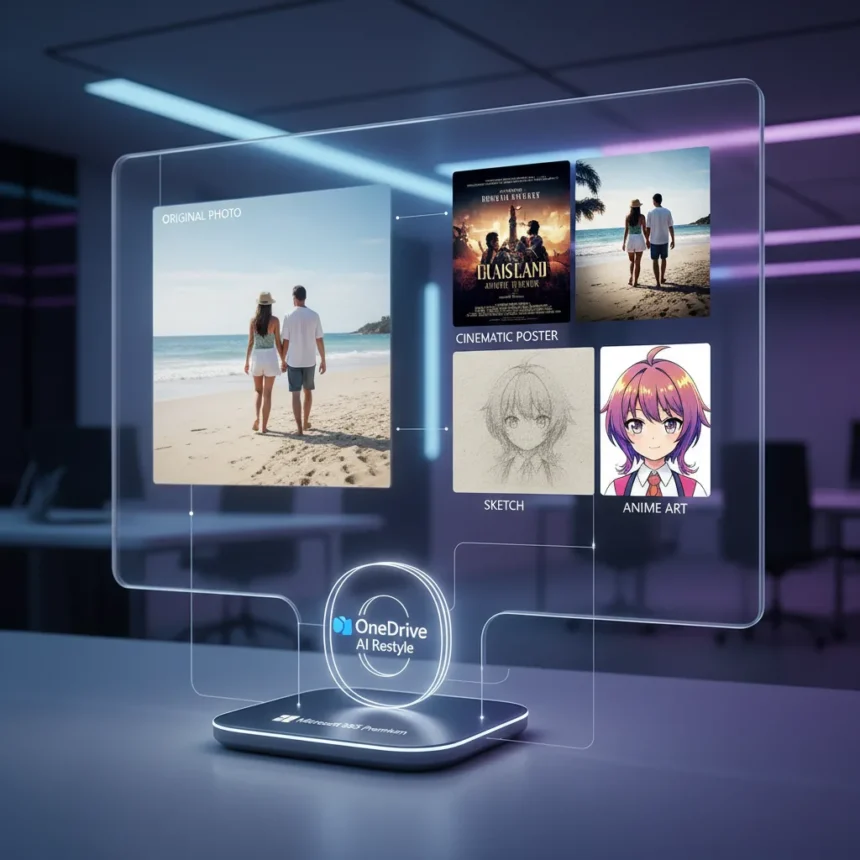
OneDrive AI Restyle is a generative AI tool in OneDrive Photos that transforms everyday photos into artistic styles like cinematic posters, hand-painted artwork, pencil sketches, and anime-inspired scenes, now rolling out across iOS, Android, and web platforms.
Key Takeaways
- OneDrive AI Restyle converts photos into cinematic, hand-painted, sketch, and anime styles in seconds with one tap
- Users can add optional text prompts for custom guidance without design experience
- Requires Microsoft 365 Premium subscription; regional availability varies
- Distinct from Microsoft Photos app’s Restyle Image, which runs only on Copilot+ PCs
- Undo, redo, and sharing features keep edits within the OneDrive ecosystem
How OneDrive AI Restyle Works
The tool operates through a straightforward process: open OneDrive on your device, sign in with a Microsoft 365 Premium account, select a photo, and tap the AI Restyle option. A rotating set of one-tap styles appears, each matched to your photo’s content, with new styles added regularly. If you want more control, optional text prompts let you guide the transformation without needing design skills. The restyle completes in seconds, giving you instant results to experiment with.
Once you have a result, OneDrive AI Restyle lets you try multiple versions, undo or redo changes, and share directly from the app without jumping to another platform. This keeps your creative workflow contained within OneDrive, the same place your photos already live.
OneDrive AI Restyle vs. Microsoft Photos Restyle Image
Microsoft offers two distinct AI restyle tools, and they serve different ecosystems. OneDrive AI Restyle is cloud-based, available through the OneDrive app and web interface, and requires a Microsoft 365 Premium subscription. Microsoft Photos app’s Restyle Image, by contrast, runs exclusively on Copilot+ PCs and uses an on-device Sketch-to-Image model. The Photos app version includes face preservation in the foreground, meaning if your photo contains people, the AI protects their faces while styling the background. For most users with standard PCs or mobile devices, OneDrive AI Restyle is the accessible option.



This distinction matters because Microsoft is positioning OneDrive as more than storage—it is becoming a creative hub. The tool competes with Google Photos, which has introduced its own AI photo management features like the Photos Agent chatbot for surfacing memories. OneDrive AI Restyle is part of a broader redesign that includes an AI Photos Agent and a new Windows app launching next year.
Availability and Requirements
OneDrive AI Restyle is rolling out now on iOS, Android, and web, though regional availability continues to vary. To use it, you need a Microsoft 365 Premium subscription—the tool is not available on free OneDrive accounts. Access the feature by opening the OneDrive app or web interface, signing in with your Premium account, opening any photo, and tapping the AI Restyle button. On iOS, download Microsoft OneDrive from the App Store; on Android, grab it from Google Play.



The rolling rollout means not all users will see the feature immediately, even if they meet the subscription requirement. Microsoft typically staggers feature releases to monitor performance and gather feedback before full deployment. If you do not see AI Restyle yet, check back in the coming weeks as the feature expands.
What Makes OneDrive AI Restyle Different
The absence of the Copilot branding is telling. Microsoft has leaned heavily on the Copilot name for its AI initiatives, but OneDrive AI Restyle breaks that pattern, suggesting the company wants to position this as a native OneDrive feature rather than a Copilot product. This approach also avoids confusion with Copilot+ PC-exclusive tools, making it clear that mobile and web users have a legitimate AI photo editing option.
The tool’s strength lies in its simplicity. You do not need to understand prompting, layering, or design principles—one tap gets you a stylized result, and optional prompts let you refine if you want to. For casual users who want to transform a vacation photo into a painted poster or turn a selfie into anime art without opening Photoshop, this is frictionless.
Does OneDrive AI Restyle require a paid subscription?
Yes, OneDrive AI Restyle requires a Microsoft 365 Premium subscription. It is not available on free OneDrive accounts, so you will need an active Premium membership to access the feature.


Can I use custom prompts with OneDrive AI Restyle?
Yes. While the tool offers one-tap preset styles matched to your photo, you can also add optional text prompts to guide the transformation without needing design skills. This gives you flexibility between quick results and more personalized edits.
How long does OneDrive AI Restyle take to process a photo?
The restyle completes in seconds with a single tap. There is no waiting around—you get instant results that you can undo, redo, or share immediately from OneDrive.
OneDrive AI Restyle fills a gap for users who want AI-powered photo editing without leaving their cloud storage app or paying for a separate creative tool. For Microsoft 365 Premium subscribers, it is a compelling reason to stick with OneDrive, especially as the platform evolves beyond simple file storage into a creative workspace powered by generative AI.
Edited by the All Things Geek team.
Source: Windows Central