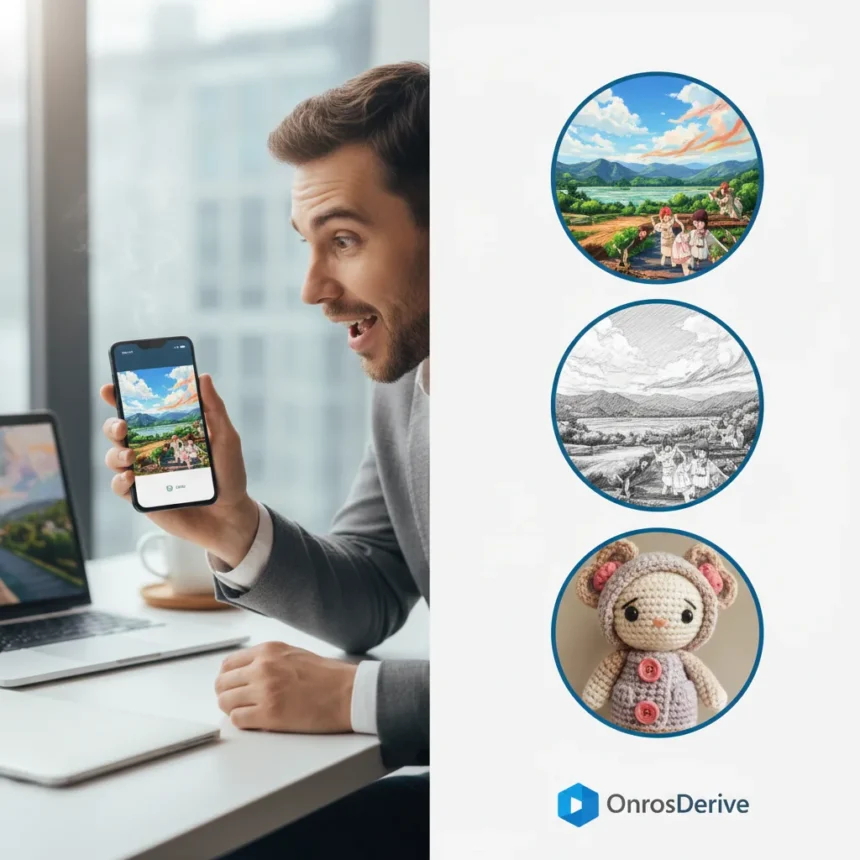
OneDrive AI Restyle is Microsoft’s new generative photo tool that transforms everyday snapshots into stylized versions—anime characters, pencil sketches, hand-painted artwork, and cinematic posters—without distorting your face or core features. The feature launched in early 2026 and is now rolling out across OneDrive for iOS, Android, and web, bundled with Microsoft 365 Premium subscriptions.
Key Takeaways
- OneDrive AI Restyle applies rotating artistic styles to photos in seconds without distorting facial features or subject identity
- Available on iOS, Android, and web; requires Microsoft 365 Premium subscription
- Styles include anime-inspired scenes, pencil sketches, hand-painted artwork, and cinematic posters with optional custom prompts
- Feature preserves core subject details while applying styles, addressing the “image drift” problem common in other AI tools
- Accessible directly from OneDrive Photos app; no external tools or apps required
How OneDrive AI Restyle Works
The feature addresses a real problem: most AI image generators either distort your face or produce overly stylized results that barely resemble the original subject. OneDrive AI Restyle takes a different approach. Open a photo in OneDrive Photos, tap AI Restyle, choose from preset styles like anime or sketch, and the tool generates variations in seconds. You can explore multiple versions, undo changes, and redo until you find one you like—all without leaving the app.
The rotating style library includes anime-inspired scenes, pencil sketches, hand-painted artwork, and cinematic posters, with Microsoft regularly adding new options. If you want more control, you can add optional text prompts to customize the output further. The entire process is seamless. No external subscriptions, no separate apps, no complex menus—just open, tap, select, and share.
What Makes OneDrive AI Restyle Different
The real win here is what Microsoft calls “zero-drift” technology. Traditional AI photo editors often distort faces, shift facial features, or produce images so divorced from the original that you barely recognize yourself. OneDrive AI Restyle preserves your core features—your face shape, expression, and identifying details—while applying artistic styles on top. A crochet doll version of you still looks like you, just rendered in yarn and thread.



This matters for practical use. You can confidently restyle family photos, portraits, or personal snapshots without worrying that the AI will turn your friend’s face into a blob or invent features that weren’t there. The feature is also not branded as Copilot, signaling Microsoft’s broader shift toward standalone AI tools embedded directly into everyday apps rather than funneling everything through a single assistant interface.
Pricing and Where to Get It
OneDrive AI Restyle requires a Microsoft 365 Premium subscription. The feature is rolling out now across iOS, Android, and web, though availability varies by region. You can download OneDrive from the App Store (iOS) or Google Play (Android). If you already subscribe to Microsoft 365 Premium, the feature should appear in your OneDrive Photos app as the rollout reaches your region.



Microsoft has not disclosed whether processing happens on-device or in the cloud, which is worth noting if privacy is a concern. The company also positions this as distinct from the Restyle Image tool in Microsoft Photos, which is exclusive to Copilot+ PCs and uses a different model.
The Catch: What Still Needs Work
The results are charming and weird in equal measure, but “AI slop” critics point out that quality varies by style and input photo. Some outputs genuinely impress—a cinematic poster style can make a casual selfie look like a movie poster. Others feel generic or overprocessed. The crochet doll version? Genuinely fun, if a bit uncanny.
The feature also depends on what Microsoft considers a rotating style at any given moment. You cannot create custom styles from scratch or fine-tune parameters like creativity level or detail intensity the way you can with some competitors. You pick from what’s available or use a text prompt to nudge the output—that’s it. For casual users, this simplicity is a feature. For creative professionals, it’s a limitation.
Is OneDrive AI Restyle Worth It?
If you already pay for Microsoft 365 Premium, yes. The feature is free, embedded in an app you likely use, and produces genuinely entertaining results without requiring a separate subscription or workflow. It is not replacing professional photo editing or AI art generators like Midjourney, but it is a solid creative tool for personal projects, social media, or just having fun with your photo library.


For non-subscribers, whether it justifies the Microsoft 365 Premium cost depends on what else you use the subscription for. The storage, Office apps, and other benefits matter more than this single feature for most people.
FAQ
What styles does OneDrive AI Restyle support?
The feature includes anime-inspired scenes, pencil sketches, hand-painted artwork, and cinematic posters, with new styles added regularly. You can also add optional text prompts to customize the output further.
Do I need Microsoft 365 Premium to use OneDrive AI Restyle?
Yes, the feature is exclusive to Microsoft 365 Premium subscribers. You cannot use it with a free OneDrive account.
Can OneDrive AI Restyle distort my face?
No. The tool is designed to preserve core facial features and subject identity while applying artistic styles—a feature Microsoft calls “zero-drift” technology. Your face stays recognizable even in stylized versions.
OneDrive AI Restyle is a genuinely useful addition to Microsoft’s cloud storage and photo tools. It solves a real problem—making AI photo transformation accessible and distortion-free—and does it without forcing you into a separate app or workflow. For Microsoft 365 Premium members, it is worth exploring. For everyone else, it is a nice-to-have that may eventually justify the subscription if you enjoy creative photo projects.
Edited by the All Things Geek team.
Source: TechRadar