





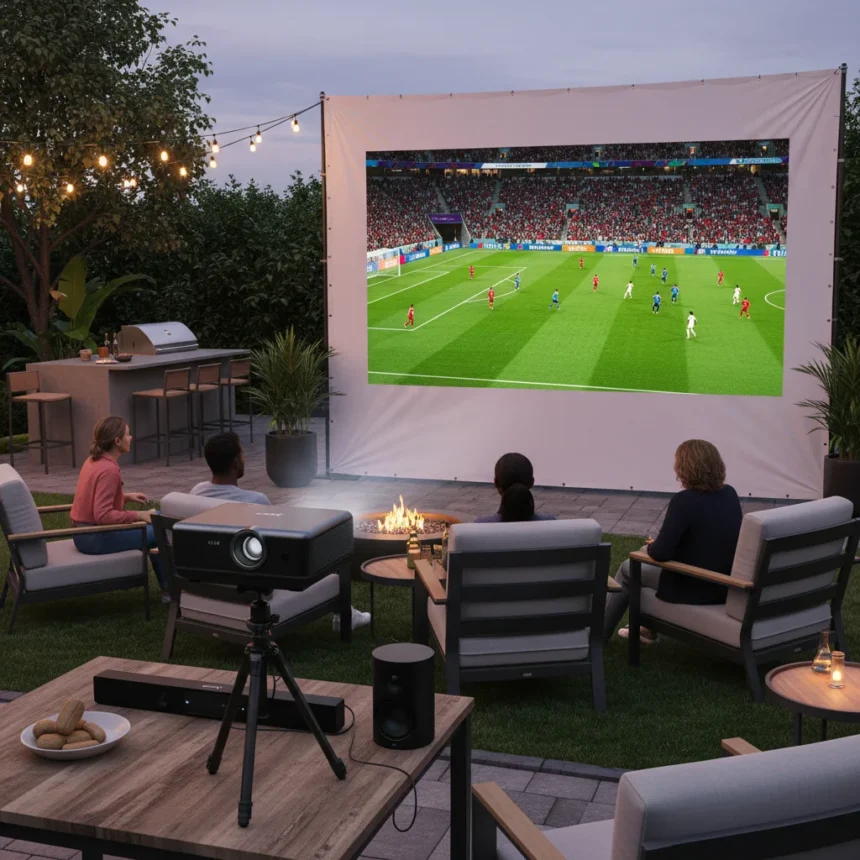
A World Cup watch party projector setup transforms your living room into a stadium-grade viewing experience, letting you catch every goal on a screen that actually does the moment justice. The centerpiece is not a TV—it’s a projector paired with the right speakers, smart lights, and catering gadgets that let you stay engaged with the match instead of disappearing into the kitchen.
Key Takeaways
- A 100-inch screen is the minimum entry point for immersive 4K projector viewing.
- 120 inches or larger delivers even stronger visual immersion for World Cup matches.
- From a 10-foot viewing distance, a 100-inch-or-larger screen creates genuine stadium-like atmosphere.
- A projector-based setup beats a 65-inch TV for scaling up big moments.
- Catering gadgets and smart lighting complement the projector to keep the host in the action.
Why a World Cup Watch Party Projector Beats a Standard TV
Most people default to a big TV for sports, but a TV maxes out at around 85 inches before the price and bezels become absurd. A World Cup watch party projector, by contrast, can push 100 inches or larger without the same cost penalty. From a reasonable viewing distance of 10 feet, a 100-inch-or-larger screen creates the kind of visual immersion that makes you feel like you’re actually in the stadium. A 65-inch TV simply cannot compete at that scale—the visual real estate matters when you’re tracking fast-moving players across the pitch.
The projector also handles the ambient light better than you might expect. A quality 4K projector maintains contrast and color accuracy even in a partially lit room, which means you’re not locked into a dark bunker for your watch party. Your guests can actually see their food and drinks.
Screen Size Is Everything for World Cup Viewing
The minimum entry point for a 4K projector setup is a 100-inch screen. That is not a suggestion—anything smaller defeats the purpose of going projector. At 100 inches, you get the visual scale that makes a World Cup match feel like an event. But if you have the space and budget, 120 inches or larger is even better. The difference between 100 and 120 inches might sound marginal on paper, but when you’re sitting 10 feet away watching a penalty kick, that extra real estate changes everything.


Screen size also determines how close you can sit. At 10 feet of viewing distance, a 100-inch-or-larger screen delivers the immersion sweet spot—close enough to feel the tension, far enough to see the whole field. Sit closer and you start noticing pixels; sit farther and the details flatten. A projector-led World Cup watch party projector setup forces you to think about room geometry, not just equipment specs.
Audio, Lighting, and Catering Complete the Setup
The projector is the hero, but the supporting gear matters just as much. Stadium sound—a quality soundbar or surround speaker pair—puts you inside the roar of the crowd. Smart lights synced to the match (or at least dimmed to accent the screen) create atmosphere without forcing your guests into complete darkness. And here is the practical part: catering gadgets that do the work for you—a slow cooker for wings, a beverage cooler with auto-ice, a charcuterie board that does not require constant restocking—let you actually watch the match instead of playing host.



The best World Cup watch party projector setups treat the projector as the anchor and everything else as force multipliers. You are not building a home theater; you are building a match-day command center that keeps people fed, comfortable, and staring at the screen.
Projector Placement and Room Layout Matter More Than You Think
A World Cup watch party projector is only as good as the room it occupies. Throw distance—how far the projector sits from the screen—dictates where you can mount it. A short-throw projector works in a small apartment; a standard-throw model needs more depth. Ambient light control is non-negotiable; even a quality projector struggles if sunlight is pouring through windows during a daytime match. Blackout curtains or a dedicated projector room solves this instantly. The screen itself should be a proper projection surface, not a white wall—a wall absorbs light unevenly and kills contrast.
Is a World Cup watch party projector setup worth the investment?
Yes, if you host regularly or have the space to dedicate a room. A projector-plus-screen combo costs less than a 85-inch premium TV and gives you 100+ inches of screen. The payoff compounds every time you use it—sports, movies, gaming, even video calls feel different on a proper projection surface. For a single World Cup tournament, it might feel excessive. For years of use, it is one of the best entertainment investments you can make.
Can I use a projector in a bright room during daytime World Cup matches?
A quality 4K projector maintains usable brightness even in partially lit rooms, but you will get the best results with blackout curtains or a dedicated dark space. Daytime matches are tougher than evening ones—you are fighting ambient light rather than adding to it. If you have windows, control them. If you do not have blackout options, a projector is still viable but not ideal for noon kickoffs.


What viewing distance should I plan for a 100-inch screen?
A 10-foot viewing distance is the sweet spot for a 100-inch-or-larger screen. Closer than that and you start seeing individual pixels; farther away and the details flatten. Measure your room before you buy the projector. If your seating is 12 feet back, you might want to go to 120 inches instead to maintain immersion.
A World Cup watch party projector setup is not just about bigger—it is about the right size in the right room with the right supporting gear. Get those three things aligned, and every goal feels like it matters.
Where to Buy
20% OFFXGIMIMogo 4 projector$398.99$499shop now | 36% OFFXGIMIMogo 3 Pro Projector$318.95$499.99shop now | 38% OFFSamsungThe Freestyle (2nd gen) projector$497.99$797.99shop now | WiiMSound Lite Smart Speaker$229shop now | 24% OFFGoveeTV Backlight 3 Lite$52.99$69.99shop now
Edited by the All Things Geek team.
Source: TechRadar




