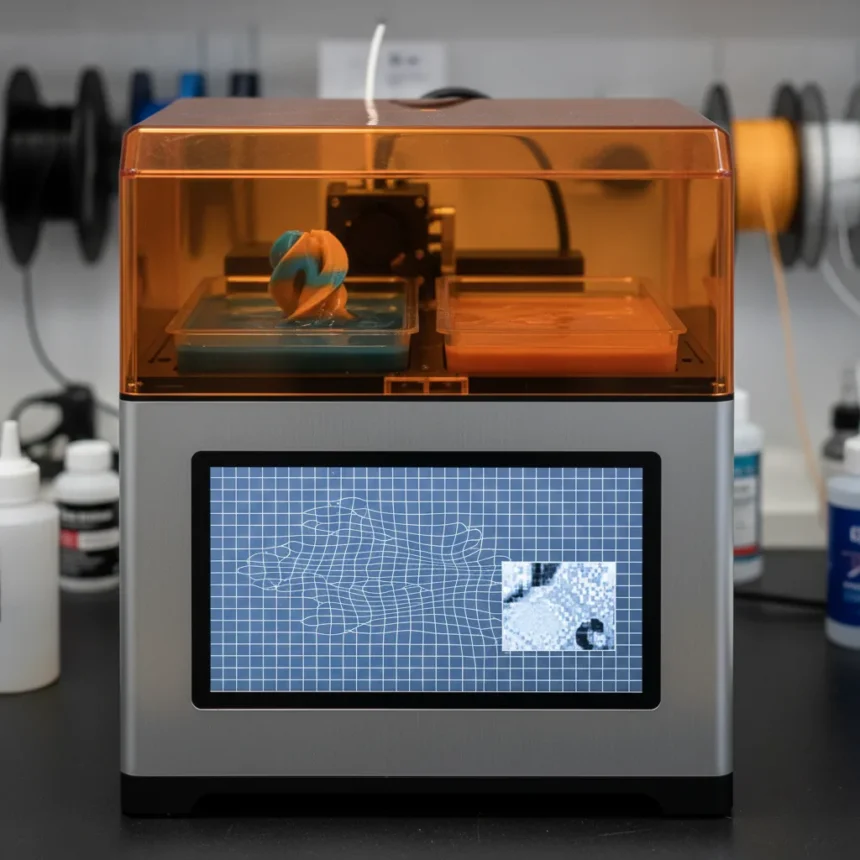
The Anycubic Photon P1 is a dual-vat resin 3D printer made by Anycubic, launched in 2025 at $799 USD, available globally through Anycubic and select retailers. It is the first consumer MSLA printer to ship with a dual-bucket system for simultaneous dual-color and dual-material printing—a feature the resin printing community has wanted for years. But after examining real-world tests and design choices, the Photon P1 proves that first-to-market does not always mean best-in-class.
Key Takeaways
- First consumer resin printer with dual-vat system for simultaneous dual-color and dual-material prints without material swaps.
- Heated resin vat maintains consistent viscosity in cold climates below 68°F, essential for reliable prints in winter conditions.
- Wave Release Technology reduces peel force by 60 percent and extends PFA film lifespan, improving print reliability.
- 14K screen resolution undermined by wavy bonded surface that scatters light and softens fine details compared to flat 14K panels.
- AI Camera falls short of marketing claims, with poor angle and lighting limiting practical monitoring utility.
Dual-Vat System: A Genuine First, Held Back by Cost
The Anycubic Photon P1 does something no competitor currently offers: it prints two colors or two materials simultaneously from separate resin vats. This eliminates the tedious workflow of pausing prints, draining tanks, and swapping resins to create multi-material parts. For makers building rigid frames with flexible inserts, or mixing opaque and transparent resins in a single job, this is genuinely useful. The catch? The dual-vat system requires an optional upgrade kit, meaning buyers who want the flagship feature must pay extra. At $799 for the base unit, adding dual-vat capability pushes the total cost higher—a poor choice for a printer marketed as feature-rich.
The dual-vat architecture also forced Anycubic to redesign the chassis with a wider base to accommodate both tanks. That structural change is not wasted; the printer’s build quality feels noticeably more robust than older models like the Photon Mono, which relied on flimsy plastic bases. The industrial-grade ball screw system for Z-axis movement is smooth and precise.
The 14K Screen Problem: Resolution Without Clarity
Marketing a 14K screen sounds impressive until you understand what Anycubic actually built. The Photon P1’s 14K panel is bonded to a wavy, corrugated surface designed to reduce light scattering. In theory, this improves uniformity. In practice, the wavy texture causes distortion and softens fine details compared to flat 14K panels found on competitors like the Photon Mono M7 Pro. Prints come out slightly fuzzier, especially at smaller scales where precision matters most.


This is not a minor trade-off. For a printer positioned as a flagship model above the M7 Pro, losing sharpness on the screen—the component that directly determines print quality—is a significant step backward. Reviewers testing the P1 against the M7 Pro found that the M7 Pro’s flat 14K screen delivers crisper details without the optical distortion. Anycubic made a design choice that prioritizes manufacturing simplicity over image quality, and users pay the penalty.
Wave Release and Heated Vat: Real Engineering Wins
Not every feature on the Photon P1 is compromised. Wave Release Technology—the wavy textured layer on glass above the screen—reduces peel force by 60 percent, meaningfully extending the lifespan of the PFA film (an improvement over older FEP materials). Lower peel stress means fewer failed prints and less strain on consumables, which adds up in cost savings over time.



The heated resin vat is equally practical, particularly for users in cold climates. Resin viscosity changes dramatically below 68°F, causing inconsistent exposure and failed prints. A temperature-controlled vat solves this by keeping resin at optimal working temperature year-round. For anyone printing in a basement workshop or unheated garage in winter, this feature is not optional—it is essential. Combined with the LightTurbo 4.0 UV system for consistent exposure, the P1 delivers reliable prints when conditions are properly managed.
Connectivity and the Overhyped AI Camera
The Photon P1 connects via Wi-Fi and LAN (2.4 GHz), managed through the Anycubic App and Makeronline cloud platform. This reduces USB dependency and lets users monitor and control prints remotely. The 4.5-inch touchscreen interface is fluid and well-organized.
The built-in AI Camera is where hype collides with reality. Anycubic markets it as a monitoring tool, but the camera’s poor angle, limited lighting, and mechanical obstruction from the printer’s own components make it barely useful in practice. Reviewers consistently note that the camera fails to capture meaningful detail of actual prints, defeating its stated purpose. Marketing departments love AI labels; engineering reality is less impressive.
Build Quality and UV Protection: A Lesson in Post-Launch Fixes
The Photon P1’s UV cover was initially inadequate, blocking less than advertised and allowing stray light to degrade resin over time. Anycubic later replaced and fixed this flaw, but shipping a flawed component in the first place is unacceptable for a $799 flagship printer. The removable wavy layer on the glass is replaceable, which is good design for a consumable component, but the initial UV cover issue suggests quality control lapses at launch.



Noise during printing runs 38–45 dB, similar to the M7 Pro—a constant fan hum that is not intrusive but not silent either. For a printer sitting on a desk or in a shared workspace, expect ambient noise comparable to an office environment.
How does the Anycubic Photon P1 compare to the M7 Pro?
The P1 is positioned above the M7 Pro in build quality and features (dual-vat, heated tank, Wave Release), but the M7 Pro’s flat 14K screen delivers sharper prints without optical distortion. Choose the P1 if you need dual-material capability or temperature control; choose the M7 Pro if pure print sharpness is your priority.
Is the dual-vat system worth the upgrade cost?
Only if you regularly print multi-color or multi-material parts. For single-material users, the upgrade adds unnecessary expense. The dual-vat system is genuinely useful but should have been standard on a $799 printer, not optional.
Should you buy the Anycubic Photon P1?
The Photon P1 is a capable printer with real engineering strengths—the heated vat, Wave Release peel reduction, and robust chassis are solid features. But the wavy 14K screen undermines the resolution promise, the AI Camera is marketing theater, and the dual-vat system being optional is a poor product decision. If you need dual-material printing and can afford the full setup with upgrades, the P1 fills a gap no competitor currently occupies. If you want the sharpest 14K prints, the M7 Pro remains the better choice. The Photon P1 is a good printer held back by design choices that prioritize novelty over refinement.
Where to Buy
$549.99 at Amazon | $549.99 at Amazon | $675.98
Edited by the All Things Geek team.
Source: Tom's Hardware