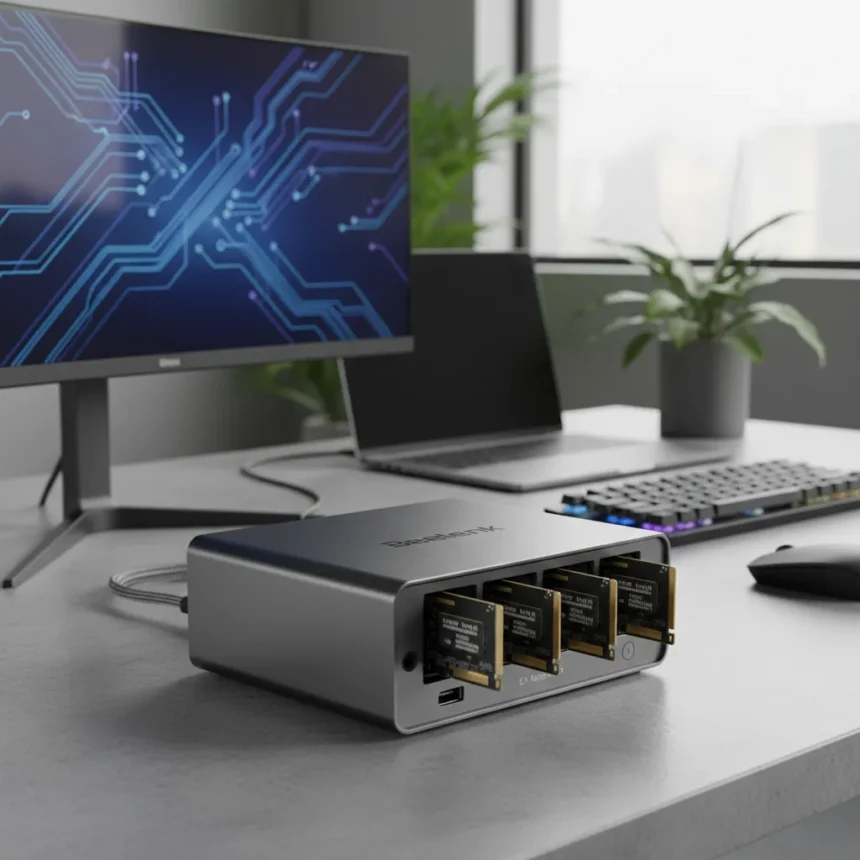
The Beelink EX Mate Pro is a USB4 docking station with four internal M.2 NVMe drive bays, manufactured by Beelink and launched in late 2024, priced from 249 USD for the base model without drives. This hybrid approach merges traditional docking functionality with direct-attached storage (DAS), eliminating the cable clutter and desk footprint that separate external enclosures demand.
Key Takeaways
- Beelink EX Mate Pro mounts four M.2 NVMe drives internally, functioning as both dock and storage expansion.
- USB4 connection delivers 40Gbps speeds; supports RAID configurations (0, 1, 5, 10) for data redundancy.
- Includes 100W power delivery, HDMI/DisplayPort for 8K displays, 2.5GbE Ethernet, and SD card reader.
- Compact form factor (200 x 100 x 40 mm, 500g empty) reduces desk clutter versus separate dock and external enclosure.
- Tool-less drive installation for first three bays; bundled models with 1TB or 4x1TB NVMe available.
What Makes the Beelink EX Mate Pro Different
Most USB4 docks handle peripherals—monitors, keyboards, Ethernet—but offload storage to external enclosures. The Beelink EX Mate Pro flips this design. Instead of plugging in a separate DAS alongside your dock, you mount up to four M.2 2280 NVMe SSDs directly inside the dock’s chassis. This single-cable approach means one USB4 connection delivers both docking and storage expansion, a meaningful shift for creators juggling large video files, raw photo libraries, or machine learning datasets.
The dock itself is compact. At roughly 200 x 100 x 40 millimeters and 500 grams empty, it sits flat on a desk without dominating real estate. The bottom panel screws off to reveal four M.2 slots. Installation is straightforward: the first three bays use a tool-less design; the fourth requires a screwdriver. Once drives are seated and the panel is reattached, the dock presents those NVMe drives to your laptop or desktop as local storage, accessible immediately via file explorer.
Docking and Connectivity Features
Beyond storage, the Beelink EX Mate Pro delivers traditional dock capabilities. It offers HDMI and DisplayPort outputs supporting up to 8K resolution, multiple USB-A and USB-C downstream ports, 2.5GbE Ethernet, and an SD card reader. Power delivery reaches 100W, sufficient for most laptops. The USB4 upstream connection handles all this simultaneously—video, data, and charging flowing through a single cable.


This matters for workspace efficiency. A video editor can connect monitors, external keyboards, and network connectivity while the internal NVMe drives hold project files. No separate enclosure cluttering the desk. No daisy-chaining hubs. One dock, one cable, multiple functions.
RAID and Storage Flexibility
The dock supports RAID configurations—modes 0, 1, 5, and 10—allowing users to balance speed, redundancy, or capacity according to their workflow. RAID 0 stripes data across all four drives for maximum throughput; RAID 1 mirrors drives for backup protection; RAID 5 and 10 offer hybrid approaches. Setup requires accessing the host system’s BIOS during boot, navigating to the storage menu, selecting the desired RAID level, then initializing and formatting the array via the operating system’s disk management utility.



For professionals handling time-sensitive content—live event footage, real-time data analysis—RAID 0 across four drives provides fast local storage without cloud dependency. For archivists and backup-conscious users, RAID 1 or 5 trades some speed for peace of mind. This flexibility is rare in compact docking solutions.
How Beelink EX Mate Pro Compares to Alternatives
Traditional USB4 docks like the CalDigit TS4 or Kensington SD5700T offer solid peripheral connectivity but require a separate external enclosure for multiple NVMe drives, consuming additional desk space and adding cost. Dedicated external DAS systems like the OWC ThunderBay support more bays—up to eight—but are bulkier and lack integrated docking ports, requiring users to manage two separate devices.
The ORICO MiniTower presents a similar all-in-one concept, though it targets Mac Mini M4 Pro users and typically supports fewer bays (usually 2-4) via USB-C connectivity. The Beelink EX Mate Pro’s advantage lies in its Windows and Linux compatibility, compact footprint, and four-bay capacity in a single unified device. It sacrifices the expandability of larger external systems but wins on desk real estate and simplicity.
Pricing and Availability
The base model without drives starts at 249 USD. Beelink offers bundled configurations: 1TB pre-installed at 349 USD, or fully loaded with four 1TB NVMe drives at 649 USD. Regional pricing includes 229 GBP in the UK and 259 EUR in the EU. Frequent discounts bring the base model down to 199 USD. The dock launched in Q4 2024 and is now widely available through Beelink’s official site, Amazon, and AliExpress across US, EU, and Asian markets.



Installation and Setup Process
Unplug the dock from power before opening the chassis to avoid electrical hazards. Remove the bottom panel screws to access the internal M.2 bays. Insert up to four M.2 2280 NVMe SSDs into the dedicated slots—the first three use a tool-less design for quick installation; the fourth requires a screwdriver and provided clips. Secure all drives with provided fasteners, reattach the panel, and connect the USB4 cable to your host device. Install Beelink drivers from the official website to ensure full USB4 and Thunderbolt compatibility. The drives will appear as local disks in your file explorer once the system boots.
Is the Beelink EX Mate Pro worth buying?
If your workflow involves large local file storage and you are tired of managing separate docks and external enclosures, yes. The Beelink EX Mate Pro eliminates desk clutter and streamlines connectivity. For casual users with modest storage needs, a traditional dock plus cloud storage remains cheaper and simpler. For creators, professionals, and anyone handling terabytes of local data, the integrated approach justifies the investment.
Can you use RAID without technical knowledge?
RAID setup requires basic familiarity with BIOS navigation and disk management tools, but Beelink’s documentation walks users through each step. If BIOS access intimidates you, stick with RAID 0 for speed or leave drives unmirrored and use external backup software for protection instead.
What NVMe drives work with the Beelink EX Mate Pro?
Any M.2 2280 NVMe SSD compatible with standard AHCI or NVMe protocols works. Popular options include Samsung 990 Pro, WD Black SN850X, and Crucial P5 Plus. Verify drive compatibility with Beelink’s official specifications before purchasing to ensure optimal performance.
The Beelink EX Mate Pro represents a practical rethinking of docking station design. By integrating four NVMe bays into a compact dock, it solves a real problem: the proliferation of cables and peripherals on modern desks. For professionals who need both connectivity and fast local storage, it is a genuinely useful tool that simplifies workflow and reclaims desk space.
Where to Buy
Edited by the All Things Geek team.
Source: TechRadar