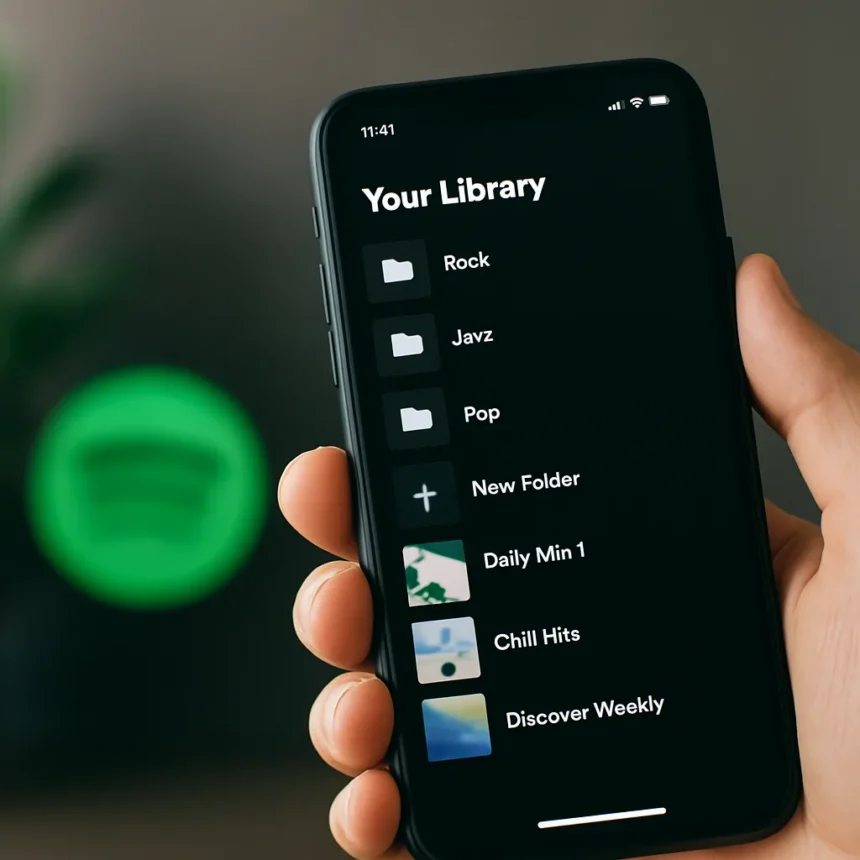
Spotify playlist folders are arriving on mobile devices, closing a frustrating 15-year gap that has forced millions of users to organize their libraries exclusively on desktop. Code discovered in the Android app version 9.1.34.12 reveals folder creation strings, suggesting the feature is moving from teardown concept to real rollout.
Key Takeaways
- Spotify playlist folders have been desktop-only since 2010, with no mobile creation or management capability until now.
- Folder creation will launch via the Create button or Your Library tab, with contextual “Move to folder” actions for playlist management.
- Users can rename folders, delete folders, and move playlists in and out of folders directly from mobile.
- Changes sync instantly across desktop, web, and mobile platforms.
- Feature expected for both Android and iOS, with no confirmed launch date or pricing changes.
Why Mobile Playlist Folders Matter Now
Spotify playlist folders solve a real workflow problem that has plagued mobile-first listeners for over a decade. Most users now discover and listen to music primarily on phones, yet organizing playlists has required switching to a desktop or web client. This friction point becomes more painful as libraries grow—a user with 50 playlists has no mobile way to group them by mood, genre, artist, or workout type. The feature closes that gap entirely, letting phone users manage their full library without leaving the app.
The timing matters because Spotify has gradually added other mobile organization tools in recent years, but playlist folders remained the conspicuous missing piece. Desktop users have enjoyed folder hierarchies since 2010, creating an asymmetry that newer users often discover only when they hit the organizational ceiling on their phones. This feature finally brings mobile parity to a core organizational function.
How Spotify Playlist Folders Will Work on Mobile
The new folder creation flow is straightforward. Tap the Create button (or Your Library tab if Create is disabled), select “Folder,” and enter a folder name. Once created, users can move existing playlists into folders using a contextual “Move to folder” action—likely accessed via long-press on a playlist. Renaming and deleting folders will also be available directly from the mobile interface.


Changes sync instantly across all platforms, so organizing playlists on your phone immediately updates your desktop and web library. This real-time synchronization is crucial for users who switch between devices throughout the day. A folder created on Android will appear on iOS and desktop without delay or manual refresh.
One unconfirmed detail is whether nested folders (supported on desktop) will launch alongside the base feature. Desktop users can create folders within folders for deeper organization, but the mobile teardown does not definitively confirm this level of nesting. Spotify may launch the feature with single-level folders first and add nesting in a later update.



When to Expect Spotify Playlist Folders on Your Phone
No official launch date has been announced, and APK teardown discoveries do not guarantee public release. Spotify typically stages feature rollouts via server-side flags and A/B testing, meaning some users may see the feature weeks or months before others. Android is likely to receive the feature first, given that the folder creation code was found in the Android app, with iOS following in a staged rollout.
Both free and Premium users should expect access once the feature rolls out—Spotify has not indicated any paywall restrictions on folder management. The feature requires no pricing changes and will be available to the entire user base as rollout completes.
Does Spotify Need Nested Folders on Mobile?
Desktop users with massive libraries benefit from nested folder hierarchies, but most mobile users likely need only single-level organization. A typical phone listener might create folders for “Workouts,” “Sleep,” “Party,” and “Chill,” with 5–10 playlists in each. Nested folders add complexity that clutters the mobile experience without solving a real problem for most users. Spotify’s initial mobile implementation will probably keep things simple, and power users can always use desktop for deeper nesting.
How Does This Compare to Apple Music and YouTube Music?
Neither Apple Music nor YouTube Music has been mentioned as offering equivalent mobile playlist folder management in the research available. Spotify’s delay in bringing this feature to mobile is unusual given that playlist organization is a basic music library function. The 15-year gap is a competitive vulnerability that this update finally addresses. Once launched, Spotify’s mobile playlist folders will be a standard feature that brings the app in line with user expectations for music library management.



Will Deleting a Folder Delete Your Playlists?
When you delete a folder on mobile, Spotify may delete all playlists inside it, though an unconfirmed option to keep playlists unfoldered could exist. A confirmation warning is expected before deletion to prevent accidental loss. Users concerned about data loss should move playlists out of a folder before deleting it, or wait for Spotify to clarify the exact behavior once the feature launches publicly.
Can You Use Playlist Folders on the Spotify Web Player?
Playlist folders have been available on Spotify’s web player and desktop app since their 2010 launch. Changes made on mobile will sync to the web player instantly, so you can manage folders on your phone and see the changes reflected immediately when you log in on a computer.
This feature represents a long-overdue alignment of mobile and desktop capabilities. For 15 years, Spotify users have lived with an artificial constraint that forced them to switch apps to organize their own libraries. The rollout of mobile playlist folders will finally let phone-primary listeners manage their music the way they actually listen—on the device in their pocket.
Edited by the All Things Geek team.
Source: Tom's Guide