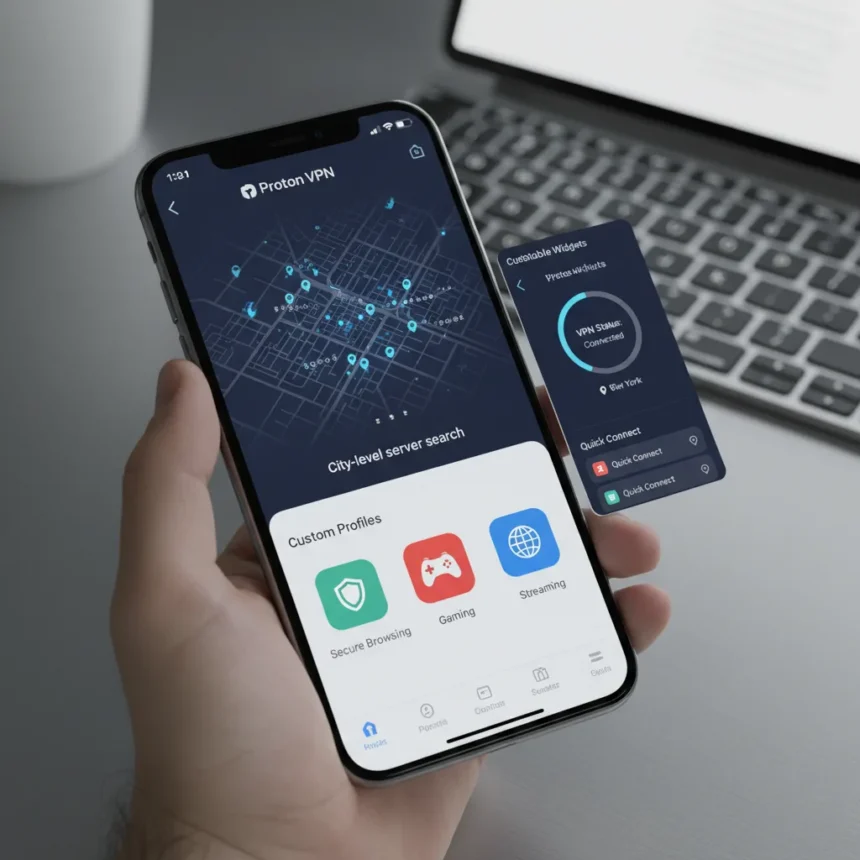
Proton VPN’s iOS app just underwent its most significant overhaul in years, and it finally addresses the one thing that annoyed users most: finding the right server in massive countries like the US or UK. The redesign, rolled out in 2025 as part of a broader interface overhaul across all platforms, brings iOS users closer to feature parity with Android while introducing several quality-of-life improvements that should have arrived years ago.
Key Takeaways
- City-level server search lets you type a city or state name instead of scrolling endless lists
- iOS 17 or later required; iOS 15 support dropped
- Home screen widgets allow one-tap VPN connections without opening the app
- Custom profiles preset connections for specific use cases like streaming and gaming
- Server load sorting shows congestion levels instead of just alphabetical order
The Proton VPN iOS App Gets Smarter Server Selection
The single biggest improvement in this update is city-level server grouping, available from version 7.1.0 onwards. Previously, selecting a US server meant scrolling through dozens of city options with no search function. Now you type your city or state name directly and get instant results. This matters because most VPN users care about geographic location for streaming or privacy reasons, not server names.
Server load sorting adds another layer of control. Instead of picking a server blindly and hoping it’s not congested, you can now see which servers are under heavy load and which are idle. This is especially useful during peak hours when connection speeds matter.
Home Screen Widgets and Custom Profiles Streamline Daily Use
The redesigned home screen now displays recent connections with one-tap reconnect buttons. But the real convenience comes from two new features: widgets and custom profiles. You can pin your favorite VPN connections directly to your home screen, letting you connect without opening the app at all. For users who switch between VPN profiles frequently—different servers for streaming versus P2P, for example—this saves seconds every time.


Custom profiles let you preset configurations for specific use cases. Proton offers templates for higher privacy, streaming, gaming, and P2P. You can also use the Connect & Go feature to automatically launch a specified website or app when you activate a profile. If you always connect to a US server before opening Netflix, you can automate that workflow entirely.
What Proton VPN iOS App Still Requires from Users
The update does come with one notable requirement: iOS 17 or later. Proton dropped support for iOS 15, which means older iPhone users will be stuck on outdated app versions. This is a common trade-off when apps modernize—newer iOS versions unlock better performance and security APIs—but it does exclude anyone on an iPhone XS or earlier.



The redesign also represents Proton’s effort to ensure no platform gets left behind. VPN providers historically prioritize Android or Windows development while iOS users wait months for equivalent features. This update signals a shift toward simultaneous cross-platform releases, though Mac and Linux apps are promised next.
How Proton VPN iOS App Compares to Competitors
Most VPN apps on iOS offer basic server lists and connection toggles. Few offer city-level search or load-based sorting without digging through settings menus. NordVPN and ExpressVPN have comparable feature sets, but neither has made server selection as frictionless as Proton’s new approach. The widget functionality is becoming table stakes for iOS apps, and Proton’s implementation here is straightforward and useful.
What sets Proton apart is the philosophy behind these changes. Rather than adding flashy features, the update focuses on removing friction from everyday tasks. You spend more time managing your VPN connection than any other feature—so making that experience seamless is smart product design.
Should You Update Proton VPN on iOS?
Yes, if you’re on iOS 17 or later. The improvements are substantial enough that older users frustrated by server selection should seriously consider upgrading their phone just to access this version. The city search alone eliminates one of the biggest pain points in VPN apps. Custom profiles and widgets add genuine convenience, not just cosmetic changes.



If you’re on iOS 15 or 16, you’re stuck on an older version. Proton hasn’t announced when or if older iOS versions will receive these features, so upgrading your phone is the only path forward.
Does the Proton VPN iOS app work with all iPhones?
The redesigned app requires iOS 17 or later, which limits it to iPhone XS and newer models. Older iPhones will continue running the previous app version without access to city search, widgets, or custom profiles.
Can you use Proton VPN iOS app widgets without opening the app?
Yes. Once you add a widget to your home screen, you can connect to a preset VPN profile with a single tap, no app launch required. This is especially useful if you have a routine connection you use multiple times daily.
What’s the difference between custom profiles and recent connections in Proton VPN iOS app?
Recent connections show servers you’ve used before and let you reconnect with one tap. Custom profiles are preset configurations you create for specific purposes—streaming, gaming, P2P, or higher privacy—with predefined server selections and app launch triggers. Profiles are reusable templates; recent connections are just quick access to past choices.
Proton VPN’s iOS app redesign proves that sometimes the most valuable updates aren’t about new features—they’re about removing friction from the features that already exist. City search and load sorting sound simple, but they solve real problems that have annoyed iOS users for years. If you’re on iOS 17, this update alone is worth your time to download.
Edited by the All Things Geek team.
Source: Tom's Guide