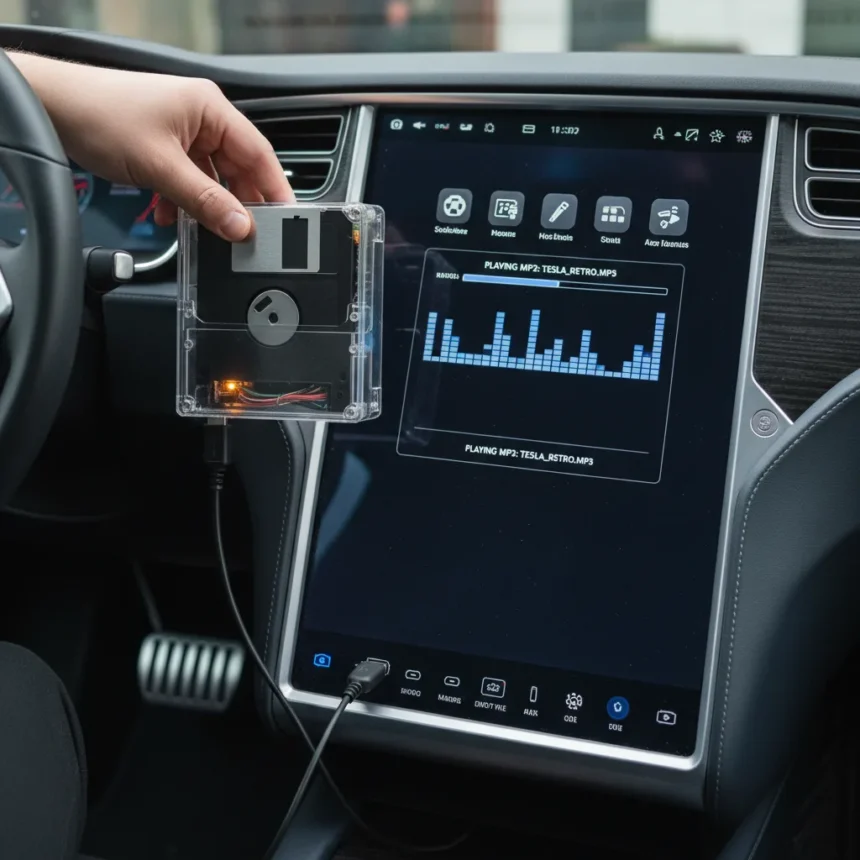
A Tesla USB floppy drive integration demonstrates that modern electric vehicles can recognize and run decades-old storage technology. An engineer connected a 3.5-inch floppy drive to a Tesla using a USB-to-FDD converter, successfully accessing files and playing MP3 audio from a 1.44MB diskette.
Key Takeaways
- Tesla’s USB port recognized a 3.5-inch floppy drive via a USB-to-FDD adapter without additional drivers or configuration.
- The engineer successfully played an MP3 file stored on a standard 3.5-inch floppy diskette through the vehicle’s infotainment system.
- USB-to-FDD converters work as plug-and-play devices on Windows XP, Vista, 7, 10, and Mac systems.
- The adapter requires a separate 4-pin power supply for the floppy drive; USB power alone is insufficient.
- Floppy capacity remains the standard 1.44MB for 3.5-inch high-density drives.
How the Tesla USB floppy drive adapter works
The Tesla USB floppy drive integration uses a USB cable connected to a 3.5-inch 34-pin FDD adapter board. The converter bridges the gap between modern USB connectivity and the 34-pin interface standard for 3.5-inch floppy drives. Once connected to a Tesla’s USB port, the vehicle’s infotainment system recognizes the floppy drive as a standard storage device, allowing users to browse files and access media stored on diskettes.
The adapter board measures approximately 3.6 by 4.4 centimeters and includes a USB cable roughly 20 centimeters long. Because USB power cannot supply the 4-pin connector voltage that floppy drives require, users must connect a separate power supply to the adapter board. This dual-power requirement means the setup is not truly plug-and-play for floppy hardware, though the USB connection itself is recognized instantly by the Tesla without additional drivers.
Why this Tesla USB floppy drive hack matters
The Tesla USB floppy drive experiment highlights an unexpected compatibility layer in modern EV infotainment systems. Tesla’s software stack treats USB-connected storage devices generically, allowing it to recognize and mount a floppy drive the same way it would a flash drive or external hard disk. This reveals that the vehicle’s file system does not discriminate based on storage type—only on the USB protocol itself.


The ability to play MP3 files from a 1980s storage format on a 2020s electric vehicle underscores how backward-compatible modern operating systems remain. Even as consumer technology moves toward solid-state storage and cloud-based media, the underlying USB and file system standards preserve support for legacy hardware. For retro computing enthusiasts and vintage tech collectors, this opens a curious possibility: any modern device with a USB port and basic file browsing capability can theoretically interface with floppy drives via converters.
Tesla USB floppy drive vs. modern storage alternatives
A traditional USB floppy reader replaces the physical floppy drive entirely, emulating a 720KB or 1.44MB IBM-format drive through a flash memory interface. This approach eliminates the need for separate power and offers faster data transfer, but it cannot read diskettes that have physical damage or magnetic degradation. The Tesla USB floppy drive hack, by contrast, uses the actual 3.5-inch drive mechanism, which can sometimes recover data from marginal diskettes that a reader might reject.



Standalone portable USB floppy drives available on retail platforms like Walmart offer similar functionality to the adapter approach, supporting Windows XP through Windows 11 and Mac systems. However, these devices are purpose-built and may not integrate as smoothly into a vehicle’s infotainment system as a raw adapter connected to the Tesla’s native USB port. The engineer’s approach bypassed any vendor-specific software layer, relying instead on the Tesla’s generic USB mass-storage driver.
Compatibility and limitations of USB-to-FDD adapters
USB-to-FDD converters work reliably with Sony and other standard 3.5-inch floppy drives that use the 34-pin interface. However, compatibility is not universal. Some drives fail to work with certain adapters due to power supply mismatches or USB port limitations. The adapter does not improve read or write speed compared to the native floppy drive controller, so users should expect performance consistent with 1990s-era floppy access times.
The 20-centimeter USB cable included with most adapters may require an extension for vehicles with USB ports positioned far from a center console or dashboard. Additionally, the separate 4-pin power connector means the setup requires access to a power source—either a vehicle’s auxiliary power outlet or a dedicated power supply, depending on the adapter model. For a Tesla, this constraint is less problematic than for portable use cases, but it remains a consideration for users expecting true plug-and-play operation.
Can any Tesla use a USB floppy drive?
Tesla’s USB port implementation is standard across most models, suggesting that a USB-to-FDD adapter should work on any Tesla with a front or rear USB port. However, the Tesla USB floppy drive hack described in the engineer’s project was demonstrated on a specific vehicle, and edge cases may exist depending on infotainment software version or vehicle generation. Compatibility with non-Tesla electric vehicles remains unverified, as different manufacturers implement USB mass-storage support differently in their proprietary infotainment systems.



What file formats can a Tesla USB floppy drive play?
The engineer successfully played an MP3 file from the floppy diskette, confirming that Tesla’s media player recognizes audio formats stored on the emulated floppy drive. Most modern infotainment systems support MP3, AAC, FLAC, and WAV formats, though the Tesla USB floppy drive setup does not change the vehicle’s native audio codec support. Any file format that Tesla’s infotainment system already recognizes should be accessible from a floppy drive connected via USB adapter.
Is a USB floppy adapter faster than a native floppy drive?
No. USB-to-FDD adapters do not improve read or write speed compared to the original floppy drive mechanism. Transfer rates remain limited by the floppy drive’s mechanical speed, typically around 250 kilobits per second for 3.5-inch drives. The USB connection is merely a bridge; it does not accelerate the underlying floppy controller. Users should expect access times and throughput consistent with 1990s-era floppy storage.
The Tesla USB floppy drive hack is ultimately a curiosity that demonstrates the flexibility of modern USB standards and vehicle infotainment systems. While few drivers will find practical use for diskette storage in a 2020s electric vehicle, the project proves that the bridge between retro and contemporary technology remains intact. Tesla’s willingness to recognize and mount a 3.5-inch floppy drive via a simple USB adapter is a reminder that standardized protocols, when properly implemented, can outlive the hardware they were designed for by decades.
Edited by the All Things Geek team.
Source: Tom's Hardware