




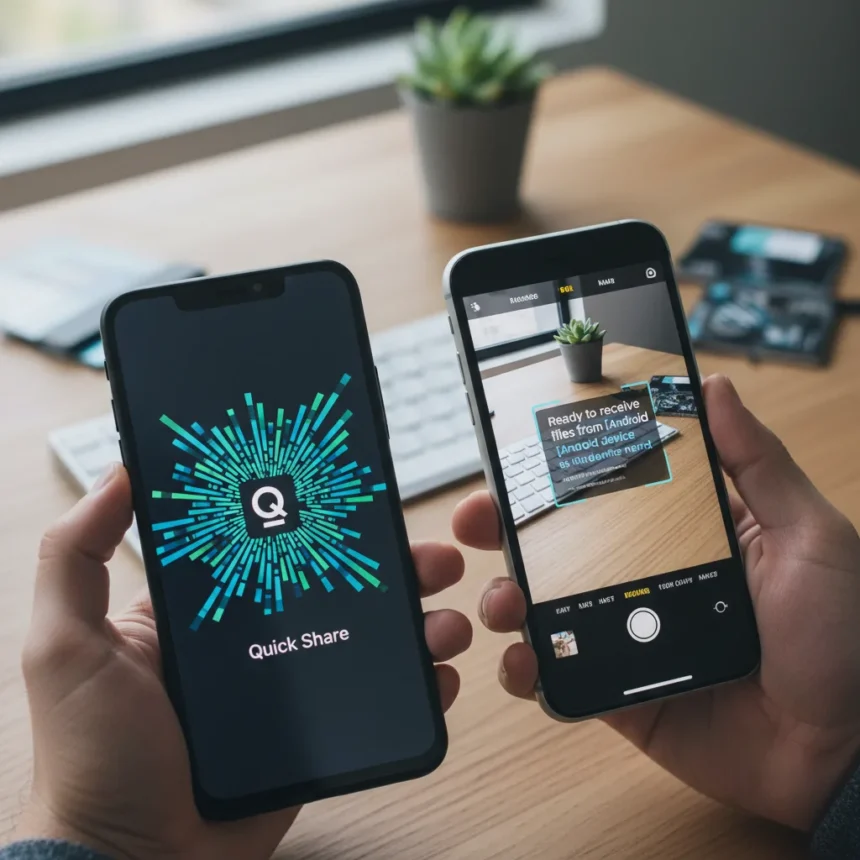
Quick Share QR code functionality represents the first meaningful step toward closing Android’s file-sharing gap with Apple’s ecosystem. The feature, discovered in Google Play Services beta version 24.20.13, creates a nearby deep link URL that lets Android users share files with iPhones by scanning a generated QR code.
Key Takeaways
- Quick Share QR code feature discovered in Google Play Services beta 24.20.13
- Eliminates need to change privacy settings for quick cross-device sharing
- Requires Bluetooth and Location permissions before connection establishes
- iPhone users directed to support page when scanning QR code
- Galaxy S26 series already supports direct AirDrop compatibility via One UI 8.5
How Quick Share QR code works
The Quick Share QR code process streamlines what has traditionally been a friction-heavy experience. Users select their files, tap Quick Share, hit Share with QR code, and a scannable code appears. The recipient scans it, accepts Bluetooth and Location permissions, and the connection establishes automatically. This eliminates the previous requirement to manually adjust Quick Share visibility settings to “Everyone,” a step that many users either skip or forget.
The feature addresses a real usability problem. Before this, Android users wanting to share with iPhone had no native option—they defaulted to cloud services, email, or third-party apps. Now, with a QR code, the handoff feels almost as seamless as AirDrop, though iPhone users attempting to use the feature are currently directed to the Quick Share support page rather than receiving files directly.
Quick Share QR code versus existing cross-platform options
Android’s file-sharing ecosystem has historically lagged Apple’s. AirDrop is instant, frictionless, and requires zero setup. Nothing’s Warp offers an alternative for sharing between Android and macOS, but coverage remains limited. Quick Share QR code doesn’t match AirDrop’s polish yet—iPhones cannot receive files directly—but it represents genuine progress.



Samsung and Google have already begun closing this gap through direct AirDrop integration. The Galaxy S26 series received One UI 8.5 with native AirDrop support, enabling users to toggle “Share with Apple devices” in Settings and share smoothly when both devices have visibility set to “Everyone”. Pixel 10 series gained similar AirDrop interoperability in November 2025, while Pixel 9 series support is now expanding. These moves signal that cross-platform file sharing is no longer optional—it’s expected.
When will Quick Share QR code launch?
The feature remains in beta testing. Google has not announced an official rollout date or timeline for moving it from Google Play Services beta to production. Beta code discoveries often take weeks or months to reach general availability, and some features never graduate beyond testing. Users wanting to test the QR code feature now must enroll in the Google Play Services beta program, though the feature may not be visible to all beta participants.

Is Quick Share QR code available on all Android devices?
Quick Share itself runs on all Android phones, tablets, Chromebooks, and Windows PCs at no cost. However, the QR code feature’s availability will likely depend on Google Play Services version. Devices running older versions may not see the option even after official launch. Samsung devices with One UI 8.5 or later already have direct AirDrop support, which may make Quick Share QR code redundant for Galaxy users sharing with iPhones.
Can iPhones actually receive files via Quick Share QR code?
Not yet. When iPhone users attempt to scan a Quick Share QR code, they are directed to the Quick Share support page rather than receiving the files. This suggests the feature currently works for Android-to-Android sharing with a QR code convenience layer, but full Android-to-iPhone file transfer via QR code is not yet functional. Apple would need to build native Quick Share support into iOS for true cross-platform compatibility, which seems unlikely given AirDrop’s entrenched position.
FAQ
Does Quick Share QR code work with iPhones right now?
Not for actual file transfer. iPhone users scanning a Quick Share QR code are directed to the support page. The feature is designed for Android-to-Android sharing with easier setup, though full cross-platform functionality may come later.
What permissions do I need to use Quick Share QR code?
Users must grant Bluetooth and Location permissions after scanning the QR code. These permissions establish the connection between devices before the file transfer begins.

Is Quick Share QR code faster than AirDrop?
Speed comparisons are not available yet since the feature remains in beta. The QR code approach eliminates privacy setting adjustments, which should make the initial setup faster, but actual transfer speeds depend on connection quality and file size.
Quick Share QR code is a pragmatic move that acknowledges Android’s weakness in cross-platform file sharing. It won’t dethrone AirDrop, but it removes one barrier to Android users sharing with the iPhone ecosystem. For now, it’s a beta feature worth watching—and for Galaxy S26 owners, direct AirDrop support offers a more complete solution today.
Edited by the All Things Geek team.
Source: Android Central