





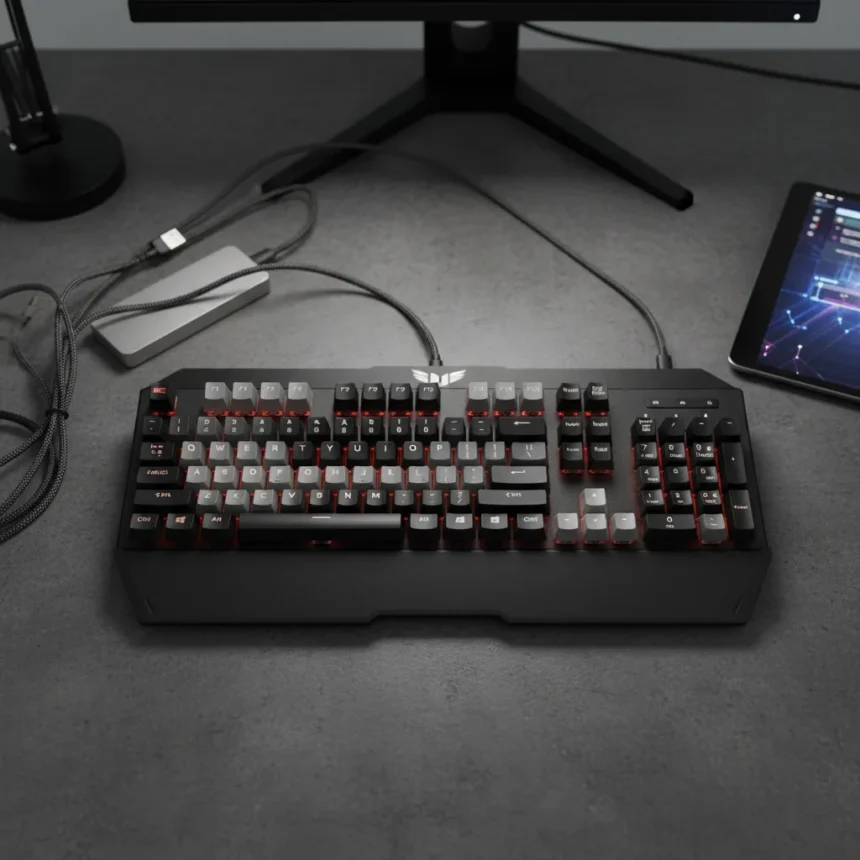
The Asus TUF Gaming K3 Gen II is a compact 97-key gaming keyboard that nails the fundamentals—optical-mechanical switches with a 100-million keypress lifespan, hot-swappability, and IP57 waterproof protection—but stumbles where it matters most: ease of use and coherent design. For a keyboard positioned as a space-saving workhorse, it asks too much of users in exchange for what it delivers.
Key Takeaways
- Optical-mechanical switches with 1.8mm actuation deliver responsive, lag-free gaming and typing performance.
- Compact 96% layout preserves desk space while retaining full functionality including number pad.
- IP57 waterproof rating and silicone gasket mount provide durability and quieter typing than standard gaming keyboards.
- Armoury Crate software is complex and requires multiple apps, creating a steep learning curve.
- Hot-swappable switches and detachable aluminum top plate enable customization without soldering.
Optical Switches That Actually Deliver
The Asus TUF Gaming K3 Gen II ships with Asus’s own optical-mechanical switches—linear red variants with a 1.8mm actuation point and 35g force, or blue tactile switches with 55g force for audible feedback. These switches are the keyboard’s strongest asset. Reviewers consistently report responsive, precise input without lag or missed keystrokes, whether gaming or typing long documents. The actuation speed is genuinely noticeable compared to cheaper mid-range gaming keyboards that lack optical technology entirely. Each switch is rated for 100 million keypresses, which means this keyboard should outlast most users’ attention spans for gaming hardware.
What elevates these switches beyond mere specifications is the supporting hardware. A silicone gasket mount with dampening foam and sound-absorbing padding reduces vibration and noise significantly. The result is a typing experience that feels smoother than you’d expect from a gaming keyboard—not mushy, but not harsh either. The switches are hot-swappable, so you can swap them out without soldering if you want a different feel later. For a compact keyboard in this price tier, that’s a genuine advantage over competitors locked into fixed switches.
Compact Layout Works, But Design Choices Confuse
The 96% layout is the Asus TUF Gaming K3 Gen II’s core selling point. By shrinking the keyboard to omit the traditional 10-key spacing while keeping the number pad, Asus frees up desk real estate for mouse movement—a genuine win for gamers with cramped setups. The layout retains full functionality, including dedicated function keys for volume, media playback, and lighting effects. The detachable wrist rest and magnetic, aircraft-grade aluminum top plate add polish and allow easy cleaning without disassembly.


Yet the design philosophy contradicts itself. If the goal is space-saving for competitive gamers, why include a detachable wrist rest that most serious players remove anyway? The multi-function key layout, while feature-rich, feels cramped for a keyboard marketed at both casual and hardcore users. The aluminum top plate looks premium but adds weight and thermal mass that some typists find fatiguing during long sessions. The keyboard tries to be all things—durable, customizable, compact, feature-rich—and succeeds at none of them completely.
Software Is the Deal-Breaker
Here’s where the Asus TUF Gaming K3 Gen II falls apart. RGB customization requires Asus’s Armoury Crate software, which is notoriously bloated and requires additional applications to function properly. Setting up lighting profiles, macro keys, and Aura Sync integration with other Asus peripherals demands navigating multiple menus across different apps. For a keyboard that costs less than flagship models, the software barrier is disproportionately steep. A casual gamer buying this keyboard for its compact size and durability will likely abandon RGB customization entirely rather than wrestle with the setup.



The original Asus TUF Gaming K3 suffered from the same software complexity, and the Gen II iteration doesn’t fix it. This is not a minor inconvenience—it’s a usability failure that undermines the entire value proposition. A keyboard should work out of the box without requiring a PhD in Asus ecosystem navigation.
Durability That Justifies the Compact Footprint
One area where the Asus TUF Gaming K3 Gen II genuinely excels is build quality. The IP57 waterproof and dust-resistant rating means spills and debris won’t immediately brick your keyboard. The sturdy construction, praised across reviews, suggests this keyboard will survive years of gaming and productivity use. That durability matters more for a compact keyboard, where you’re investing in a tool you’ll keep for a while rather than replacing annually.
Compared to cheaper mid-range gaming keyboards, the K3 Gen II offers features—hot-swappability, gasket mount, optical switches, waterproofing—that typically appear only in pricier models. For users who value longevity and protection against accidental spills, that’s a legitimate advantage. But durability alone doesn’t justify the software friction and design compromises.
Should You Buy the Asus TUF Gaming K3 Gen II?
If you’re a gamer or productivity user with limited desk space who values optical switches and waterproof protection, and you’re willing to spend time configuring Armoury Crate, the Asus TUF Gaming K3 Gen II is a solid choice. The switches are genuinely excellent, and the compact layout delivers on its promise. But if you want a keyboard that works intuitively out of the box without software headaches, look elsewhere. The gap between what the hardware delivers and what the software demands is too wide to ignore.



Does the Asus TUF Gaming K3 Gen II have hot-swappable switches?
Yes, the switches are hot-swappable, meaning you can replace them without soldering. This makes it easy to customize your typing feel or swap in different switches if you want a linear or tactile variant later.
What’s the difference between the K3 Gen II and the original Asus TUF Gaming K3?
The Gen II upgrades to optical-mechanical switches, adds a silicone gasket mount for quieter typing, includes IP57 waterproof protection, and enables hot-swappability. The original K3 used mechanical red switches and lacked these features.
Is the Asus TUF Gaming K3 Gen II waterproof enough for spills?
With an IP57 rating, it resists dust and water splashes effectively, protecting against accidental spills and debris. However, complete submersion would still damage the electronics, so don’t deliberately soak it.
The Asus TUF Gaming K3 Gen II is a keyboard caught between two identities: a premium compact gaming board held back by lazy software, and a budget-friendly workhorse undermined by design confusion. The switches deserve praise, but they can’t carry a keyboard whose biggest barrier is the software you’ll dread using every time you want to adjust a setting.
Where to Buy
$99.99 at Amazon | $99 | £95 | $99 | £95
Edited by the All Things Geek team.
Source: Tom's Guide




