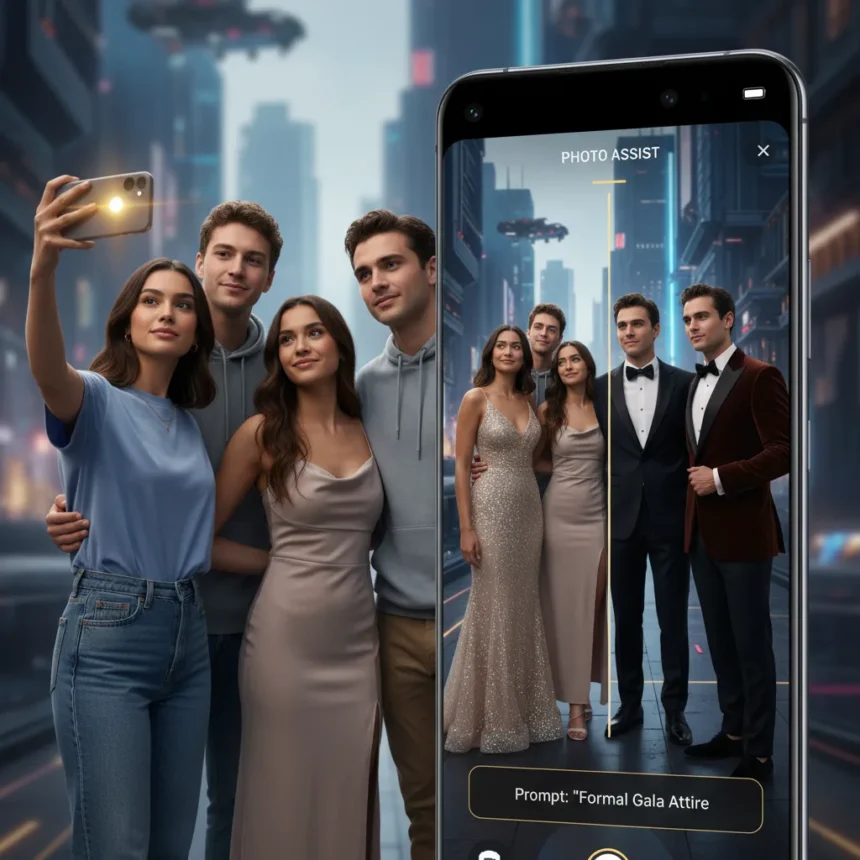
Galaxy S26 Photo Assist is a conversational photo-editing tool built into Samsung’s latest flagship phone that lets you describe edits in plain English and have AI apply them to your photos. Rather than spending hours digging through your closet for the perfect outfit or visiting a stylist, this tool allows you to modify your appearance directly within images using natural language commands.
Key Takeaways
- Galaxy S26 Photo Assist uses conversational AI to edit photos with plain English descriptions.
- The tool can erase objects, add elements from your gallery, and modify backgrounds in images.
- Photo Assist works as a built-in feature on the Galaxy S26, no external app required.
- You can test Galaxy S26 features including Photo Assist on existing Samsung phones before upgrading.
- The tool transforms how users approach personal photo editing without traditional wardrobe limitations.
How Galaxy S26 Photo Assist Works
Galaxy S26 Photo Assist operates through a conversational interface where you simply describe the changes you want to make to your appearance or surroundings. Instead of navigating complex menus or learning professional editing software, you tell the AI what you want—whether that is changing a background, adjusting clothing appearance, or modifying other visual elements—and the tool executes the edits. This approach eliminates the barrier between vision and execution that traditional photo editing apps create.
The underlying technology interprets your natural language requests and applies them with surprising precision. A demo video shows the tool erasing unwanted objects, adding elements pulled from your own photo gallery, and transforming backgrounds in ways that maintain realistic lighting and perspective. This level of control, delivered through conversational commands rather than slider adjustments, represents a meaningful shift in how smartphone users can manipulate their own images.
What Galaxy S26 Photo Assist Can Actually Do
The tool handles three primary editing categories: object removal, element addition, and background transformation. Object removal means you can eliminate distracting items from your photos without leaving traces. Element addition lets you incorporate objects from your existing gallery into new photos, creating composite images that blend naturally. Background modification allows you to change the setting behind you—useful if you want to appear in a different environment without actually being there.


For fashion and appearance-focused use, this means you can photograph yourself in one outfit and then use Galaxy S26 Photo Assist to visualize how you would look in different styles, colors, or accessories without owning them or trying them on physically. The conversational interface makes these edits accessible to users who lack professional photo editing skills, democratizing a capability that previously required Photoshop expertise or hiring a professional.
Galaxy S26 Photo Assist vs. Traditional Photo Editing Apps
Traditional photo editing applications—whether Photoshop, Lightroom, or mobile apps like Snapseed—require users to understand layers, masks, selection tools, and adjustment parameters. This creates friction. Galaxy S26 Photo Assist removes that friction by accepting plain English requests. You do not need to know what a “layer mask” is or how to use a healing brush; you simply describe what you want.



The speed advantage is significant. A complex edit that might take 10 minutes in a traditional app—selecting an object, feathering the selection, healing the background—happens in seconds with a conversational command. This speed makes the tool practical for rapid iteration, letting you test multiple appearance variations in the time a traditional workflow would take for a single edit.
Testing Galaxy S26 Photo Assist Before Upgrading
Samsung recognizes that users want to experience Galaxy S26 features before committing to an upgrade. The company offers a Try Galaxy web app and companion app that lets you test drive Galaxy S26 capabilities, including Photo Assist, on your existing phone. This approach reduces upgrade anxiety by proving the tool’s value in your actual workflow before you purchase the device.
The Try Galaxy app democratizes access to these features, meaning you do not have to visit a carrier store or wait for a friend’s upgrade to see if Galaxy S26 Photo Assist actually solves your editing problems. You can install it today and experiment with real photos from your library, making an informed decision about whether the feature justifies the hardware investment.
Why Galaxy S26 Photo Assist Matters for Mobile Photography
Smartphone cameras have become the primary way most people capture photos, yet the editing tools built into phones remain clunky and limited. Galaxy S26 Photo Assist bridges this gap by bringing conversational AI—the same technology powering ChatGPT and Claude—into the photo editing space. This is not just an incremental improvement; it is a fundamental rethinking of how users interact with their images.



The practical impact extends beyond fashion and appearance. Users can clean up vacation photos by removing photobombers, add missing people to group shots by pulling them from other images, or change backgrounds to create professional-looking content for social media or work. The tool adapts to whatever editing need you have, as long as you can describe it in words.
Can I use Galaxy S26 Photo Assist on my current phone?
Yes. Samsung’s Try Galaxy app lets you test Galaxy S26 Photo Assist and other flagship features on compatible existing Samsung phones before upgrading. Download the Try Galaxy app or access the web version to experiment with the tool using your own photos.
What types of edits does Galaxy S26 Photo Assist handle best?
The tool excels at object removal, background changes, and adding elements from your photo library to new images. It is most effective when your requests are clear and specific—describing exactly what you want removed, changed, or added produces the best results.
Is Galaxy S26 Photo Assist better than Photoshop or Lightroom?
Galaxy S26 Photo Assist is faster and more accessible for casual users because it uses conversational commands instead of complex menus. However, professional photographers needing precise control over color grading, tone curves, or advanced masking will still prefer traditional tools. Photo Assist is designed for speed and simplicity, not professional-grade precision.
Galaxy S26 Photo Assist represents a meaningful step forward in making sophisticated photo editing accessible to everyone, not just professionals. If you spend time editing selfies, vacation photos, or social media content, testing this tool on your current phone through the Try Galaxy app is worth 10 minutes of your time. The speed and ease of conversational editing may change how you approach personal photography entirely.
Edited by the All Things Geek team.
Source: Android Central