





Android Quick Share AirDrop compatibility is finally here, ending a decade of frustration for Android users trying to share files with iPhones and Macs. Google has announced that 16 flagship devices now support direct file sharing through AirDrop, with a fallback QR-code method rolling out to every Android phone.
Key Takeaways
- Galaxy S25, S24, Z Fold/Flip, OnePlus 15, Oppo Find X8, and Honor Magic devices support direct AirDrop compatibility
- Pixel 8 and Pixel 8 Pro are excluded; Pixel 9 and Pixel 8a already have the feature
- All unsupported Android phones can generate a QR code to share files with iOS via the cloud
- The QR-code method rolls out immediately and will be fully available within one month
- This eliminates the long-standing incompatibility barrier between Android and Apple’s file-sharing ecosystem
Which Android Phones Support Android Quick Share AirDrop Compatibility
Google’s Android Quick Share AirDrop compatibility list includes 16 devices across Samsung, OnePlus, Oppo, and Honor brands. The supported phones are: Galaxy S25, Galaxy S25+, Galaxy S25 Ultra, Galaxy S24, Galaxy S24+, Galaxy S24 Ultra, Galaxy Z TriFold, Galaxy Z Fold 7, Galaxy Z Flip 7, Galaxy Z Fold 6, Galaxy Z Flip 6, Oppo Find X8, Oppo Find X8 Pro, OnePlus 15, Honor Magic V6, and Honor Magic 8 Pro.
Pixel 8 and Pixel 8 Pro do not appear on this compatibility list, despite Google’s own development of Quick Share. However, Pixel 9 series phones and the Pixel 8a already support Android Quick Share AirDrop compatibility, suggesting Google is staggering rollout across its own hardware. This patchwork approach reflects the challenge of coordinating cross-platform file sharing across dozens of manufacturers and hundreds of phone models.
How the QR-Code Fallback Works for Unsupported Phones
If your Android phone is not on the compatibility list, Google is rolling out a QR-code and cloud-based alternative that lets you share files with iOS devices instantly. According to Google, users can generate a QR code through Quick Share on any Android phone, which allows immediate file transfer to iPhones via the cloud. The feature starts rolling out to all Android phones immediately and will be fully available within the next month.


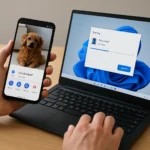
The practical process is straightforward. On Android, open the file, photo, or video and tap the Share icon, then choose Quick Share. Alternatively, swipe down to open the connectivity menu, tap Quick Share, and select the files to send. On the iPhone side, swipe down and turn on AirDrop so the iPhone can detect the Android sender. This workaround ensures that even owners of older or budget Android phones can share with iPhones without upgrading hardware.
Android Quick Share AirDrop Compatibility vs. the Old Ecosystem Divide
Before Android Quick Share AirDrop compatibility, cross-platform file sharing between Android and iPhone was clunky and unreliable. Android users had to resort to email, cloud storage, messaging apps, or third-party tools—none of which matched the seamlessness of AirDrop within Apple’s ecosystem. Quick Share itself was Android’s answer to AirDrop, but it only worked between Android devices, leaving iPhone users out of the loop.



The new Android Quick Share AirDrop compatibility bridges that gap directly. Instead of Android and iPhone users living in separate file-sharing worlds, they can now use the same underlying protocol. For users with compatible devices, this means drag-and-drop simplicity. For everyone else, the QR-code cloud method provides a safety net that didn’t exist before. This shift matters because file sharing is one of the most frequent friction points between Android and iOS households, workplaces, and friend groups.
Why Some Phones Are Excluded and What Happens Next
Google’s selective device list reflects both technical constraints and business strategy. Newer flagships have the hardware and software maturity to handle direct AirDrop interoperability, while older models may lack the necessary Bluetooth or security infrastructure. The exclusion of Pixel 8 and Pixel 8 Pro—despite their relative newness—suggests Google is prioritizing Samsung’s latest Galaxy lineup and select partners, possibly to incentivize upgrades or reward early Quick Share adopters.
The QR-code fallback ensures that the feature does not become a luxury exclusive to flagship buyers. Google states that all Android phones will support the cloud-based sharing method within the next month, democratizing cross-platform file transfer across the entire Android ecosystem. This two-tier approach balances premium features for flagship users with universal access for everyone else.
Does my phone support Android Quick Share AirDrop compatibility?
If you own a Galaxy S25, S24, Z Fold 7, Z Flip 7, OnePlus 15, Oppo Find X8, or Honor Magic V6/8 Pro, your phone supports direct Android Quick Share AirDrop compatibility. Pixel 9 and Pixel 8a users also have the feature. If your phone is not on this list, you can still share files with iPhones using the QR-code and cloud method, rolling out now.


How do I use Quick Share to send files to an iPhone?
On Android, open the file or photo, tap Share, and select Quick Share. If your phone supports direct AirDrop compatibility, it will appear as an option on nearby iPhones. For unsupported phones, Quick Share generates a QR code that the iPhone can scan to initiate cloud-based file transfer. On the iPhone, make sure AirDrop is enabled in the Control Center.
Will older Android phones ever get Android Quick Share AirDrop compatibility?
Google has not announced plans to bring direct AirDrop compatibility to older Android devices. However, all Android phones—regardless of age—will gain access to the QR-code and cloud-based sharing method within the next month. This ensures that even phones from 2020 or earlier can send files to iPhones, albeit through a slightly different process than direct AirDrop.
The arrival of Android Quick Share AirDrop compatibility marks a turning point for cross-platform file sharing. For the first time, Android and iPhone users can share files using the same ecosystem rather than workarounds. Whether you own a flagship or a budget phone, you now have a path to seamless file transfer with iOS—no email, no cloud storage app, no third-party tool required.
Edited by the All Things Geek team.
Source: Tom's Guide




