





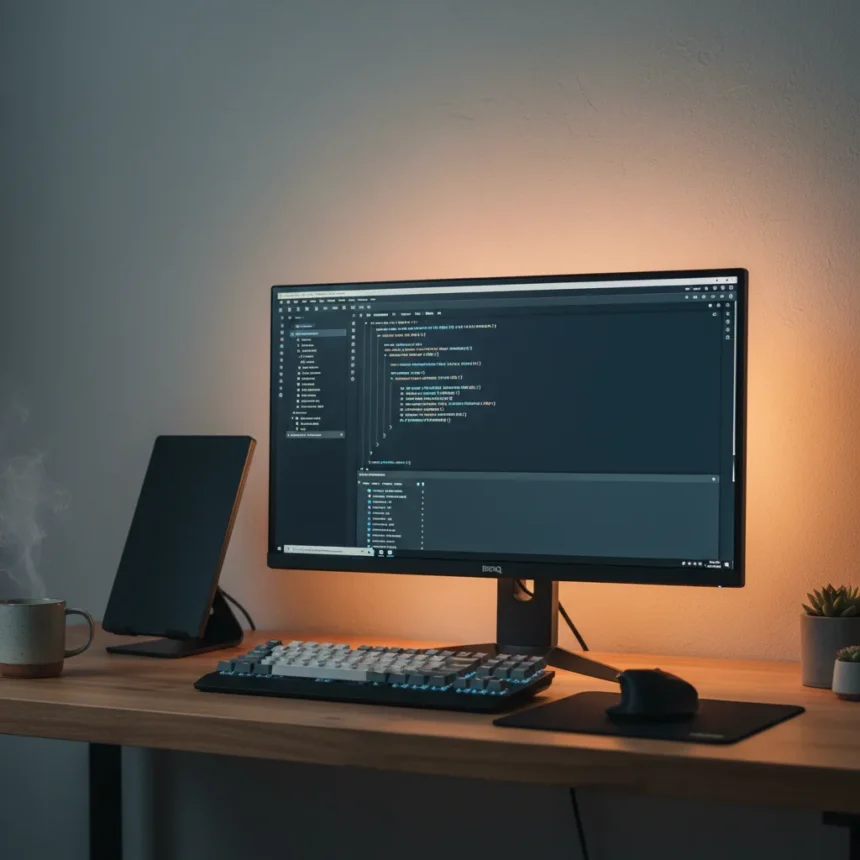
The BenQ RD280UG monitor is a 28-inch productivity display featuring a 3:2 aspect ratio, IPS panel, 3840 x 2560 resolution, and built-in ambient lighting, designed specifically for programming and professional work. This is not a gaming monitor. It is not a general-purpose display. BenQ has engineered the RD280UG for people who spend entire workdays reading and writing code, and the design choices reflect that singular focus.
Key Takeaways
- The BenQ RD280UG features a rare 3:2 aspect ratio that provides extra vertical screen space compared to standard 16:9 monitors.
- Built-in ambient halo lighting on the back casing reduces eye strain by bouncing light off the wall behind the display.
- Matte screen finish eliminates glare, critical for developers working in various lighting conditions.
- 28.2-inch IPS panel delivers 3840 x 2560 resolution at 60Hz with 5ms response time.
- Includes a dedicated coding mode optimized for software development workflows.
Why the 3:2 Aspect Ratio Matters for Developers
The 3:2 aspect ratio is the headline feature here, and it deserves explanation. Most monitors sold today are 16:9—wider than they are tall. The BenQ RD280UG flips that proportionality, giving you more vertical space. For someone reading lines of code, reviewing documentation, or scrolling through long documents, this extra height is not a luxury. It is practical. You see more of your work without reaching for the scroll wheel.
BenQ’s RD line-up has clearly focused on engineering for real developer needs. The reviewer at TechRadar noted that this monitor is among the best for programming they have encountered, and the 3:2 geometry is the reason why. Compared to the BenQ PD2706QN, which targets color-critical designers with QHD resolution and USB-C connectivity, the RD280UG prioritizes vertical real estate over connectivity features—a deliberate trade-off for the coding audience.
Ambient Lighting: More Than Aesthetic Window Dressing
The ambient light ring built into the back casing sounds gimmicky on paper. In practice, it addresses a real problem. The reviewer found the halo lighting useful for bouncing light off the wall behind the display, which alleviates eye strain from a bright screen against a dark wall. If you work late nights or early mornings, or if your desk faces a dark corner, this feature earns its place in the design.


The matte screen finish compounds this benefit. Glare is eliminated, which means the ambient lighting does not create reflections or wash-out effects. For professionals working in uncontrolled lighting environments—home offices with windows, shared workspaces, or anywhere the sun angle changes—a matte panel is non-negotiable.
Specifications and Real-World Performance
The BenQ RD280UG runs a 28.2-inch IPS panel at 3840 x 2560 resolution with a 60Hz refresh rate and 5ms response time. Brightness peaks at 400 nits, which is adequate for indoor work without being excessive. This is not a monitor built for speed or gaming responsiveness. The 60Hz refresh and 5ms response time are developer-grade, not gamer-grade, because that is what the use case demands.



The stand is described as functional, though the brief does not specify tilt, swivel, or height adjustment ranges. If ergonomics are your priority, BenQ offers the RD320UA, a 32-inch variant in the same line-up that includes an ergonomic arm. The RD280UG appears positioned as the compact, feature-rich option for those with limited desk space.
Coding Mode and Developer-First Features
The RD280UG includes a dedicated coding mode, a preset optimized for software development workflows. This suggests BenQ listened to what developers actually do—not just assumed. A coding mode likely adjusts color temperature, contrast, and perhaps even font rendering to reduce eye strain during extended coding sessions. It is a small detail that signals intentional design.
Is the BenQ RD280UG Worth It?
The monitor is described as priced well for the product, though no exact price was specified in the source material. For programmers and developers who spend eight or more hours daily staring at code, the 3:2 aspect ratio, matte finish, ambient lighting, and coding mode justify the investment. If you work in design, video editing, or general productivity tasks, the BenQ PD2706QN or a standard 16:9 display may better serve your workflow.
Does the BenQ RD280UG have USB-C connectivity?
The research brief does not specify USB-C connectivity for the RD280UG. The competing BenQ PD2706QN includes USB-C with 90W charging, but this feature is not mentioned for the RD280UG. If USB-C is essential for your setup, verify current specifications before purchasing.



Can you adjust the brightness of the ambient lighting?
The research brief confirms the BenQ RD280UG has built-in ambient halo lighting, but does not detail whether brightness is adjustable or offer preset options. Contact BenQ support or check the manual for specific lighting controls.
How does the RD280UG compare to a standard 16:9 monitor for coding?
The 3:2 aspect ratio gives you roughly 25% more vertical screen space than a 16:9 display of similar diagonal size, meaning less scrolling and more code visible at once. For developers, this translates directly to fewer context-switching moments and faster code review. A standard 16:9 monitor offers wider horizontal space, which benefits spreadsheets and multi-window layouts, but the RD280UG prioritizes the vertical workflow that dominates modern development.
The BenQ RD280UG is a rare monitor that does not chase mainstream appeal. It is built for developers, by engineers who understand developer pain points, and it executes that mission with clarity. If you code for a living, the 3:2 geometry, matte finish, and ambient lighting make this monitor worth serious consideration.
Where to Buy
Edited by the All Things Geek team.
Source: TechRadar




