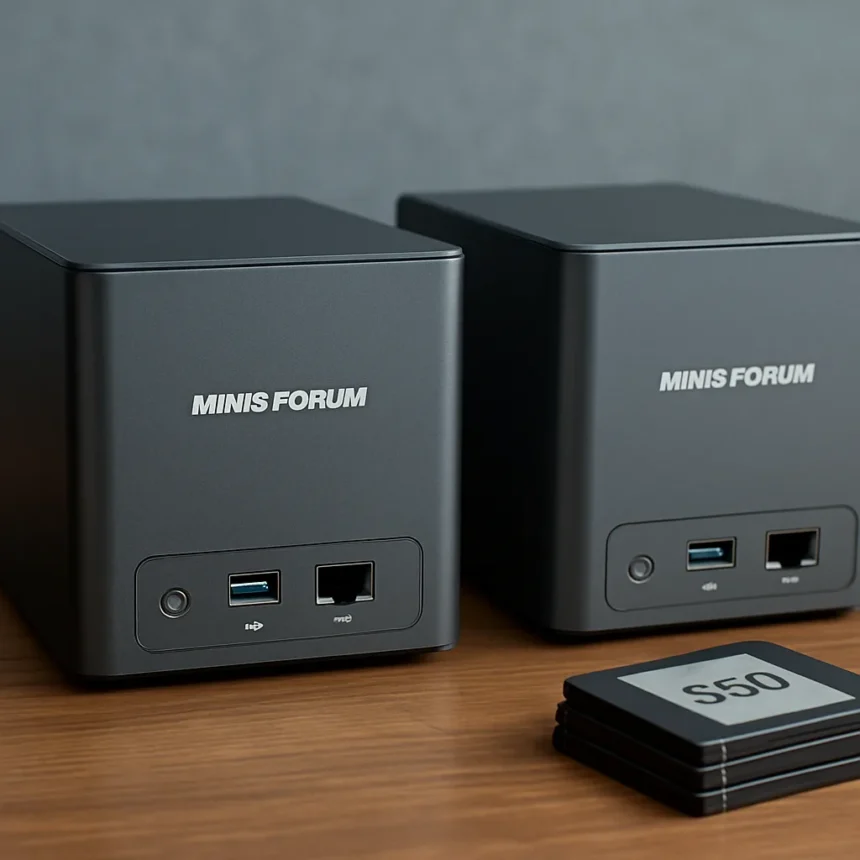
Minisforum’s all-flash NAS systems S5 and S7 represent a bold bet that speed matters more than capacity for the next generation of network storage. Rather than following the traditional NAS playbook of cramming hard drives into a box, the company is betting that creative professionals, power users, and AI-focused workflows will pay a premium for flash-based storage. The problem: that premium could be steep.
Key Takeaways
- The S5 is a compact all-flash NAS with five M.2 NVMe bays and fanless design for silent operation.
- The S7 expands on the S5 concept with larger capacity and broader networking options.
- Both systems include 10GbE networking and USB4 connectivity for high-speed data transfer.
- All-flash NAS eliminates the cost-per-terabyte advantage of traditional HDD-based systems.
- Minisforum is positioning these devices for speed-critical workflows, not bulk storage.
The S5 is the more compelling of the two devices. Minisforum designed it as a compact, fanless unit with five M.2 NVMe bays, LPDDR5X memory, and 10GbE networking. The fanless thermal design matters—it means silent operation in environments where quiet matters, whether that’s a creative studio, home office, or bedroom server closet. USB4 connectivity adds another high-speed pathway for external storage and peripherals. This is not a traditional NAS box. It is a high-speed appliance built for workflows that demand throughput over terabyte count.
The S7 takes the all-flash concept further, expanding storage capacity and networking options beyond the S5. Where the S5 is about elegant compactness, the S7 is about scaling the all-flash approach to larger deployments. Both systems run Minisforum’s cloud-oriented software ecosystem, tying hardware to the company’s broader push into the NAS market.
Why All-Flash NAS Costs So Much to Fill
Here is the central tension: all-flash NAS systems S5 and S7 eliminate the economic advantage that has made traditional NAS attractive to consumers and small businesses. A four-bay HDD NAS loaded with 18TB drives costs roughly one-third the price per terabyte of a flash-based equivalent. That math is brutal for anyone planning to use these systems for bulk storage, media libraries, or archival work.


The S5’s five M.2 NVMe bays sound generous until you price out the SSDs. A single 4TB NVMe drive costs three to four times more per terabyte than a 18TB hard drive. Fill all five bays and you are looking at a storage investment that rivals or exceeds the cost of the chassis itself. The S7, with its expanded bay count, only amplifies this problem. Minisforum is not selling you a storage solution in the traditional sense—it is selling you a performance appliance that happens to use SSDs.
This is not a flaw in the design. It is a deliberate choice. All-flash NAS systems make sense for specific use cases: video editors pulling high-bitrate footage from local storage, AI model training that demands fast sequential reads, or developers who need rapid database access. These workflows justify the cost. But anyone expecting to load these systems with terabytes of media, backups, or archives will find the economics punishing compared to a conventional HDD NAS.



All-Flash NAS Systems S5 and S7 Against Traditional Storage
The architectural difference between all-flash NAS systems and hard-drive alternatives is not subtle. Traditional NAS devices prioritize capacity and reliability over speed. They trade throughput for cost-per-terabyte, which works perfectly for home media servers, small business backups, and long-term archival. A four-bay HDD NAS with four 18TB drives gives you 72TB of raw capacity. The same budget applied to the S5 or S7 would yield perhaps 12-16TB of SSD storage, a difference so stark that it almost feels unfair to compare them head-to-head.
Yet the speed delta is equally dramatic. SSD-based NAS systems deliver sustained throughput measured in gigabytes per second. Hard-drive systems max out at 200-300 megabytes per second per drive. For sequential workloads—video editing, large file transfers, machine learning—that difference is transformative. The trade-off is real and the choice is clear: speed or capacity, not both.
Minisforum’s Bigger NAS Ambitions
The S5 and S7 signal that Minisforum sees an opportunity in the high-performance NAS segment. The company has built its reputation on compact, powerful mini PCs. Extending that philosophy into NAS makes sense—Minisforum understands small-form-factor computing and thermal design. The fanless S5 is proof of that expertise.
What remains unclear is whether the market is ready to accept all-flash NAS at premium pricing. Synology, QNAP, and Asustor have dominated the NAS space by offering choice: budget HDD models, mid-range hybrid systems, and high-performance all-SSD units. Minisforum is entering with a narrower focus, betting that enough users care about speed enough to pay for it. That is a risky position, but it is also a defensible one if execution is solid.



Should You Buy the Minisforum S5 or S7?
The answer depends entirely on your workflow. If you are a video editor, AI researcher, or software developer who moves large files frequently and values speed above all else, the S5’s compact fanless design and 10GbE connectivity are genuinely compelling. The S7 makes sense if you need more bays and expanded networking for a larger team or more demanding workload. But if you are looking for a general-purpose NAS to store movies, photos, and backups, walk away. The cost-per-terabyte will make you regret it.
How much storage can the S5 hold?
The S5 has five M.2 NVMe bays, so maximum capacity depends on the largest drives available at the time of purchase. With current SSD pricing and availability, realistic capacity ranges from 10TB to 20TB depending on drive selection. Exactly how much you can afford to fill it with is another question entirely.
Is all-flash NAS worth the cost compared to hard drives?
All-flash NAS systems are worth the cost only if speed is critical to your workflow. For video production, AI training, or database-heavy applications, yes. For media storage, backups, and archival, traditional HDD-based NAS offers vastly better value. Choose based on what you actually do with the data, not on raw performance specs.
What is USB4 on the S5 used for?
USB4 on the S5 provides an additional high-speed connection pathway for external storage, docking stations, or other peripherals. Combined with 10GbE networking, it gives you multiple routes to move data at speed, whether over the network or directly to an external drive.
Minisforum’s move into all-flash NAS is bold but niche. The S5 and S7 are not for everyone—they are for users who have already accepted that performance is worth the premium. The real question is whether Minisforum can convince enough of those users to exist, and whether the company’s software ecosystem can justify the hardware cost. For now, the S5’s fanless design and compact form factor are the strongest arguments in its favor. Everything else flows from that core decision to prioritize speed and silence over capacity and affordability.
Edited by the All Things Geek team.
Source: TechRadar