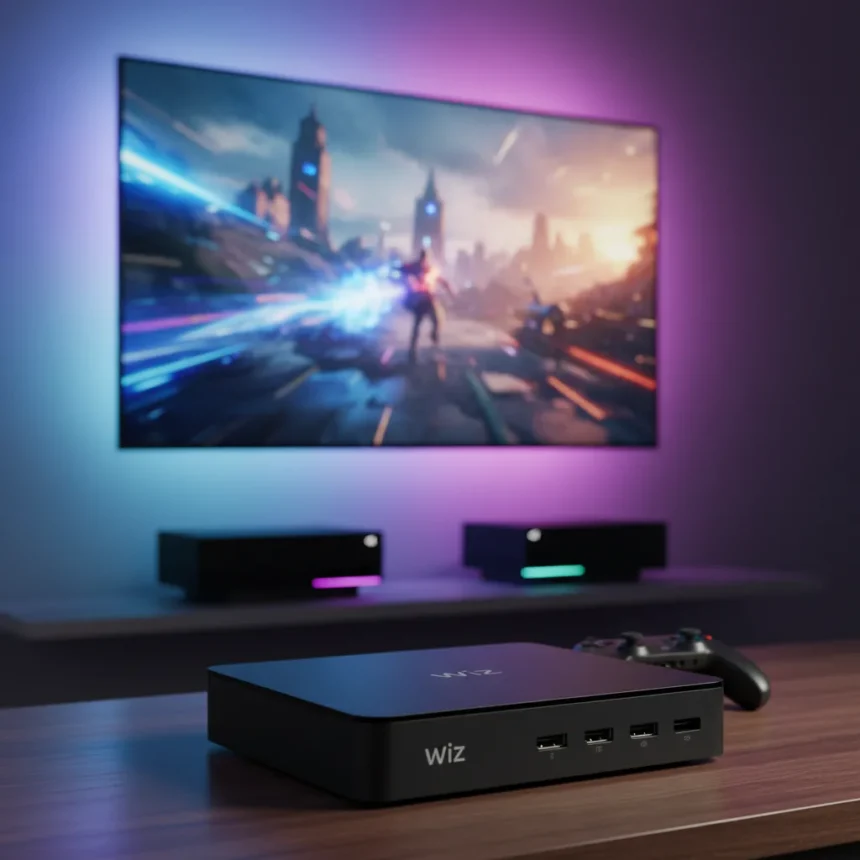
The Philips Smart Lighting HDMI Sync Box is Philips’ answer to its own premium Hue Play HDMI Sync Box 8K—a cheaper way to sync smart lights to your TV content without the flagship price. It mirrors on-screen colors via HDMI passthrough, supports 4K 120Hz gaming, and works exclusively with WiZ smart bulbs, Philips’ budget-friendly lighting ecosystem.
Key Takeaways
- Philips Smart Lighting HDMI Sync Box costs significantly less than the Hue Play HDMI Sync Box 8K while matching 4K 120Hz passthrough performance.
- Compatible only with WiZ bulbs, not Hue lights, limiting it to Philips’ budget ecosystem.
- Supports HDMI 2.1 and connects up to 4 HDMI devices for gaming consoles and streaming gear.
- Does not sync with TV apps—only with connected HDMI devices feeding the sync box.
- Requires WiZ app and WiZ hub for setup and control, separate from Hue infrastructure.
Philips Smart Lighting HDMI Sync Box vs. Hue Play 8K: What’s the Real Difference?
The Philips Smart Lighting HDMI Sync Box delivers the same 4K 120Hz passthrough and HDMI 2.1 support as the premium Hue Play HDMI Sync Box 8K, but the ecosystem split is decisive. The Hue version syncs up to 10 Hue lights and supports 8K 60Hz passthrough, making it the choice for maximum light count and future-proofing. The WiZ alternative caps out at a lower light limit and drops 8K support entirely, but the cost difference is substantial—Philips has positioned the WiZ sync box as the entry point for immersive TV lighting.
The architectural difference matters for your setup. If you’ve already invested in Hue bulbs, bridges, and the Hue ecosystem, the WiZ sync box is a dead end. You’ll need a separate WiZ hub and WiZ app to operate it, creating a split-brain smart home. For new buyers prioritizing budget and willing to commit to WiZ, the trade-off makes sense.
Why 4K 120Hz Passthrough Actually Matters for Gaming
The Philips Smart Lighting HDMI Sync Box supports 4K 120Hz passthrough, a spec that matters if you own a current-generation gaming console or high-end PC feeding a modern TV. At 4K 120Hz, you get sharper visuals than 1440p 120Hz while maintaining high refresh rates—the sweet spot for PlayStation 5 and Xbox Series X games that support it. HDMI 2.1 certification ensures the sync box doesn’t bottleneck bandwidth or introduce input lag.


The sync box mirrors colors from your HDMI source in real time, meaning your WiZ bulbs flash and shift as on-screen action unfolds. It’s not a camera-based system like some competitors—it reads the HDMI signal directly, so there’s no lag between screen and light. That responsiveness matters during fast-paced games or action movies where a delayed light response breaks immersion.
WiZ Ecosystem: The Budget Trade-Off
Compatibility with WiZ bulbs rather than Hue is the defining constraint. WiZ is Philips’ value-oriented smart lighting line, offering basic color, brightness, and scheduling controls at lower price points than Hue. If you’re building a smart lighting setup from scratch and cost is the priority, WiZ bulbs paired with this sync box create a complete immersive system without the Hue premium.


Setup requires downloading the WiZ app and connecting a WiZ hub—the same infrastructure as standalone WiZ bulb control. The sync box then links to your hub and bulbs, and you assign which lights respond to HDMI input. It’s straightforward for anyone familiar with smart home apps, but it’s a separate ecosystem from Hue, so you cannot mix the two on the same sync box.
Connection Limits and TV App Sync Gaps
The Philips Smart Lighting HDMI Sync Box connects up to 4 HDMI devices—gaming consoles, streaming boxes, cable boxes, or Blu-ray players. That’s enough for most living rooms but tighter than some alternatives. More importantly, it syncs only with HDMI input devices, not TV apps. If you’re watching Netflix directly on your TV’s built-in app rather than through an external device, the sync box cannot read that signal. For cord-cutters and app-heavy viewers, this is a notable gap.
Is the Philips Smart Lighting HDMI Sync Box Worth It?
Yes, if you’re starting a smart lighting setup and want immersive TV sync without Hue’s price tag. The WiZ ecosystem delivers the core feature—color-synced lighting to on-screen action—at a fraction of the cost. The 4K 120Hz passthrough is modern and future-proof for gaming, and HDMI 2.1 support ensures no bottlenecking.
Skip it if you already own Hue bulbs, bridges, or are committed to the Hue ecosystem. A second sync box ecosystem creates management friction. Also avoid it if you rely heavily on TV app streaming (Netflix, Disney+, YouTube directly on your TV) and want lights that respond to that content—the sync box only reads HDMI input devices.



Does the Philips Smart Lighting HDMI Sync Box work with Hue bulbs?
No. The Philips Smart Lighting HDMI Sync Box is designed exclusively for WiZ smart bulbs. It does not support Hue lights. If you want Hue ecosystem sync, you need the Philips Hue Play HDMI Sync Box 8K, which supports up to 10 Hue lights.
How many lights can the Philips Smart Lighting HDMI Sync Box control?
The research brief does not specify an exact light count limit for the WiZ sync box. The Hue Play 8K syncs up to 10 lights, but the WiZ version’s limit is not documented in available sources. Check the WiZ app specifications or Philips support for the precise ceiling.
Can the sync box read signals from TV apps like Netflix?
No. The Philips Smart Lighting HDMI Sync Box only syncs lights to content from connected HDMI devices (gaming consoles, streaming boxes, cable boxes). It cannot read signals from TV apps running directly on your television, so Netflix, Disney+, and other app-based streaming will not trigger light changes.
The Philips Smart Lighting HDMI Sync Box fills a real gap: it brings TV-synced lighting to budget-conscious buyers without forcing them into the Hue ecosystem. For gaming and HDMI-fed content, it delivers immersion at a price that doesn’t require a second mortgage. Just accept the WiZ ecosystem trade-off and the app-streaming limitation, and you have a solid entry point into immersive smart lighting.
Edited by the All Things Geek team.
Source: TechRadar