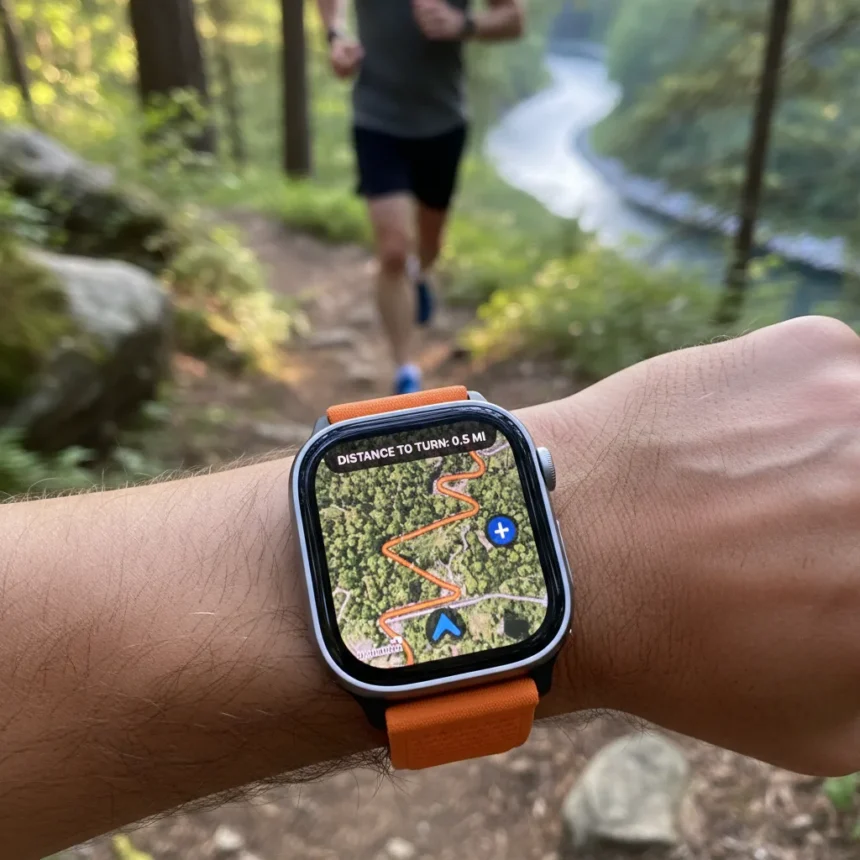
Apple Watch running navigation is a GPS-powered routing tool that uses Apple Maps data to guide runners through precise, hidden turn-by-turn directions during workouts—a capability no other smartwatch currently offers. The feature sits quietly in the Workout app across recent Apple Watch models including Series 10, Series 11, Ultra 3, and SE 3, accessible via watchOS, yet most runners never discover it.
Key Takeaways
- Apple Watch running navigation uses GPS and Apple Maps data for turn-by-turn route guidance exclusive to Apple’s ecosystem.
- Available on Series 10, Series 11, Ultra 3, and SE 3 through watchOS updates.
- Garmin outperforms Apple Watch in advanced running metrics like running power, grade-adjusted pace, and race predictions after 10 years of competition.
- Apple Watch integrates running navigation with Training Load, which visualizes workout intensity over 7 days to prevent overtraining.
- Chained workouts let runners link multiple activities like warm-up, run, and strength training into a single session.
What Apple Watch running navigation actually does
The Apple Watch running navigation feature provides real-time GPS-based directions using Apple Maps data, allowing runners to follow complex routes without constantly checking their phone. Unlike simple distance tracking, this tool displays turn-by-turn cues on your wrist, making it possible to explore new routes with confidence. The feature integrates smoothly into the Workout app—runners simply select a route or allow the watch to guide them through saved paths, and the GPS combined with Apple Maps intelligence handles the navigation.
What makes this feature genuinely innovative is its exclusivity. Garmin, Apple Watch’s most serious competitor in running sports watches, offers advanced metrics like running power, grade-adjusted pace, PacePro pacing strategies, and race predictions—tools Apple Watch lacks entirely after a decade of development. Yet Garmin has not replicated Apple’s Maps-integrated navigation approach. Garmin runners still rely on separate navigation apps or imported GPX files; Apple Watch owners get native, seamless guidance built into the fitness experience.
Why most runners never find Apple Watch running navigation
The feature’s obscurity stems from Apple’s design philosophy: powerful tools buried a few taps beneath the surface. Apple Watch running navigation is not advertised in marketing materials or highlighted in setup tutorials. Runners must actively dig into the Workout app, select a running activity, and configure navigation settings to unlock it. This hidden-gem approach mirrors other underused Apple Watch features like Training Load and Effort rating notifications, which Apple’s VP of Fitness Tech has acknowledged remain unknown to most users.


Training Load deserves mention here because it works alongside Apple Watch running navigation to create a complete running strategy. Training Load visualizes your workout intensity over seven days, helping you track trends and avoid overtraining—a feature that transforms Apple Watch from a basic step counter into a coaching tool. Combined with the ability to chain multiple workouts (linking a warm-up, run, and strength session into one recorded activity, introduced in watchOS 9), Apple Watch offers a sophisticated running ecosystem that most owners never fully explore.
How Apple Watch running navigation compares to Garmin
Garmin dominates in raw running metrics. After 10 years of Apple Watch use, reviewers consistently note that Garmin delivers vertical oscillation, ground contact time, running power, and grade-adjusted pace—measurements that serious runners crave for training optimization. Garmin’s battery life also crushes Apple Watch; Garmin watches deliver up to 72 hours in low-power mode, while Apple Watch maxes out around 18 hours of typical use. On paper, Garmin is the runner’s watch.



But Apple Watch running navigation flips the equation for casual and intermediate runners who value simplicity over spreadsheets. The Apple Watch Ultra 3, positioned as Apple’s answer to Garmin’s dominance, adds satellite connectivity, 5G, and an LTPO3 display with smoother refresh rates that make Flow and Waypoint watch faces feel more responsive. For runners who want to explore new routes without fumbling with their phone, Apple Watch’s integrated navigation is a genuine advantage Garmin cannot match. The trade-off is clear: choose Garmin for metrics, choose Apple Watch for navigation and ecosystem integration.
How to access Apple Watch running navigation
Open the Workout app on your Apple Watch. Scroll through available activities and select Running. From there, you can create a custom workout or open an existing saved route. The navigation settings appear in the activity configuration screen—enable turn-by-turn directions and let Apple Maps guide your run. The feature works best on newer models with faster processors and consistent GPS signal, though it functions across Series 10, Series 11, Ultra 3, and SE 3.
For runners linking multiple activities into a single session, open the Workout app, scroll to your desired activity, select Create Workout or Custom, and add additional exercises (warm-up jog, tempo run, cool-down walk, strength routine) to chain them together. This approach records all activities under one unified workout session, making it easier to track total effort and recovery metrics in the Health app.
Is Apple Watch running navigation worth using?
Yes, if you regularly run new routes or explore unfamiliar neighborhoods. The feature eliminates the friction of consulting your phone mid-run and integrates naturally into Apple’s fitness ecosystem. No other smartwatch offers this exact combination of GPS guidance and Apple Maps intelligence. For runners already invested in Apple devices, it is a compelling reason to actually use your Apple Watch for navigation rather than defaulting to a phone app.



Does Garmin have a running navigation feature like Apple Watch?
Garmin offers navigation tools, but not through Apple Maps integration. Garmin runners can import GPX files or use separate navigation apps, but there is no native equivalent to Apple Watch’s seamless Maps-based turn-by-turn guidance. Garmin focuses instead on advanced running metrics—power, pace analysis, race predictions—that Apple Watch does not provide.
Can you use Apple Watch running navigation offline?
Apple Watch running navigation relies on GPS and Apple Maps data. The exact offline capabilities depend on whether you have pre-downloaded maps and stored routes on your watch, though the research brief does not specify detailed offline functionality. For the most reliable experience, ensure your watch has cellular or Bluetooth connection to your iPhone.
Apple Watch running navigation proves that innovation in wearables is not always about raw power or metrics—sometimes it is about solving a real problem elegantly. While Garmin will always own the serious runner’s wrist, Apple Watch offers something Garmin has not yet matched: native, effortless route guidance that turns your wrist into a navigation device. The feature sits there, waiting. Most runners just have not found it yet.
Edited by the All Things Geek team.
Source: TechRadar