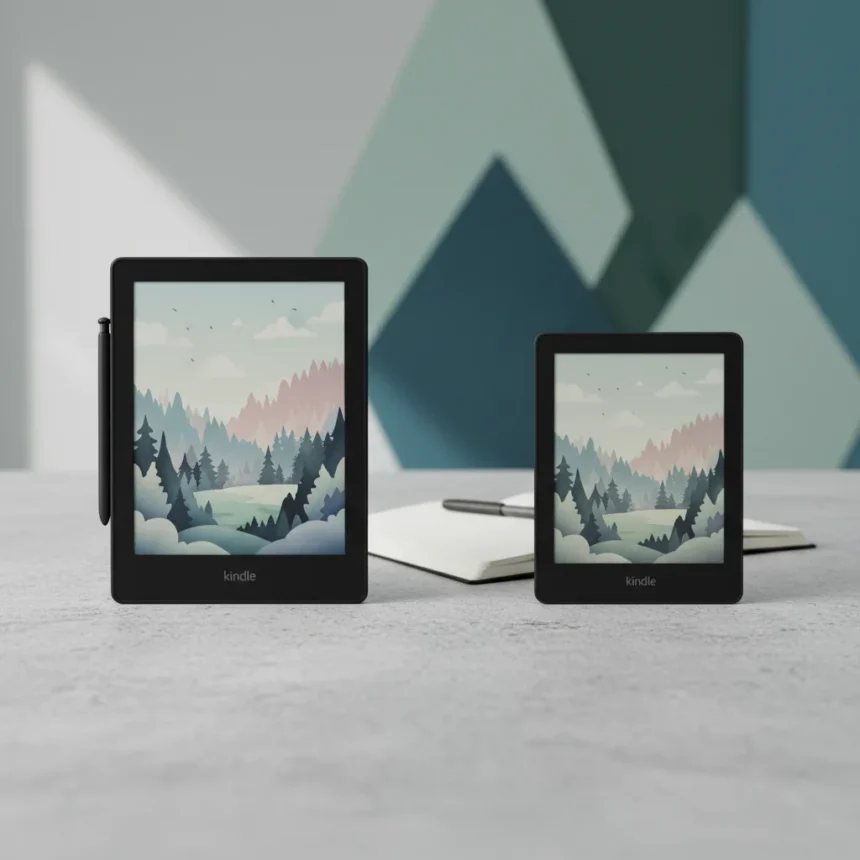
The Kindle Scribe Colorsoft is Amazon’s answer to a question early Kindle Colorsoft buyers didn’t know they were asking: what if your color e-reader could also handle serious note-taking and sketching? For anyone who just dropped cash on the standard Kindle Colorsoft, the timing is cruel.
Key Takeaways
- Kindle Scribe Colorsoft adds full stylus support and a larger screen than the standard Kindle Colorsoft
- Both devices use Amazon’s e-ink color technology, but Scribe targets productivity users
- Early Kindle Colorsoft adopters are experiencing genuine buyer’s remorse over the feature gap
- The Scribe’s note-taking and sketching capabilities set it apart from basic color e-readers
- Price difference between the two models justifies the Scribe’s additional hardware for serious users
Kindle Scribe Colorsoft: What Changes
The Kindle Scribe Colorsoft fundamentally reframes what a color e-reader can do. It pairs Amazon’s color e-ink display with a pressure-sensitive stylus, transforming the device from a reading tablet into a hybrid note-taking and sketching machine. This is not a minor firmware update—it’s a different product category wearing the same brand name.
The stylus integration matters because it actually works. Sketching on color e-ink has historically been sluggish and imprecise, but early reviews confirm the Scribe handles handwriting and simple drawings with responsiveness that rivals dedicated note-taking tablets. For students, designers, and anyone who annotates PDFs or sketches ideas, this is the feature that justifies the upgrade.
Why Kindle Colorsoft Buyers Are Frustrated
If you purchased a standard Kindle Colorsoft in the weeks before Amazon announced the Scribe version, you’re experiencing legitimate buyer’s remorse—and it’s justified. The standard Colorsoft is a solid color e-reader, but it’s purely a consumption device. No stylus, no note-taking, no sketching. It reads books and magazines in color. That’s the entire feature set.


The Scribe Colorsoft doesn’t just add stylus support; it redefines the value proposition of owning a color Kindle. Early adopters who bought Colorsoft expecting to use it for work or study now face a choice: live with a reading-only device or spend significantly more to get the productivity features they actually wanted. Amazon’s timing here—releasing the Scribe so quickly after the Colorsoft launch—has left early buyers feeling like beta testers for a product they didn’t know existed.
Kindle Scribe Colorsoft vs Kindle Colorsoft: Feature Breakdown
The core difference is straightforward: the Scribe Colorsoft includes a stylus and larger screen optimized for note-taking, while the standard Colorsoft is a pure e-reader. If you only read books and magazines, the Colorsoft is sufficient. If you want to annotate documents, sketch, or take handwritten notes, the Scribe is the only choice between the two.



Screen size matters here. The Scribe’s larger display gives you more room to write and draw without feeling cramped, a critical factor for anyone who plans to use the stylus regularly. The standard Colorsoft’s smaller screen works fine for reading but becomes frustrating when you’re trying to take detailed notes or create sketches.
Battery life, processing power, and software are comparable between the two—both run the same Amazon e-reader operating system and deliver the color e-ink experience Amazon promises. The difference is entirely in the stylus hardware and the screen real estate dedicated to input rather than output.
Should You Upgrade If You Own Colorsoft?
This depends entirely on your use case. If you bought the Colorsoft to read books, keep it. The upgrade path is not worth the cost for pure reading. But if you find yourself wanting to annotate, sketch, or take notes—or if you bought the Colorsoft hoping it would do those things—the Scribe Colorsoft is worth the investment.
The frustration many early Colorsoft buyers feel is real because Amazon released two products that target different users without clearly separating them in marketing. The Colorsoft is a reading device. The Scribe Colorsoft is a productivity device that also reads. Knowing which one you actually need before purchase is the only way to avoid regret.



Is the Kindle Scribe Colorsoft available globally?
Availability varies by region, with the device rolling out to major markets including North America and select international regions. Check Amazon’s official store for your country to confirm current availability and exact pricing in your local currency.
Can you use a regular Kindle stylus on the Scribe Colorsoft?
No. The Scribe Colorsoft uses a proprietary pressure-sensitive stylus designed specifically for the device. Third-party styluses are not compatible, and Amazon does not support alternative input devices.
How long does the Scribe Colorsoft battery last?
Battery life is comparable to the standard Colorsoft, delivering weeks of reading and note-taking on a single charge depending on usage patterns. Heavy stylus use will drain the battery faster than passive reading, but the device still outperforms traditional tablets in longevity.
The real lesson here is that early adoption of any new device category carries risk—especially when a company is still refining the product line. The standard Kindle Colorsoft is not a bad device; it’s just incomplete for anyone who needs more than reading. The Scribe Colorsoft fixes that problem, which is exactly why the timing feels so unfair to everyone who bought first and asked questions later.
Where to Buy
AU$999 | AU$1,099 | AU$849 (32GB) | Scribe without a frontlight for just AU$699 | Amazon Kindle Scribe Colorsoft
Edited by the All Things Geek team.
Source: Tom's Guide