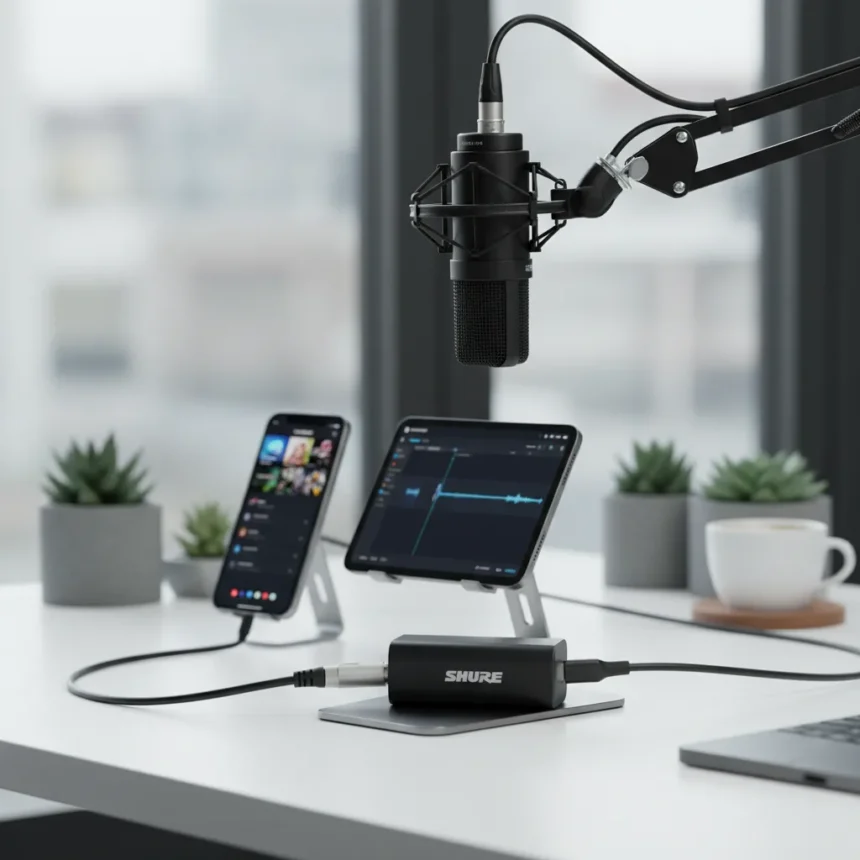
The Shure MVX2U Gen 2 is a compact XLR-to-USB digital audio interface made by Shure, designed to connect any professional XLR microphone—dynamic or condenser—to phones, tablets, and computers via USB-C. This tiny adapter eliminates the barrier between affordable pro-grade microphones and mobile creators who want studio-quality audio without investing in separate recording equipment.
Key Takeaways
- Shure MVX2U Gen 2 delivers +60 dB gain and 48V phantom power, supporting even low-output microphones like the Shure SM7B on mobile devices.
- MFi certified for iPad and iPhone; works with iOS 17+, Android 14+, Windows 10+, and macOS 14+.
- Zero-latency headphone monitoring and app-based gain control via ShurePlus MOTIV for both desktop and mobile.
- Records at 48 kHz, 16/24-bit depth with consistent frequency response across all devices.
- Pocket-sized design enables seamless switching between phone, tablet, and desktop without reconfiguration.
What Makes the Shure MVX2U Gen 2 Stand Out
The Shure MVX2U Gen 2 solves a real problem for on-the-go creators: professional XLR microphones are affordable and reliable, but they require XLR inputs that phones and tablets simply don’t have. This adapter bridges that gap with genuine pro features, not stripped-down compromises. The +60 dB gain is the headline number here—it’s enough to run low-output condensers and dynamic mics that would otherwise require a separate preamp. That matters because it keeps your mobile rig compact and your wallet lighter.
Setup is refreshingly simple. Plug your XLR mic into the adapter, connect the adapter to your device’s USB-C port, and download the ShurePlus MOTIV app. The app handles gain control with an Auto Level mode for quick setup or manual control for fine-tuning. For condenser mics, flip the 48V phantom power button; for dynamics, leave it off to preserve battery life. This isn’t overcomplicated—it’s straightforward enough for a first-timer but flexible enough for someone who knows what they’re doing.
Zero-latency headphone monitoring is a feature that separates this from cheaper alternatives. You hear yourself through the headphone output connected directly to the mic input, not through software, which means no delay and no frustration during recording or streaming. Disable software monitoring in your app to avoid feedback, and you’ve got clean, responsive audio monitoring.


How the Shure MVX2U Gen 2 Compares to Older Models
Shure’s older X2u adapter laid the groundwork for mobile XLR recording, but the MVX2U Gen 2 improves on nearly every front. The X2u offered 40 dB gain and basic 16-bit recording; the new model jumps to +60 dB gain and supports 24-bit depth. The X2u was Mac and Windows only; the MVX2U Gen 2 is MFi certified for iOS and has full Android support. Both offer zero-latency monitoring and phantom power, but the Gen 2 adds app-based processing and the ability to smoothly switch between devices without reconfiguring your system.
The trade-off is cost and complexity. The MVX2U Gen 2 requires the MOTIV app and relies on USB-C, which means older devices are out. The X2u bypassed your sound card entirely, which some users preferred for simplicity. But for creators working across multiple devices—phone for interviews, tablet for editing, laptop for streaming—the MVX2U Gen 2’s flexibility and higher gain make it the better choice.



Who Should Buy the Shure MVX2U Gen 2
This adapter is for creators who already own or plan to buy a good XLR microphone. If you’re using a budget USB mic, you don’t need this. But if you’ve invested in a Shure SM7B, a Rode Procaster, or any other quality XLR mic and want to use it on your phone or tablet, the MVX2U Gen 2 pays for itself in flexibility. Podcasters who record on their phone, YouTubers who grab audio on the road, and streamers who want consistent sound across multiple devices all benefit here.
The compact, pocket-sized design means you can throw it in a bag and record anywhere. iOS users need iOS 17 or newer; Android users need Android 14 or newer. Windows and macOS support goes back further—Windows 10+ and macOS 14+. Check your device compatibility before buying, but if you’re running a recent OS, you’re covered.
One caveat: some low-output microphones might still need additional gain even with the +60 dB available. If you’re pushing the adapter to its limits, you might hear slight hiss at high gain settings. For most mics in normal use, this isn’t an issue, but it’s worth knowing.
How to Set Up the Shure MVX2U Gen 2
Start by plugging your XLR microphone into the adapter’s XLR input. Connect the MVX2U Gen 2 to your device’s USB-C port—no batteries needed, the adapter draws power from the device. Download the ShurePlus MOTIV app on desktop or mobile. In your device’s system settings, select the adapter as your input device: on Mac, go to Sound Preferences; on Windows, open Sounds and Audio Devices. For condenser mics, enable the 48V phantom power button in the app; for dynamic mics, leave it off.



Next, test your gain. Speak at your normal recording level and watch the meter in the MOTIV app. The Auto Level mode will adjust automatically, or you can tweak it manually. Connect headphones to the adapter’s headphone output for zero-latency monitoring. Disable software monitoring in the app to avoid feedback. That’s it—you’re ready to record or stream.
Is the Shure MVX2U Gen 2 worth the cost?
At $154, the Shure MVX2U Gen 2 is more expensive than generic XLR-to-USB adapters, but you’re paying for mobile compatibility, higher gain, and app-based control. If you already own a quality XLR microphone, it’s a bargain compared to buying a whole new USB mic or a separate portable interface. For creators who record on multiple devices, the seamless switching alone justifies the price.
Can I use any XLR microphone with the Shure MVX2U Gen 2?
Yes. The adapter works with any XLR microphone—dynamic or condenser. If it’s a condenser mic, enable 48V phantom power in the MOTIV app. If it’s a dynamic mic, leave phantom power off to save battery. The +60 dB gain is enough for most professional mics, though extremely low-output models might require additional preamp gain.
Does the Shure MVX2U Gen 2 work with older iPhones and Android phones?
The MVX2U Gen 2 requires iOS 17 or newer for iPhones and Android 14 or newer for Android devices. If your phone is older than that, it won’t work. Check your device’s OS version before purchasing. Older devices may be stuck on older operating systems that the adapter doesn’t support.
The Shure MVX2U Gen 2 is a genuinely useful tool for creators who want professional audio without professional complexity. It doesn’t reinvent mobile recording, but it removes one of the last barriers between affordable pro microphones and creators on the go. If you own a quality XLR mic and want to use it everywhere, this adapter makes that possible.
Where to Buy
Edited by the All Things Geek team.
Source: TechRadar