





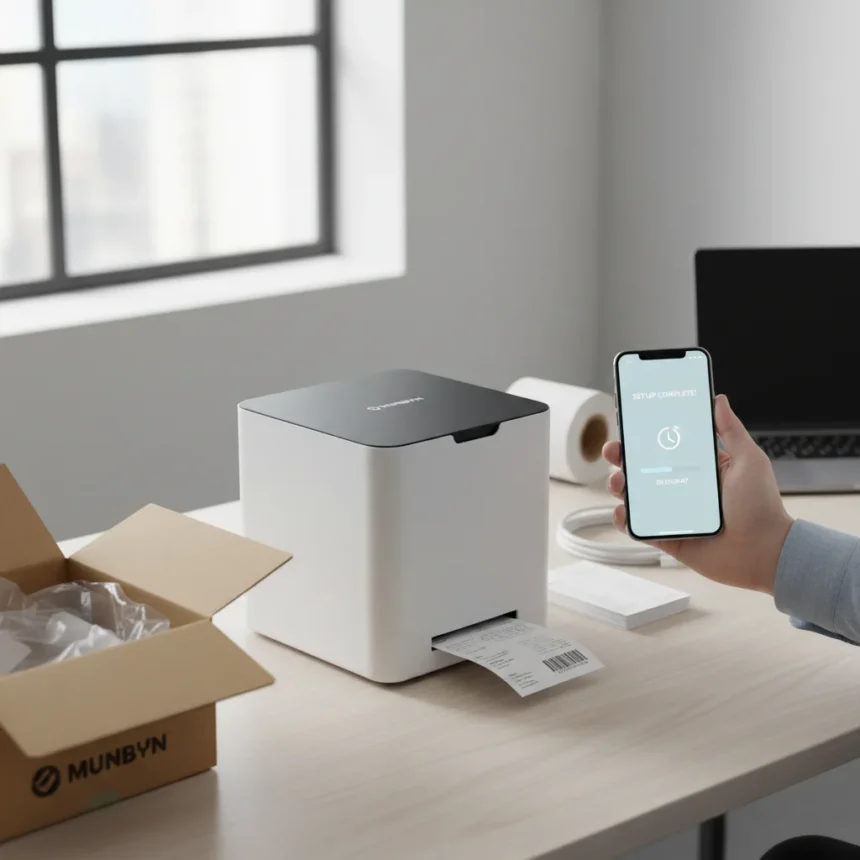
The Munbyn ITPP941 thermal label printer is a wireless shipping label solution that gets you printing within ten minutes of opening the box. For small businesses and retailers drowning in manual label processes, this speed matters. Setup is genuinely frictionless—no drivers to hunt down, no configuration nightmares, no waiting for IT support. You unbox it, load labels, connect to your phone or computer, and start printing. That is the entire story.
Key Takeaways
- Prints shipping labels within ten minutes of unboxing with zero technical friction.
- Wireless connectivity via Munbyn Print Pro app for mobile printing from anywhere.
- Quiet, reliable operation designed specifically for small business and retail workflows.
- Compatible with Windows and Mac computers with straightforward printer setup.
- Presented as a current deal targeting small businesses and retailers managing shipping volume.
Why the Munbyn ITPP941 Thermal Label Printer Stands Out for Shipping
Most thermal label printers demand patience. Drivers stall. Software crashes. Calibration takes longer than actually printing labels. The Munbyn ITPP941 flips that script. The printer auto-reads label size when you close the holder, eliminating manual calibration steps that waste minutes per shift. For small businesses processing dozens or hundreds of orders daily, those minutes compound into hours of lost productivity.
The real advantage is reliability. Once you load labels and press print, the device does its job quietly and consistently. No paper jams. No mysterious error codes. No need to restart the printer mid-shift. This consistency is what separates tools that actually get used from gadgets that sit in a corner gathering dust.
Munbyn ITPP941 Setup: What Actually Happens in Ten Minutes
Setup begins the moment you open the box. Press the button on the label holder, insert your shipping labels—gently pinching them until they slide smoothly without crumpling—and close the holder. The printer automatically reads the label dimensions. On a computer, add the device through Control Panel (Windows) or the print menu (Mac). On a phone, install the Munbyn Print Pro app, connect the printer, and wait for a green check confirming readiness. That is genuinely it. No firmware updates. No waiting for cloud sync. No registration screens.

This speed matters because it removes friction from your workflow. Small retailers and Amazon sellers often print labels moments after receiving orders. Faster setup means faster printing, which means faster shipping, which keeps customers happy. The ten-minute claim is not marketing hype—it is the difference between a printer you use immediately and one that sits in a box while you troubleshoot connectivity.
Munbyn ITPP941 Thermal Label Printer vs. Manual and Competitor Solutions
Hand-writing or printing labels on standard inkjet printers is slow and unreliable for any business handling more than a handful of daily shipments. Thermal printers eliminate ink costs and speed up the process dramatically. The Munbyn ITPP941 competes on simplicity and setup time—you are not waiting hours for technical setup, which positions it as the practical choice for retailers who lack IT staff or patience for complex configuration. Its wireless design also beats USB-only printers, letting you print from a phone or tablet without tethering to a fixed computer.



Troubleshooting the Munbyn ITPP941 Thermal Label Printer
If labels get stuck or half-printed, the printer includes a reset procedure. Press and hold the FEED button (the one with the red and green light) until you hear five consecutive beeping sounds, then release. One long beep confirms the reset is complete. For label calibration, press and hold the FEED button until you hear a single beep, then let the printer run back and forth automatically to read label size.
Printing density and speed can be adjusted if output looks too light or the printer overheats. Set speed to level 4 and density to level 2 as a baseline. If prints remain faint, increase density by one increment at a time. On Windows, access these settings through Control Panel > Devices and Printers > Right-click Munbyn ITPP941 > Printer Preferences > Page Setup. Mac users adjust settings directly in the print menu.
Is the Munbyn ITPP941 Thermal Label Printer Right for Your Business?
This printer is built for small businesses and retailers shipping enough volume to justify thermal printing but not so much that you need industrial-grade equipment costing thousands. If you are an Amazon seller, Shopify store owner, or small logistics operation, the Munbyn ITPP941 eliminates the friction that slows down shipping. The quiet operation means it will not annoy anyone sharing an office. The reliability means it will not fail during your busiest shipping day. The wireless connectivity means you can print from anywhere in your workspace.
The current deal positioning suggests this is a good time to buy. For small businesses looking to streamline shipping without enterprise complexity or cost, the Munbyn ITPP941 thermal label printer delivers speed, ease, and results in a package that actually works out of the box.



How do I load labels into the Munbyn ITPP941?
Press the button on the label holder to open it, then insert your shipping labels. Pinch the labels gently until they slide smoothly into place—avoid pinching too hard or they may crumple. Close the holder and the printer automatically reads the label size.
What app do I use to print from my phone with the Munbyn ITPP941?
Install the Munbyn Print Pro app on your phone, connect the printer via the app, and wait for a green check to confirm readiness. Once connected, you can print shipping labels directly from your mobile device.
Can the Munbyn ITPP941 work with both Windows and Mac?
Yes. The Munbyn ITPP941 works with both Windows and Mac computers. Windows users access printer settings through Control Panel > Devices and Printers, while Mac users adjust settings directly in the print menu.
The Munbyn ITPP941 thermal label printer is not reinventing shipping logistics. It is solving a real problem: getting labels printed fast without technical headaches. For small businesses tired of slow, complicated printer setups, that is exactly what matters.
Where to Buy
Munbyn RW403B is discounted down to $75.99 (was $119.99) at Amazon | Munbyn RW403B is now £69.98 (was £94.99) at Amazon | Tech Week sale | Munbyn RW403B Bluetooth Thermal Label Printer : | Munbyn RW403B Bluetooth Thermal Label Printer :
This article was written with AI assistance and editorially reviewed.
Source: TechRadar