Garmin WhatsApp support has arrived for a growing roster of newer smartwatches, transforming how you handle messages without reaching for your phone. The WhatsApp Connect IQ app, now available in the Garmin Connect IQ Store, enables direct message replies on compatible models announced after March 2026, marking the first full WhatsApp integration for Garmin’s ecosystem.
Key Takeaways
- Garmin WhatsApp support is free and available now in the Connect IQ Store for compatible newer watches.
- The app displays 10 recent contacts and 10 recent messages per conversation for quick access.
- Reply to messages via mini-keyboard or choose from 6 preset quick replies without opening your phone.
- Photos, GIFs, stickers, videos, and watch-based calling are not supported.
- Older Garmin models like the Epix Pro remain unsupported; they only receive basic notifications.
How to Install Garmin WhatsApp Support on Your Watch
Installing Garmin WhatsApp support takes just minutes. Open the Connect IQ Store app on your smartphone, search for WhatsApp, select Install, and agree to the permission prompts. The app then installs directly to your compatible Garmin watch. Unlike widgets or glances, it appears as a full standalone app in your sports apps menu, giving it the same prominence as your fitness tracking tools.
Once installed, the app sits ready to link. This is where the setup diverges from typical smartwatch apps—you’ll need to authenticate your WhatsApp account directly on the watch using a QR code scan from your phone. The process requires scanning twice for confirmation, and your watch will then appear as a connected device in your phone’s WhatsApp settings.
Linking Your WhatsApp Account to Your Garmin Watch
To activate Garmin WhatsApp support, open the WhatsApp app on your watch (found in the sport apps menu) and initiate the QR code scan. On your phone, open WhatsApp and navigate to the settings where you’ll find the option to scan with your watch. Scan the code twice—the app requires dual confirmation to prevent accidental linking. Your watch now functions as a secondary WhatsApp device, synced to your phone’s account without draining its battery or requiring a separate number.


If linking fails, troubleshooting is straightforward but involves a full reset. Unpair your Garmin watch from your phone’s Bluetooth settings, then uninstall and reinstall the Garmin Connect app on your smartphone. This clears cached authentication data that occasionally blocks the initial pairing.
Using Garmin WhatsApp Support to Reply to Messages
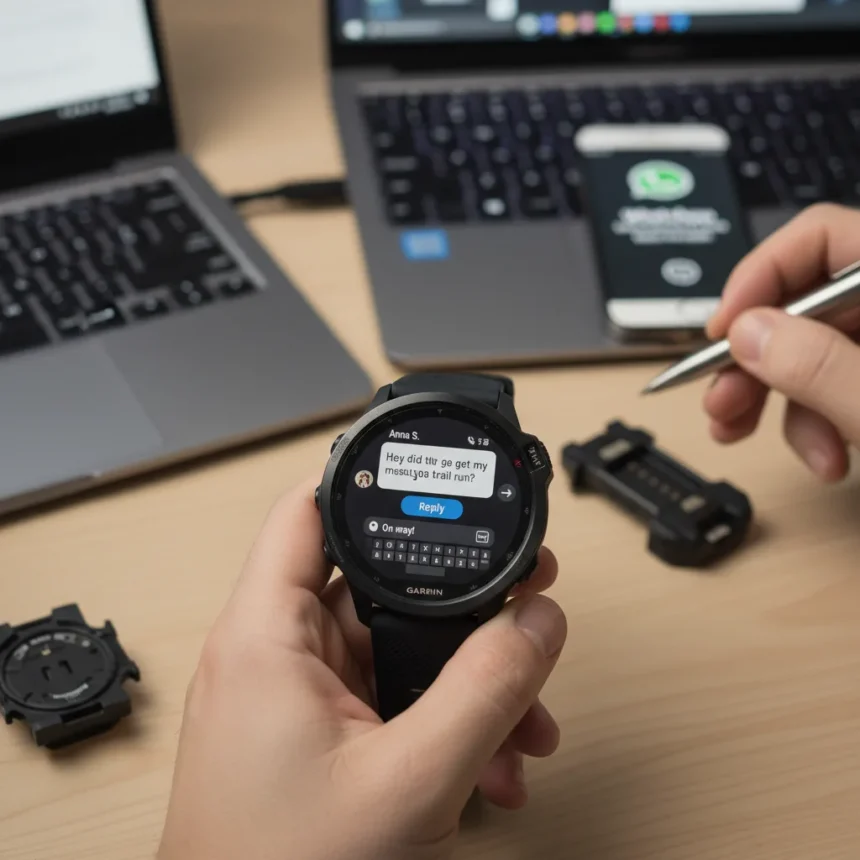
Once linked, open the WhatsApp app on your watch to view your 10 most recent contacts and their 10 most recent messages. Select a conversation and compose a reply using either the watch’s mini-keyboard or one of 6 preset quick replies. This eliminates the need to grab your phone for every message—a genuine quality-of-life improvement for runners, cyclists, and anyone who values wrist-level notifications.



Incoming messages arrive as notifications with a WhatsApp icon and an Open button. Tapping Open launches the full WhatsApp app on your watch, where you can view the message and compose a reply. This two-step process (notification, then app open) differs from some competitors’ implementations but keeps the watch’s interface clean and prevents accidental app launches.
What Garmin WhatsApp Support Cannot Do
Garmin WhatsApp support has clear limits. The app does not support photos, GIFs, stickers, videos, or watch-based calling. Voice and video call notifications will still arrive on your watch via phone pairing, but you’ll need to answer on your phone—the watch cannot initiate or receive calls. If rich media messaging is central to your WhatsApp use, this app functions best as a text-only companion rather than a full replacement.
Older Garmin watches like the Epix Pro remain entirely unsupported. Those models can receive basic WhatsApp notifications through the Garmin Connect app settings, but cannot install the dedicated WhatsApp app or reply to messages directly. This limitation has frustrated legacy watch owners, who note that Garmin appears to have abandoned support for watches announced before the March 2026 cutoff.
Garmin WhatsApp Support vs. Basic Notifications
Before this app, any Garmin watch could display WhatsApp notifications via Bluetooth pairing with your phone. The difference now is interaction. Basic notifications show you a message arrived and require you to open your phone to reply. Garmin WhatsApp support lets you compose and send replies directly from your wrist, eliminating the phone-grab workflow entirely. For users who receive dozens of messages daily, this shift from passive notification to active reply is substantial.



Older watches still default to basic notification mode. If you own a pre-2026 Garmin model, you can enable WhatsApp notifications in the Garmin Connect app under notification settings, but you cannot install the dedicated WhatsApp app. The feature gap between supported and unsupported models is significant enough that newer watch buyers gain a tangible messaging advantage.
FAQ
Is the Garmin WhatsApp app free?
Yes, the WhatsApp Connect IQ app is completely free. It installs from the Garmin Connect IQ Store at no cost, and there are no in-app purchases or subscription fees.
Does Garmin WhatsApp support work with my watch?
Garmin WhatsApp support works only on watches announced after March 2026. Older models like the Epix Pro, Forerunner (pre-2026), and other legacy watches cannot install the full app, though they still receive basic notifications. Check your watch’s announcement date against Garmin’s official compatibility list in the Connect IQ Store.
Can I send photos or make calls through Garmin WhatsApp support?
No. The app supports text messages and quick replies only. Photos, GIFs, stickers, videos, and watch-based calling are not available. Voice and video call notifications may appear on your watch, but answering requires your phone.
Garmin WhatsApp support represents a meaningful step forward for smartwatch messaging, even if it does not replicate the full WhatsApp experience. For newer Garmin watch owners, it eliminates a major friction point—reaching for your phone every time a message arrives. Older watch users, unfortunately, remain locked out of this upgrade, reinforcing the growing divide between Garmin’s supported and legacy devices.
Edited by the All Things Geek team.
Source: Tom's Guide