





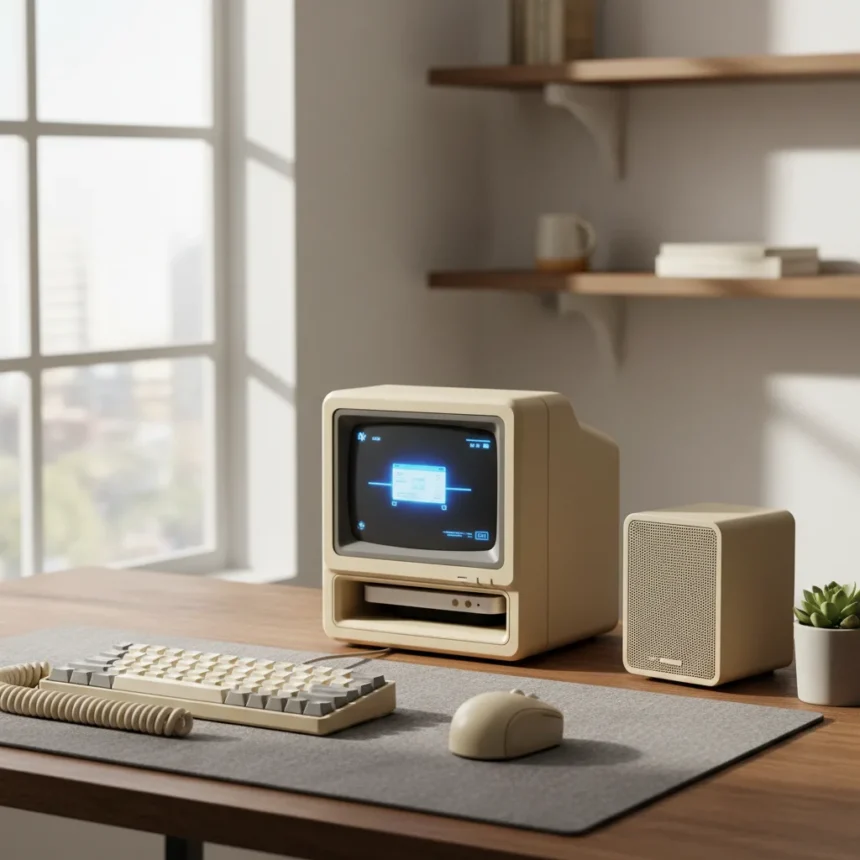
The Wokyis M5 Retro Dock is a miniature docking station designed specifically for the M4 Mac Mini that combines nostalgic 1980s Macintosh styling with practical modern connectivity features. This compact dock sits alongside your Mac Mini and delivers a striking visual transformation while expanding your desk setup’s functionality through additional USB ports, memory card readers, external SSD storage, and a built-in 5-inch HD display.
Key Takeaways
- Wokyis M5 Retro Dock mimics vintage 1980s Macintosh design while supporting modern M4 Mac Mini hardware
- Built-in 5-inch HD display provides secondary screen real estate without external monitor clutter
- M.2 NVMe SSD slot enables fast external storage expansion for media and backup files
- Multiple USB ports and memory card readers extend connectivity beyond Mac Mini’s native ports
- Compact form factor keeps desk footprint minimal while delivering significant functionality
Design and Aesthetic Appeal
The Wokyis M5 Retro Dock succeeds where most modern tech accessories fail: it makes functionality look intentional rather than utilitarian. The 1980s Macintosh styling creates an immediate visual statement on your desk, transforming the otherwise minimalist M4 Mac Mini into a retro-inspired workspace centerpiece. This approach appeals directly to users who want their technology to reflect personality rather than disappear into neutral design language.
The compact form factor keeps your desk organized. Rather than surrounding your Mac Mini with separate external drives, card readers, and display adapters, the Wokyis M5 consolidates these elements into a single purpose-built enclosure. The dock’s small footprint means you gain significant functionality without sacrificing the clean desk aesthetic that drew you to the Mac Mini in the first place.
Connectivity and Storage Expansion
The Wokyis M5 Retro Dock addresses a genuine limitation of the M4 Mac Mini: limited native port availability and onboard storage. The dock includes multiple USB ports for peripherals, memory card readers for photographers and content creators, and critically, an M.2 NVMe SSD slot that lets you add fast external storage without relying on slower USB external drives.



M.2 NVMe storage represents a significant upgrade over traditional external hard drives or USB-connected SSDs. The speed advantage matters for video editors, photographers, and developers who regularly transfer large files. Competing solutions like the YM2P9 offer broader M.2 compatibility across multiple size standards (2230, 2242, 2260, 2280), while the Wokyis M5 focuses on delivering essential functionality in a tighter package.
The Built-in 5-Inch Display Factor
The integrated 5-inch HD display distinguishes the Wokyis M5 from standard docking stations. Rather than requiring a separate external monitor for secondary display needs, the dock provides a compact secondary screen directly adjacent to your Mac Mini. This proves especially useful for reference materials, chat windows, or monitoring applications while your main display handles primary work.


Other docking solutions like the MC-15 prioritize raw connectivity power with 4K at 60 Hz HDMI output and multiple high-speed USB-C ports, targeting users who need maximum display flexibility and peripherals. The Wokyis M5 takes a different approach: it sacrifices maximum resolution and port count in favor of integrated simplicity and retro aesthetics.
Practical Considerations for Mac Mini Users
The Wokyis M5 Retro Dock works best for users whose nostalgia for vintage computing translates into actual daily use. If you view the retro styling as pure aesthetic choice rather than something that enhances your workflow, a more conventional docking station might deliver better value. The dock assumes you want your workspace to make a visual statement, not simply solve connectivity problems invisibly.
Storage expansion through the M.2 NVMe slot addresses a real pain point for Mac Mini users. The M4 model comes with fixed internal storage, making external expansion essential for anyone handling large media files or maintaining local backups. The dock’s native integration of this capability beats hunting for separate external enclosures.
How Does the Wokyis M5 Compare to Other Mac Docks?
The Wokyis M5 occupies a unique position in the docking landscape. Most competing solutions prioritize maximum ports and display flexibility over aesthetic coherence. The MC-15, for instance, offers superior display capabilities with 4K at 60 Hz HDMI output and two USB-C 3.2 ports delivering up to 10 Gbps speeds, making it ideal for users who need raw connectivity power. However, it delivers none of the integrated design philosophy that defines the Wokyis M5.



The choice between the Wokyis M5 and conventional docks ultimately depends on your priorities. Need maximum flexibility and highest-speed connections? A traditional docking station wins. Want your Mac Mini setup to feel intentional and visually cohesive? The Wokyis M5 delivers something most tech accessories cannot: genuine personality.
Is the Wokyis M5 Retro Dock Worth the Space on Your Desk?
The Wokyis M5 Retro Dock justifies its desk real estate if you value both functionality and aesthetic coherence. You gain genuine storage expansion, secondary display capabilities, and expanded connectivity while maintaining a compact footprint that actually enhances your workspace rather than cluttering it. For Mac Mini users who appreciate retro design, this dock transforms your entire setup.
What Types of External Storage Does the M.2 NVMe Slot Support?
The Wokyis M5 Retro Dock includes an M.2 NVMe SSD slot for external storage expansion. This enables you to add fast solid-state storage for media files, backups, and project work without relying on slower USB external drives. The integration keeps your desk organized while delivering significant speed advantages over traditional external storage solutions.
Can You Use the Wokyis M5 with Other Mac Models?
The Wokyis M5 Retro Dock is specifically designed for the M4 Mac Mini. While the dock’s USB ports and external storage capabilities could technically work with other Macs, the aesthetic design and physical form factor are optimized around the M4 Mac Mini’s dimensions. For other Mac models, you would want a dock engineered specifically for your hardware.
The Wokyis M5 Retro Dock succeeds because it refuses to be just another generic docking station. It acknowledges that your workspace deserves intentional design, not just functional necessity. For M4 Mac Mini users who want their setup to reflect personality while gaining practical storage and connectivity upgrades, this dock delivers both in a package that actually makes your desk look better.
Where to Buy
This article was written with AI assistance and editorially reviewed.
Source: Tom's Hardware