


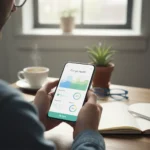


Apple Watch sleep tracking accuracy depends on far more than simply strapping the device to your wrist before bed. Even users who love the Apple Watch’s intuitive design and thorough sleep tracking often make everyday mistakes that silently degrade the quality of their sleep data. Understanding these five habits—and how to break them—can transform your Apple Watch from a source of frustration into a genuinely useful sleep tool.
Key Takeaways
- Loose wrist fit and poor sensor contact are the leading cause of inaccurate Apple Watch sleep data.
- Battery depletion overnight means zero sleep data recorded—enable charging reminders to prevent this.
- Wrist Detection must be enabled for heart-rate tracking and sleep stage detection to work properly.
- Consistent sleep schedules matter more than perfect sleep scores for long-term sleep health.
- Apple Watch sleep data is an approximation, not a clinical measurement—focus on trends, not single nights.
Wearing Your Watch Too Loosely Undermines Sensor Accuracy
The most common culprit behind poor Apple Watch sleep tracking accuracy is a watch worn too loosely on the wrist. When the device sits too far from your skin, the built-in accelerometer cannot reliably detect movement and restlessness. This sensor disconnect means the watch interprets your natural sleep shifts as awakenings, which inflates your restlessness count and deflates your overall sleep efficiency score. A snug but comfortable fit—secure enough that you cannot slide a finger underneath—keeps the sensors in constant contact with your skin overnight.
Comfort matters here. A watch worn so tightly it cuts off circulation or causes discomfort will prompt you to remove it during the night, which is worse than wearing it loosely. Find the balance: secure enough for accurate tracking, comfortable enough that you forget you are wearing it. If you toss and turn significantly during sleep, a slightly tighter fit helps the accelerometer distinguish between rolling over and actual wakefulness.
Letting Your Apple Watch Battery Die Overnight Erases All Sleep Data
If your Apple Watch runs out of battery during the night, you will not get any sleep data for that session. This is not a minor accuracy issue—it is a complete data loss. Many users charge their watches during the day and forget to top up before bed, only to wake and discover a dead device and a blank sleep record. The fix is simple: enable charging reminders on your watch. Set a reminder for 30 minutes before your typical bedtime so you have time to charge without rushing. Most Apple Watch models reach a full charge in under an hour, so even a late reminder gives you a window to plug in.


Battery anxiety should not drive your sleep schedule, but battery awareness should inform your charging habits. If you know you are a light sleeper who wakes easily, charging your watch before bed becomes non-negotiable. The small friction of a charging reminder is worth far more than the frustration of losing an entire night’s data.
Disabling Wrist Detection Breaks Heart-Rate and Sleep-Stage Tracking
Wrist Detection is a vital setting that many users disable thinking it will save battery or improve comfort. Without it, the watch cannot reliably track movement, heart rate, or sleep stages, which means your sleep data may be incomplete or inaccurate. Wrist Detection enables overnight heart-rate tracking, which is essential for the Apple Watch to detect different sleep stages and understand your sleep architecture. Disabling it is like turning off the engine to save fuel—you might extend battery life by a few hours, but you lose the core function entirely.


Check your Apple Watch settings and confirm Wrist Detection is toggled on. It should remain on overnight. The battery impact is minimal compared to the accuracy gain, and sleep tracking is one of the few features that genuinely benefits from continuous heart-rate monitoring.
Ignoring Sleep Schedule Consistency Undermines Long-Term Sleep Health
The single most important thing you can do to improve both your sleep health and your Apple Watch sleep tracking accuracy is maintaining a consistent sleep schedule. Going to bed at 10 p.m. one night and midnight the next, waking at 6 a.m. on weekdays and 9 a.m. on weekends—this erratic pattern confuses your body’s circadian rhythm and makes accurate sleep tracking nearly impossible. Your Apple Watch measures sleep patterns, and inconsistent patterns produce inconsistent data.
Set a target bedtime and wake time, and stick to them within a 30-minute window, even on weekends. This consistency trains your nervous system and improves sleep quality itself, which makes your Apple Watch data more reliable and your actual sleep more restorative. A consistent schedule is not just good for your sleep score—it is good for your body.
Drinking Tea or Fluids Too Close to Bedtime Disrupts Sleep Tracking
A surprising culprit is finishing your evening tea or other fluids too close to bedtime. Even caffeine-free tea can disrupt sleep because fluid volume and bladder sensitivity can wake you during the night, even if you do not consciously remember the waking. Each overnight bathroom trip registers as a sleep interruption on your Apple Watch, lowering your sleep efficiency and fragmenting your sleep stages. The fix is timing: finish your bedtime tea about 60 to 90 minutes before sleep.


This extends to the broader 10-3-2-1-0 rule: no caffeine 10 hours before bed, no food or drink 3 hours before bed, no work 2 hours before bed, no screen time 1 hour before bed, and zero times pressing snooze. These are not arbitrary—they reflect how your body processes stimulation and prepares for sleep. Following this rule will improve both your actual sleep and the accuracy of your Apple Watch’s measurement of it.
Obsessing Over Single Sleep Scores Creates Anxiety Without Insight
Apple Watch sleep tracking accuracy is real, but the data should be viewed as an approximation of sleep patterns, not a precise measurement of sleep stages or quality. The watch is estimating sleep based on patterns, not directly measuring brain activity like a clinical sleep study would. Yet many users obsess over single-night scores, chasing perfect numbers and creating unnecessary stress. This anxiety about achieving the ideal sleep score—a phenomenon called orthosomnia—can actually worsen your sleep by adding psychological pressure.
Instead, focus on trends over two-week windows. Is your average sleep duration stable? Are your deep-sleep percentages improving? How do you feel during the day? That last question matters most. If you feel rested and alert despite a low sleep score, your actual sleep is probably fine—your watch is just being conservative in its estimates. If you feel exhausted despite a high score, something else is at play. Use your Apple Watch as a trend tool, not a clinical instrument.
Optimize Your Sleep Environment to Support Accurate Tracking
Beyond device settings and personal habits, your sleep environment shapes both your actual sleep and how accurately your Apple Watch measures it. A cool, dark, and quiet bedroom optimizes sleep. Temperature matters: aim for around 65 to 68 degrees Fahrenheit (18 to 20 degrees Celsius). Darkness signals your body to produce melatonin. Quiet reduces sleep disruptions that fragment your data.
These environmental factors are not just nice-to-haves—they are foundational. If your bedroom is warm, bright, or noisy, your sleep will be fragmented, and your Apple Watch will dutifully record that fragmentation. You cannot improve your sleep score by ignoring the basics. Focus on the fundamentals: consistent bed and wake times, a cool and dark sleep environment, limiting alcohol and screens before bed.
How does Apple Watch sleep tracking compare to clinical sleep studies?
The Apple Watch estimates sleep from patterns using heart-rate and movement data. A clinical sleep study directly measures brain activity through electroencephalography (EEG), polysomnography, and other lab-grade tools. At-home trackers like the Apple Watch have similar accuracy to research-grade actigraphy when estimating total sleep duration, making them useful for tracking trends but not for diagnosing sleep disorders. Think of your Apple Watch as a useful approximation tool, not a replacement for clinical assessment if you suspect a sleep problem.
Why does my Apple Watch sleep score drop even when I sleep eight hours?
Sleep duration and sleep quality are different metrics. You might sleep eight hours but experience frequent awakenings, which lowers your sleep efficiency score. Poor sensor contact, loose fit, inconsistent sleep schedule, late-night fluids, or a disruptive sleep environment can all fragment your sleep and reduce your efficiency score even if total hours are adequate. Check your wrist fit, enable Wrist Detection, and review your sleep environment before assuming your sleep score is inaccurate.
Should I worry if my Apple Watch sleep tracking accuracy seems low?
Not if you feel rested. Your Apple Watch is conservative in its estimates and may underestimate your actual sleep quality. What matters is how you feel during the day, not the number on your screen. Use the data as feedback about trends—if your score is dropping week after week and you feel increasingly tired, investigate. But a single low score or a night or two of lower efficiency is not a sign of a problem.
Your Apple Watch sleep tracking accuracy is within your control. A snug fit, enabled settings, consistent sleep times, smart fluid timing, and a cool dark bedroom will transform your data from frustratingly inaccurate to genuinely useful. The goal is not a perfect sleep score—it is sustainable sleep that leaves you rested and alert. Let your Apple Watch measure that, not dictate it.
Where to Buy
Apple Watch Ultra 2 | Apple Watch Ultra 3 | Apple Watch Series 10 | Apple Watch SE | Apple Watch 11
Edited by the All Things Geek team.
Source: Tom's Guide