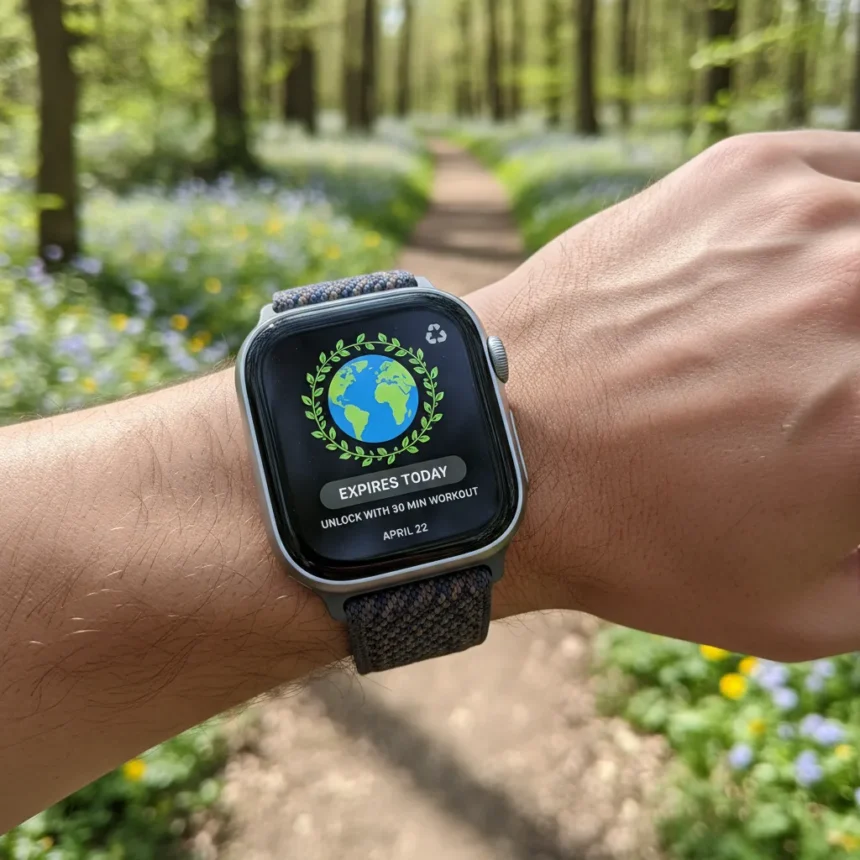
The Apple Watch Earth Day 2026 badge is a limited-edition digital reward that unlocks when you complete a 30-minute or longer workout on April 22, 2026—and today is the only day to earn it. After midnight, the challenge disappears entirely until next year, making this a rare window for collectors and fitness enthusiasts who want the accompanying animated stickers.
Key Takeaways
- Complete any 30-minute workout on April 22, 2026 to unlock the badge and stickers
- Use the Workout app or any third-party fitness app that logs to Apple Health
- Badge may take up to 9 days to appear after workout completion
- Challenge is available only today—it expires at midnight
- No purchase required; the badge and stickers are completely free
How to Earn the Apple Watch Earth Day 2026 Badge Today
Getting the Apple Watch Earth Day 2026 badge requires just one workout, but timing matters. Open the Workout app on your Apple Watch and select any workout type—running, cycling, walking, strength training, or any other activity. Start the workout and maintain it for at least 30 minutes. The clock starts when you begin, so a full half-hour of sustained activity is the minimum threshold.
You do not need to hit a specific calorie target or distance goal. Apple’s official messaging states: “This Earth Day, April 22, record any 30 minute workout with the Workout app or any app that records workouts to Health to earn this award. The earth will think the world of you”. The flexibility here is intentional—walking counts just as much as running, making the challenge accessible to users of all fitness levels.
If you prefer using a third-party fitness app instead of Apple’s native Workout app, that works too, as long as the app syncs workout data to Apple Health. This means Strava users, gym app enthusiasts, and anyone logging workouts to the Health ecosystem can participate equally.


What Happens After You Complete the Workout
Once you finish your 30-minute workout, the badge and animated stickers should appear in the Fitness app automatically. However, Apple’s systems sometimes lag. The badge may take up to 9 days to show up after your workout completes. If you finish your workout today and do not see the reward immediately, do not panic—it will likely arrive within the next week.
If the badge still has not appeared after a few days, try restarting both your Apple Watch and iPhone. Force-closing the Fitness app and reopening it can also trigger a refresh. These steps help sync data between devices and often resolve delayed badge appearances.



Why This Challenge Matters for Apple Watch Users
Earth Day badges have become collector’s items within the Apple Watch community. Unlike regular daily activity rings, which reset every 24 hours, special event badges persist permanently on your profile. They serve as digital proof of participation and add visual variety to the Fitness app’s badge collection.
The animated stickers that unlock alongside the badge add another layer of appeal. These stickers are exclusive to Earth Day 2026 and cannot be earned any other way. For users who care about customizing their Apple Watch experience or sharing achievements, this is a meaningful, if temporary, opportunity.
Apple runs similar limited-time challenges throughout the year. International Dance Day follows on April 29, 2026, requiring a 20-minute Dance workout. But that challenge is separate from Earth Day—missing today does not give you a second chance until April 22, 2027.
Common Issues and Solutions
Some users report that badges fail to appear even after completing qualifying workouts. If this happens to you, check that your workout was recorded for the full 30 minutes—workouts that pause or stop early may not count. Also verify that your Apple Watch synced with your iPhone after the workout ended. Without that sync, the Fitness app has no record of your activity.



Another potential issue: using a non-Apple workout app that does not integrate with Apple Health. If you use a niche fitness app that keeps data siloed, the workout will not register for the challenge. Stick with the Workout app or a well-established third-party app like Strava, Nike Run Club, or similar services that explicitly support Health integration.
Is the Apple Watch Earth Day 2026 badge worth the effort?
If you already exercise regularly, you will likely complete a 30-minute workout anyway—so earning the badge is essentially free. If you are sedentary, starting a 30-minute workout just for a digital badge is not a compelling reason to exercise. However, using the deadline as motivation to move is a valid approach that many Apple Watch users embrace.
Can you earn the badge with a workout you did yesterday?
No. Apple’s challenge system is date-locked. Only workouts recorded on April 22, 2026 count toward the Earth Day badge. A 30-minute workout from April 21 or April 23 will not trigger the award, no matter how perfectly it meets the duration requirement.
What if I miss the deadline today?
The Earth Day 2026 badge challenge expires at midnight on April 22, 2026. Once the calendar flips to April 23, the challenge closes permanently. You will have to wait until April 22, 2027 for another opportunity. Apple does not offer makeup windows or alternative paths to earn retired badges, so procrastination is genuinely risky here.
The Apple Watch Earth Day 2026 badge is a straightforward, low-stakes achievement that rewards a single half-hour of movement. If you own an Apple Watch and have 30 minutes today, there is no reason not to lock it in. After midnight, this particular badge becomes impossible until next year.
Edited by the All Things Geek team.
Source: Tom's Guide