





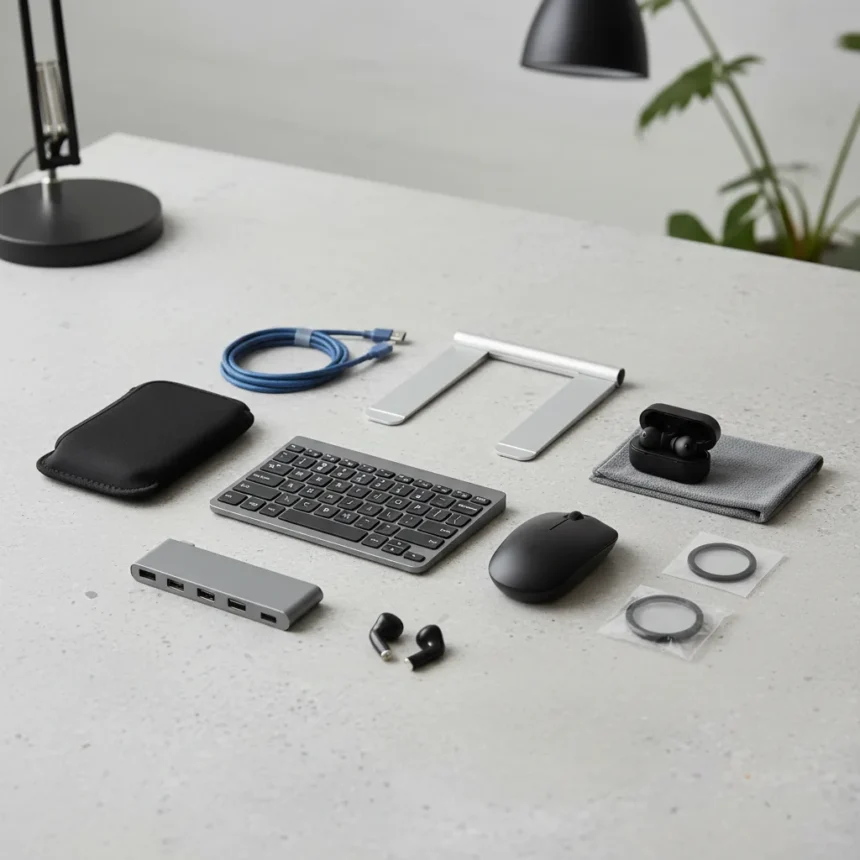
Laptop accessories under $50 can transform how you work, travel, and create without requiring a major investment. The right add-ons address real pain points: screen glare, keyboard fatigue, cable clutter, and thermal throttling. This roundup focuses on accessories that deliver genuine value at budget prices, chosen for immediate practical benefit rather than trendy branding.
Key Takeaways
- Nine practical laptop accessories all priced below $50 improve productivity and comfort
- Budget upgrades address common issues like poor posture, cable management, and screen visibility
- Best accessories balance portability with functionality for on-the-go work
- Quality budget options compete with mid-range alternatives on core performance
- Accessories enhance both Windows and Mac laptop experiences
Why Laptop Accessories Under $50 Matter for Mobile Workers
Laptops are designed for portability, but that mobility often comes with compromises. The built-in keyboard sits too low. The screen angle forces neck strain. Cables tangle in your bag. Heat builds up during video calls. Laptop accessories under $50 solve these problems without requiring expensive upgrades or replacement devices. A $30 laptop stand eliminates posture issues. A $25 cable organizer prevents daily frustration. A $40 cooling pad prevents thermal throttling during intensive work. These are not luxury upgrades—they are practical fixes for real workflow problems.
The key advantage of budget accessories is that they let you customize your setup piece by piece. Instead of committing $300 to a docking station, you can invest $15 in a USB hub, $20 in a stand, and $25 in a carrying case. If one accessory does not work for your setup, you have not overspent. This modular approach makes sense for remote workers, students, and freelancers who move between locations regularly.
Essential Categories for Laptop Accessories Under $50
The best laptop accessories under $50 fall into distinct categories, each solving a specific problem. Cooling solutions prevent thermal throttling during demanding work. Stands and risers improve ergonomics and screen visibility. Cable organizers and portable hubs reduce desk clutter. Carrying cases and sleeves protect your investment during travel. Input devices like external keyboards and mice improve comfort during long sessions. Screen protectors and anti-glare filters reduce eye strain. Each category offers multiple options at various price points, so you can prioritize based on your most pressing need.



Cooling pads are particularly valuable for laptop users who work in warm environments or run processor-intensive applications. A passive or active cooling pad costs $20 to $45 and can lower internal temperatures by 5 to 10 degrees Celsius, extending hardware lifespan and maintaining performance during sustained use. Stands and risers typically range from $15 to $40 and are among the easiest upgrades to implement—they require no installation and work with any laptop size. Cable organizers and USB hubs address the cable chaos that accumulates on portable workstations, with quality options available for $20 to $35.
Comparing Budget Accessories to Premium Alternatives
A $40 laptop stand delivers the same core benefit as a $120 premium stand: elevating your screen to eye level and creating desk space underneath. The difference lies in materials and aesthetics. Budget stands use plastic or basic aluminum; premium stands feature premium aluminum finishes and integrated cable management. A $25 portable USB hub connects peripherals just as reliably as a $80 docking station, but without the extra power delivery or video output features. For most mobile workers, budget accessories provide 80 percent of the functionality at 30 percent of the cost.



The trade-off is durability and features. A budget cooling pad may lack programmable fan speeds or RGB lighting, but it still dissipates heat effectively. A budget carrying case may not have as many organizational pockets as a premium bag, but it protects your laptop equally well during travel. Budget accessories force you to prioritize core functionality over bells and whistles—which is exactly what most laptop users actually need.
What to Look for When Choosing Budget Laptop Accessories
Material quality matters more than brand recognition at this price point. Aluminum stands feel sturdier than plastic ones and last longer. Neoprene or fabric carrying cases protect better than thin vinyl. Silicone cable organizers grip cables more reliably than basic rubber. Check weight capacity on stands—if you have a 17-inch gaming laptop, a budget stand rated for 10 pounds may not be adequate. Verify compatibility before buying: USB hubs should support your laptop’s ports, and stands should accommodate your screen size.
Read user reviews specifically for long-term durability. A $30 stand that breaks after six months is a poor value; a $30 stand that lasts three years is exceptional. Look for accessories that solve one problem well rather than attempting to do everything. A specialized cooling pad outperforms a generic laptop pad with cooling as a secondary feature. A dedicated cable organizer works better than a multi-pocket bag that tries to hold cables, chargers, and documents simultaneously.
Practical Setup Examples Using Budget Accessories
A complete ergonomic upgrade costs under $75. Combine a $25 stand, a $30 external keyboard, and a $20 mouse. This setup eliminates neck strain, wrist fatigue, and repetitive strain injuries during eight-hour work days. The total investment is less than a single premium mechanical keyboard. A travel-focused bundle costs under $85: a $35 carrying case, a $25 USB hub, a $15 cable organizer, and a $10 screen protector. This protects your hardware and keeps your bag organized during frequent trips.



A thermal management setup runs $50 to $60: a $40 cooling pad plus a $15 desk fan for ambient temperature control. This combination prevents thermal throttling during video conferences and processor-intensive tasks without requiring laptop repasting or hardware modification. A productivity desk setup totals $65: a $25 stand, a $20 external keyboard, and a $20 cable organizer. This transforms a cramped desk into an organized, ergonomic workspace using only budget accessories.
FAQ
Are budget laptop accessories under $50 actually durable?
Durability varies by category. Cooling pads and stands from reputable brands typically last 2 to 3 years with normal use. Cable organizers and carrying cases often outlast more expensive alternatives because they have fewer moving parts. USB hubs are the most failure-prone, but even budget models usually provide 12 to 18 months of reliable service. Read reviews focusing on long-term use rather than initial impressions.
Can I use the same accessories with both Windows and Mac laptops?
Most accessories are platform-agnostic. Stands, cooling pads, carrying cases, and cable organizers work with any laptop. USB hubs work with both Windows and Mac, though you may need to install drivers on Windows. External keyboards and mice work universally. The only accessories that require platform-specific choices are those designed for specific ports or form factors, which are rare in the sub-$50 range.
What laptop accessories under $50 provide the biggest productivity boost?
Stands and external keyboards deliver the most noticeable improvement because they directly affect ergonomics and comfort during daily work. Cooling pads prevent performance degradation during intensive tasks. USB hubs and cable organizers reduce friction and distraction. The best choice depends on your primary pain point—if you have neck pain, prioritize a stand; if your laptop overheats, prioritize cooling; if your desk is chaotic, prioritize organization.
Budget laptop accessories under $50 represent one of the smartest tech investments available. They solve real problems, improve your daily workflow, and cost less than a single premium gadget. Whether you prioritize ergonomics, thermal management, organization, or protection, you can find practical solutions that fit your budget and setup. Start with your biggest pain point, add accessories gradually, and build a customized workspace that works for how you actually work.
Where to Buy
EooCooEoocoo Case Compatible With Macbook Air 13$9shop now | 7% OFFMOSISOMosiso 13-13.3 Inch Laptop Sleeve$14$15shop now | 9% OFFLamicallLamicall Adjustable Laptop Stand$29$32shop now | SightProSightpro Laptop Privacy Screen 16 Inch$34shop now | 8% OFFLogitechLogitech Signature M650 Wireless Mouse$36$39shop now
Edited by the All Things Geek team.
Source: Tom's Guide