





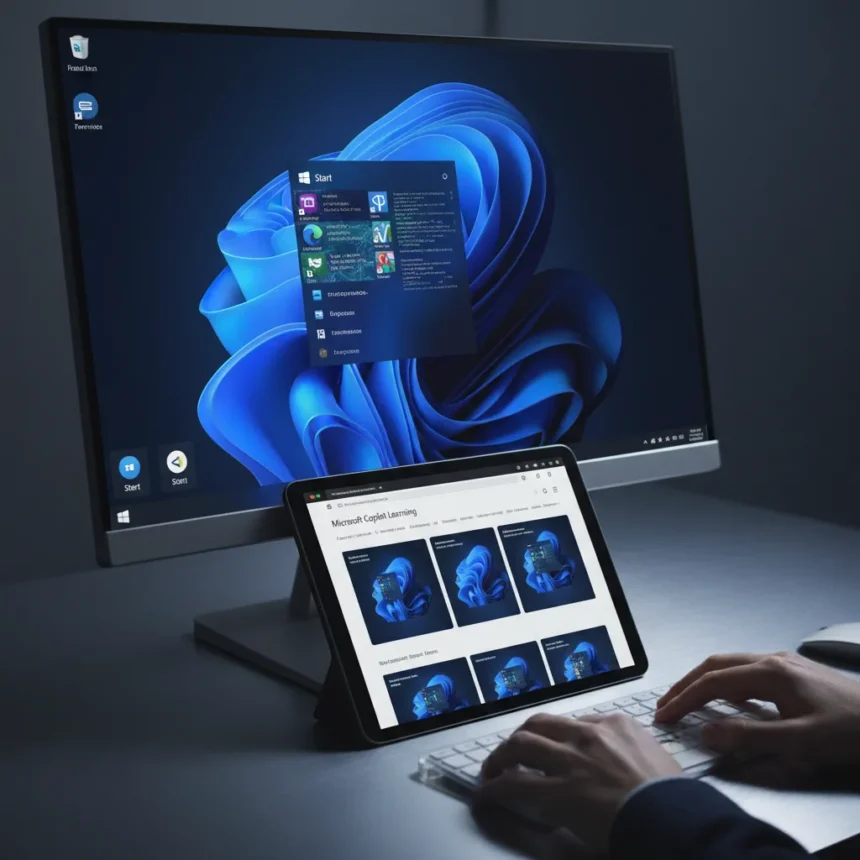
Copilot AI reliability Windows is now in question after Microsoft published an AI-generated image on its official Windows 11 Copilot Learning Center showing a taskbar with two Start buttons—a feature that does not exist in Windows 11. The error, published October 16, 2025, sits on a page meant to teach users how to use Copilot as a built-in assistant, activated by saying “Hey Copilot” or pressing Windows key + C. Instead of building confidence in Microsoft’s AI-driven vision for Windows, the image undermines it.
Key Takeaways
- Microsoft’s official Copilot learning page features an AI-generated image with duplicate Start buttons, which do not exist in real Windows 11.
- The error appeared on October 16, 2025, on Microsoft’s Windows 11 Copilot Learning Center.
- Copilot AI reliability Windows users depend on is compromised by hallucinations in official documentation.
- Copilot requires a Microsoft account to function; local account sign-in does not support the feature.
- Previous Copilot bugs included desktop icons jumping between displays on multi-monitor setups, fixed in January 2024.
How Copilot AI Reliability Windows Failed at Its Own Documentation
The duplicate Start button error is not a minor glitch—it is a fundamental failure of Copilot to accurately represent the product it is supposed to help users understand. Microsoft positions Copilot as a hands-free helper built into Windows 11, capable of assisting with tasks, work, learning, and organization. Yet the AI cannot generate a visually accurate screenshot of the interface it inhabits. The image looks fake to anyone familiar with Windows, with the second Start button appearing out of place and misaligned with actual Windows 11 design.
This matters because Microsoft is pushing hard on the AI PC narrative. The company encourages users to generate AI art via Copilot and frames the assistant as smoothly integrated into Windows 11. When the official learning materials themselves contain hallucinated UI elements, the message becomes muddled. Users cannot trust the visuals they are seeing. If Copilot cannot accurately depict Windows 11’s own interface, what else might it get wrong?
The Pattern of Copilot Bugs Undermining Trust
This is not Copilot’s first reliability failure in Windows 11. Earlier versions of the assistant caused desktop icons to jump between displays on multi-monitor setups—a bug that persisted until Microsoft fixed it service-side for Windows 11 version 23H2 on devices updated January 9, 2024 or later. The compatibility hold preventing some users from accessing Copilot remained in place until February 7, 2024. These are not edge cases. Multi-monitor setups are common in professional environments, and icon jumping breaks workflows.



Beyond visual glitches, Copilot integration has spawned other issues. Some third-party applications report unexpected behavior when Copilot runs alongside them, and users have documented cases where Copilot launches blank or fails to respond. Each bug chips away at the reliability narrative Microsoft is trying to build. The company wants Copilot to be the centerpiece of Windows 11’s future, yet the assistant keeps introducing friction rather than removing it.
Copilot AI Reliability Windows Users Actually Need
For Copilot to work at all, users must sign in with a Microsoft account—local accounts are not supported. This is a significant barrier for privacy-conscious users and enterprise environments with strict account management policies. Once activated via Windows key + C or voice command, Copilot requires a stable connection and must sometimes be reinstalled from the Microsoft Store if it stops responding. The setup friction contradicts Microsoft’s vision of a smoothly integrated assistant.



The fake Start menu image is symptomatic of a deeper problem: Copilot’s outputs cannot be trusted without verification. Users following Microsoft‘s official guidance will see an interface that does not match their screen. They might waste time looking for a feature that does not exist, or worse, lose confidence in the entire system. For a company positioning itself as an AI leader, this is embarrassing.
What This Means for Windows 11’s AI PC Future
Microsoft’s push to make Windows 11 the centerpiece of the AI PC movement depends on Copilot being reliable, accurate, and trustworthy. The duplicate Start button error proves the company is not there yet. An AI that hallucinating UI elements in official documentation is an AI that users should approach with caution. This is not a feature parity issue or a performance trade-off—it is a fundamental accuracy problem in the assistant’s core function: understanding and explaining Windows itself.
The incident also raises questions about Microsoft’s quality control for AI-generated content on official pages. If AI-generated images are not being reviewed by humans before publication, that is a process failure. If they are being reviewed and this error slipped through, that is a competence failure. Either way, Copilot AI reliability Windows users depend on is compromised.
Is Copilot broken in Windows 11?
Copilot is functional but unreliable. Previous bugs like multi-monitor icon jumping have been fixed, but new issues continue to surface, including hallucinated UI elements in official documentation. If Copilot fails to launch, try reinstalling from the Microsoft Store or ensure you are signed in with a Microsoft account rather than a local account.



Why does Copilot require a Microsoft account?
Microsoft has not publicly detailed the technical reason, but the requirement is enforced across Windows 11. Users with local accounts must switch to a Microsoft account in Settings > Accounts > Your info to use Copilot. This design choice limits accessibility for privacy-focused users and enterprise deployments.
When will Microsoft fix the fake Start menu image?
As of the publication date of the learning page (October 16, 2025), the error remained on Microsoft’s official site. Microsoft has not announced a specific timeline for replacing the AI-generated image with an accurate screenshot. The delay itself is telling—if the company had caught this immediately, it would have been corrected within hours.
The fake Start menu image is more than an embarrassing mistake. It is a warning sign that Copilot AI reliability Windows users need is still far from guaranteed. Microsoft must move beyond promotional framing and address the fundamental accuracy issues in Copilot’s outputs before asking users to trust it as the centerpiece of Windows 11’s future. Until then, skepticism is warranted.
Edited by the All Things Geek team.
Source: Windows Central




