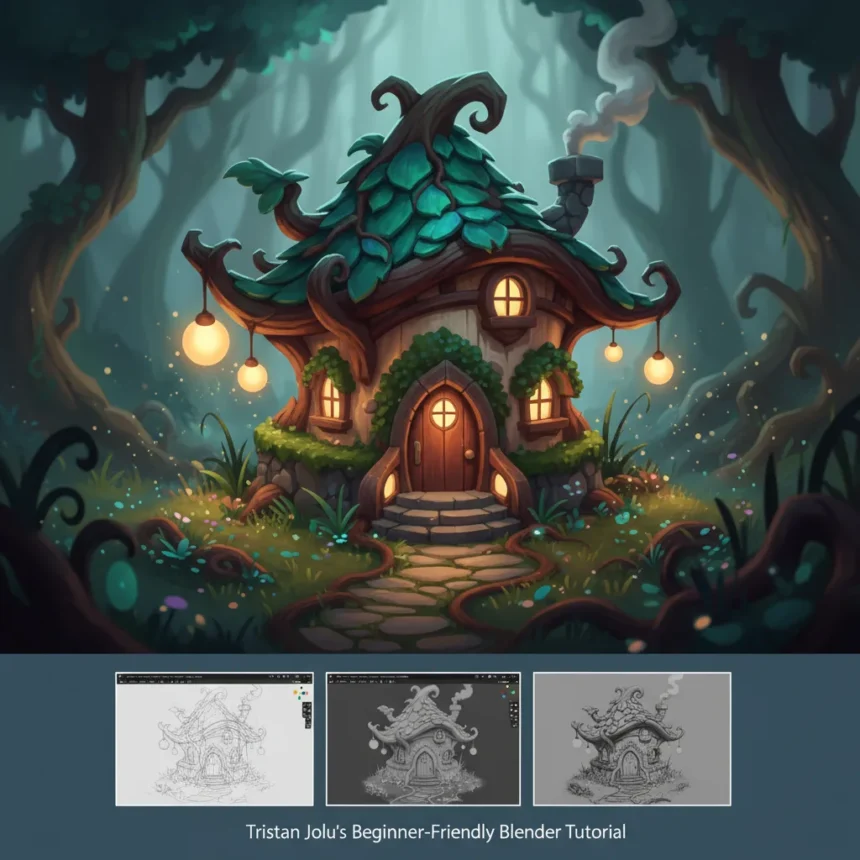
A Blender fantasy house tutorial by Tristan Jolu offers aspiring 3D artists a structured path into environment design, walking through the complete process of creating a stylised cosy fantasy house from initial concept to finished render. For hobbyists exploring game development or concept art, this beginner-friendly approach removes barriers to entry that often intimidate newcomers to 3D software.
Key Takeaways
- Tristan Jolu’s tutorial covers the full creative workflow for building a stylised fantasy house in Blender.
- The Blender fantasy house tutorial is designed specifically for beginners with no prior 3D modeling experience.
- Stylised environments offer a more forgiving entry point than photorealistic 3D work.
- Creative Bloq hosts the tutorial alongside other environment design resources and 3D modeling guides.
- Blender is free, open-source software, removing cost barriers to learning 3D art.
Why Stylised Fantasy Environments Appeal to New 3D Artists
Stylised 3D work like a cosy fantasy house requires less technical precision than photorealistic rendering, making it ideal for beginners. Exaggerated proportions, simplified textures, and painterly color choices forgive small modeling errors and allow artists to focus on composition and storytelling rather than material accuracy. This approach builds confidence faster than chasing photorealism, which demands mastery of lighting, shader networks, and texture work before producing anything visually compelling.
The fantasy genre itself invites creative freedom. A cosy fantasy house can incorporate whimsical details—rounded doorways, oversized windows, tilted roofs—that would look wrong in a realistic building but feel charming in a stylised context. This creative latitude keeps new artists engaged through the learning curve, transforming technical exercises into satisfying creative projects.
What the Blender Fantasy House Tutorial Covers
Tristan Jolu’s method walks through the complete pipeline from start to finish. Rather than jumping into modeling details, the tutorial establishes a full workflow: blocking out the composition, establishing proportions, adding structural elements, and refining details into a cohesive stylised concept. This end-to-end approach teaches not just how to build individual elements but how to think like an environment artist—balancing form, function, and visual appeal within a single scene.


By structuring the tutorial as a complete project rather than isolated techniques, learners see how individual skills connect. Modeling a door frame teaches geometry fundamentals, but modeling it within the context of a whole house teaches spatial reasoning and compositional balance. This holistic method accelerates understanding and produces a finished asset students can showcase or iterate on independently.
How Blender Compares to Other 3D Environments for Beginners
Blender’s advantage for beginners lies in accessibility and community support. As free, open-source software, it removes financial barriers that other professional tools impose. The learning curve is steep, but the ecosystem of free tutorials, community forums, and built-in documentation means stuck beginners can find answers quickly. Unreal Engine and other game engines emphasize photorealistic rendering and real-time performance, which demand more foundational knowledge before producing satisfying results. Blender’s stylised rendering capabilities let beginners create visually appealing work sooner, building momentum before tackling advanced techniques.



Creative Bloq’s tutorial library reinforces this accessibility by pairing Blender content with complementary guides on 3D world environments and environment design principles. This curated progression helps beginners understand not just software mechanics but design thinking—why certain compositional choices work, how to balance visual hierarchy, and when stylisation serves storytelling better than realism.
The Rising Interest in 3D Hobbyist Learning
Game development, concept art, and digital illustration have become more accessible as software costs dropped and online education exploded. A beginner exploring 3D art no longer needs expensive software licenses or formal training. Blender tutorials like Jolu’s tap into this shift, offering structured learning paths that respect learners’ time and budget constraints. The fantasy genre’s enduring popularity in games, animation, and illustration ensures that tutorials focused on cosy fantasy houses find eager audiences ready to learn.
Is the Blender fantasy house tutorial truly beginner-friendly?
Yes, Tristan Jolu designed the tutorial specifically for artists new to 3D modeling. The stylised approach and complete workflow structure minimize prerequisites. Beginners with no prior Blender experience can follow along, though familiarity with basic navigation and interface concepts helps. The tutorial prioritizes creative satisfaction over technical depth, allowing learners to produce a finished, visually appealing asset even on their first attempt.
What software do I need to follow the Blender fantasy house tutorial?
You need only Blender, which is free and available for Windows, Mac, and Linux. No paid plugins, assets, or additional software are required. This zero-cost entry point makes the tutorial accessible to anyone with a computer capable of running Blender, removing financial barriers that might otherwise prevent someone from exploring 3D art.



Can I create a cosy fantasy house in Blender if I’ve never used 3D software before?
Yes. Tristan Jolu’s tutorial is designed for absolute beginners with no 3D modeling experience. The stylised approach is forgiving—exaggerated proportions and simplified details tolerate imprecision. Starting with a structured tutorial rather than experimenting alone dramatically accelerates the learning curve and produces satisfying results faster than trial-and-error approaches.
For anyone curious about 3D art but intimidated by the complexity, the Blender fantasy house tutorial offers a low-risk entry point. You invest only time and attention, not money. You work toward a tangible creative goal—a finished fantasy house—rather than abstract technical exercises. And you join a massive community of hobbyists and professionals who started exactly where you are now, making questions and mistakes normal parts of the process, not signs of failure.
Edited by the All Things Geek team.
Source: Creativebloq