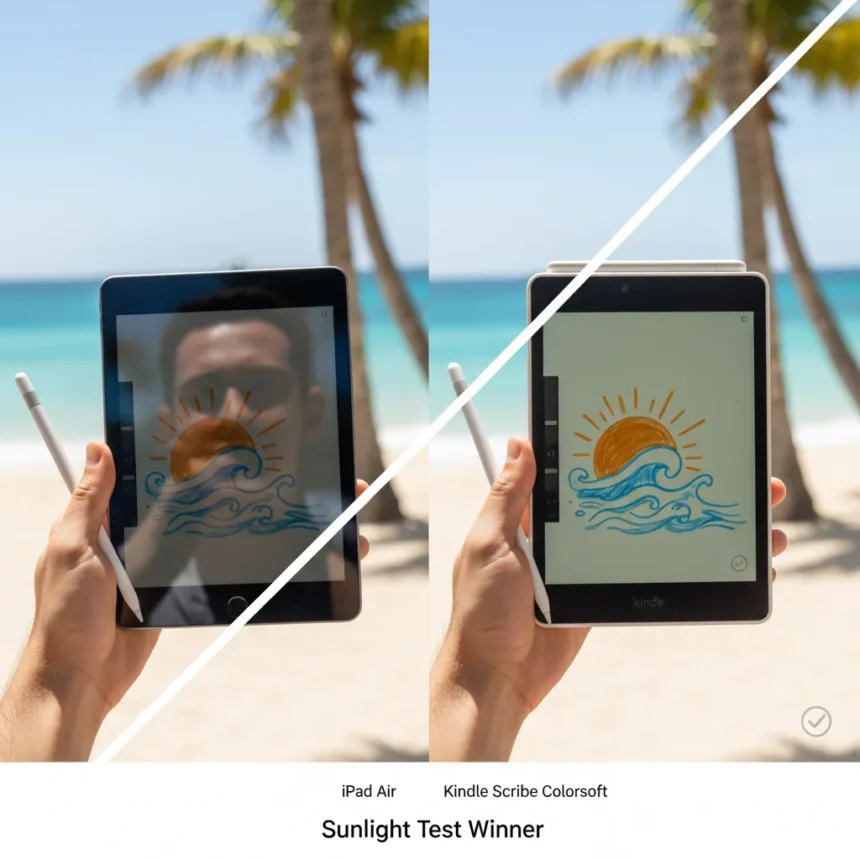
The iPad Air vs Kindle Scribe Colorsoft debate hinges on one critical factor: where you actually use these devices. Take both to a sunny park, and the answer becomes obvious. One screen vanishes in the glare. The other looks better than ever.
Key Takeaways
- Kindle Scribe Colorsoft uses reflective E Ink (Kaleido 3) that bounces ambient light, making it readable in direct sunlight without backlight.
- iPad Air relies on a backlit OLED/LCD panel that washes out, causes severe glare, and becomes nearly unusable outdoors.
- Kindle Scribe includes the Premium Pen Pro stylus with a paper-like texture and no charging needed; iPad Air requires a separate Apple Pencil Pro for $129.
- Battery life favors Kindle dramatically: 3-4 weeks versus iPad’s roughly 10 hours.
- iPad Air excels indoors with vibrant colors, smooth glass, and a full app ecosystem—but sunlight exposure is a dealbreaker for extended outdoor use.
Why Sunlight Changes Everything
Direct sunlight exposes a fundamental architectural flaw in backlit tablets. The iPad Air’s OLED or LCD panel emits light directly from the screen, which means sunlight competes with that emission. The result is a washed-out, nearly illegible display that forces you indoors or into the shade. The Kindle Scribe Colorsoft, by contrast, uses Kaleido 3 E Ink technology—a reflective screen that works exactly like paper. It bounces ambient light instead of fighting it. In bright sunlight, the Kindle Scribe becomes more readable, not less.
This is not a minor difference. One reviewer noted that the Kindle Scribe in direct sunlight performed dramatically better than the iPad, remaining legible even with the backlight completely disabled. The iPad’s glossy finish compounds the problem, amplifying glare and forcing uncomfortable viewing angles. If you plan to sketch, take notes, or read outdoors regularly, this distinction matters more than processing power or color depth.
Writing Feel and Stylus Included
The Kindle Scribe Colorsoft ships with the Premium Pen Pro stylus, a textured, paper-like writing instrument with an eraser on the flip side and zero charging requirements. The writing surface is texture-molded to mimic paper friction, creating tactile feedback that many users prefer for drawing and note-taking. The iPad Air’s smooth glass screen feels slippery by comparison—a deliberate design choice that prioritizes scrolling and gestures over writing comfort.


If you want to use the iPad Air for stylus work, you must buy the Apple Pencil Pro separately for $129, on top of the tablet’s base price. That stylus requires charging, and its battery drains quickly—some users report drops from full to 50-60% charge after just 10-20 minutes of use. The Kindle’s included stylus eliminates this friction entirely. For casual sketching or note-taking, the Kindle’s paper-like surface and included pen make it immediately ready to use.
Battery Life and Daily Practicality
The Kindle Scribe Colorsoft delivers 3-4 weeks of battery life on a single charge. The iPad Air lasts roughly 10 hours, meaning you will need to charge it daily or every other day depending on usage. For someone who uses a tablet primarily indoors, this gap is manageable. For someone who sketches in parks, travels frequently, or uses their device sporadically, the Kindle’s endurance is transformative. You can leave it in a bag for a month and pick it up fully charged.



This battery advantage compounds outdoors. An iPad left in sunlight will drain faster than indoors due to screen brightness struggles and potential thermal throttling. The Kindle thrives in sunlight and sips power because it has no backlight to drain.
Color and App Ecosystem Trade-offs
The iPad Air’s 300 PPI display delivers vibrant, saturated colors across its entire screen, supported by a 120Hz refresh rate that makes scrolling silky smooth. The Kindle Scribe Colorsoft achieves 300 PPI for black-and-white text but only 150 PPI for color, which appears desaturated and pastel-like—a deliberate trade-off to preserve battery life and readability. If you need true color accuracy for photo editing, design work, or media consumption, the iPad Air is the only choice.
Similarly, the iPad Air grants access to the full iOS app ecosystem: Procreate, Adobe apps, productivity suites, games, and thousands of other tools. The Kindle Scribe is locked into Amazon’s ecosystem, with a focus on note-taking, reading, and writing. It is intentionally simple and distraction-free—a strength for focus but a limitation for versatility.
Which Device Should You Buy?
Choose the Kindle Scribe Colorsoft if you sketch, read, or take notes outdoors regularly, value battery life measured in weeks, and want a stylus included without extra cost. Choose the iPad Air if you need full-color accuracy, app flexibility, and plan to use your device primarily indoors or in controlled lighting. The Kindle Scribe wins the sunlight test decisively. The iPad Air wins everywhere else.



Does the Kindle Scribe Colorsoft have a backlight?
No. The Kindle Scribe Colorsoft uses reflective E Ink (Kaleido 3 technology), which bounces ambient light like paper. It does not emit light, so it has no backlight and does not expose you to blue light. This design makes it readable in direct sunlight without any backlight at all.
Can you use an iPad Air in bright sunlight?
Technically yes, but the experience is poor. The iPad Air’s backlit OLED or LCD screen washes out in bright sunlight, and the glossy finish causes severe glare. The display becomes difficult to read, and viewing angles narrow significantly. For extended outdoor use, the iPad Air is impractical compared to the Kindle Scribe.
How much does the Apple Pencil Pro cost separately?
The Apple Pencil Pro costs $129 when purchased separately from the iPad Air. The Kindle Scribe Colorsoft includes its Premium Pen Pro stylus at no additional cost.
The sunlight test reveals a hard truth: backlit tablets are indoor devices, and E Ink tablets are outdoor champions. If your work or reading happens under open sky, the Kindle Scribe Colorsoft is not just better—it is the only realistic choice. The iPad Air remains the superior tool for everything else, but that everything else assumes you will stay out of the sun.
Where to Buy
Edited by the All Things Geek team.
Source: TechRadar