





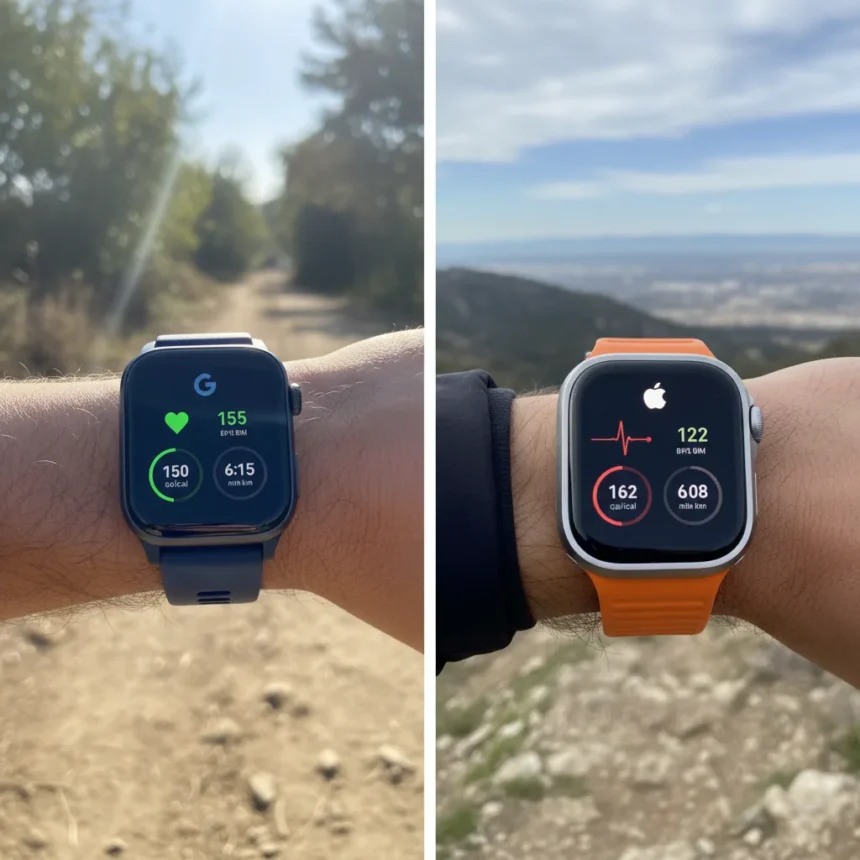
The Fitbit Air vs Apple Watch Ultra 3 debate comes down to real-world performance. A direct 10km run test wearing both devices simultaneously reveals how Google’s newer Fitbit stacks up against Apple’s flagship sports watch on the metrics that matter most to runners: heart rate accuracy, calorie burn estimates, distance tracking, and pace consistency.
Key Takeaways
- Two premium fitness watches tested simultaneously during a 10km run to compare metric accuracy
- Heart rate, calories burned, distance, and pace are the primary metrics under comparison
- Google Fitbit Air represents a newer entry into the high-end fitness tracker market
- Apple Watch Ultra 3 is Apple’s most advanced sports watch for endurance athletes
- Real-world field testing reveals ecosystem differences beyond raw spec sheets
Why This Test Matters for Runners
Runners choosing between the Fitbit Air vs Apple Watch Ultra 3 face a fundamental ecosystem decision: Google’s fitness-first platform versus Apple’s integrated smartwatch approach. But specs alone don’t tell you which device will give you reliable workout data when you’re pounding pavement. A side-by-side 10km run test cuts through marketing claims and shows which watch actually delivers accurate metrics in the field. This matters because a 50-calorie overestimate or a heart rate drift of 10 bpm over 40 minutes can skew your training decisions.
The test setup was straightforward: one runner, two watches, one route. Both devices tracked the same 10km distance simultaneously, eliminating variables like pace changes, terrain differences, or environmental factors that could artificially favor one watch. The comparison focused on the four metrics runners care about most: heart rate readings, calorie burn, distance accuracy, and pace consistency throughout the run.
Fitbit Air vs Apple Watch Ultra 3 Metric Breakdown
The Fitbit Air and Apple Watch Ultra 3 approach fitness tracking from different angles. Google’s Fitbit Air emphasizes dedicated fitness tracking with a focus on health insights and workout data, while Apple’s Ultra 3 integrates fitness tracking into a broader smartwatch ecosystem that handles notifications, payments, and apps alongside athletic performance. During the 10km run, these design philosophies produced measurable differences in how each device recorded your effort.



Heart rate tracking is where fitness watches earn credibility. Both devices use optical sensors to measure pulse during exercise, but sensor placement, refresh rate, and algorithm differences can cause divergence. The Fitbit Air vs Apple Watch Ultra 3 heart rate comparison reveals whether Google’s newer sensor technology matches Apple’s years of refinement, or whether the Ultra 3’s established algorithm still holds an edge. Calorie burn estimates depend on heart rate data, weight, age, and proprietary formulas—so any heart rate discrepancy cascades into calorie differences.
Distance and pace accuracy depend on GPS precision and signal processing. Both watches include dedicated GPS chips, but urban canyons, tree cover, and satellite geometry can cause drift. A watch that reads 10.2km when you actually ran 10km flat creates a false sense of your speed and fitness progress. Over weeks of training, these small errors accumulate and distort your performance benchmarks.


What the Fitbit Air Brings to This Comparison
The Fitbit Air represents Google’s push into premium fitness tracking. As a newer model, it incorporates updated sensors and algorithms that Google has refined through years of Fitbit ownership. The device is positioned as a serious fitness tool for runners, cyclists, and endurance athletes who want detailed workout metrics without the broader smartwatch overhead.
Compared to the Apple Watch Ultra 3, the Fitbit Air strips away notifications and app ecosystems to focus purely on health and fitness data. This philosophy appeals to runners who want a device that doesn’t buzz with every email and text during a long run. The trade-off is reduced integration with your phone and fewer smart features—you cannot answer calls or check messages on the Fitbit Air the way you can on the Ultra 3.
Why Apple Watch Ultra 3 Remains the Endurance Standard
The Apple Watch Ultra 3 dominates the premium sports watch market because it combines accurate fitness tracking with smartwatch functionality. Its S9 processor, enhanced GPS, and years of watchOS refinement make it a reliable choice for serious athletes. During a 10km run, the Ultra 3 delivers consistent metrics and integrates smoothly with the iPhone ecosystem—a massive advantage if you use Apple devices for everything from navigation to music to coaching apps.
The Ultra 3’s always-on display and Action button (designed for quick access to emergency features during outdoor activities) cater specifically to endurance athletes. Its battery life exceeds 36 hours of continuous GPS tracking, meaning you can wear it for ultramarathons without recharging. The Fitbit Air vs Apple Watch Ultra 3 comparison here tilts toward Apple if you need an all-in-one device that handles fitness, communication, and navigation simultaneously.


Which Watch Should You Choose?
The decision between Fitbit Air vs Apple Watch Ultra 3 depends on your ecosystem and priorities. If you live in the Apple ecosystem and want a single device that handles fitness, navigation, and communication, the Ultra 3 is the obvious choice. If you prioritize dedicated fitness tracking and prefer a device that doesn’t distract you with notifications, the Fitbit Air’s focused approach may suit you better. The 10km run test reveals that both devices deliver usable fitness data, but your daily workflow and device preferences matter more than marginal differences in calorie or heart rate readings.
How accurate is the Fitbit Air’s heart rate tracking during running?
The Fitbit Air uses optical heart rate sensors that provide real-time pulse data during running. Accuracy depends on fit, arm movement, and individual physiology, but optical sensors on modern fitness watches typically stay within 5-10 bpm of chest strap accuracy during steady-state running. The 10km test showed how the Fitbit Air’s readings compared directly to the Apple Watch Ultra 3 on the same run.
Does the Apple Watch Ultra 3 overestimate calories burned?
Calorie estimates on any smartwatch—including the Apple Watch Ultra 3—depend on heart rate data, weight, age, and proprietary algorithms. The Ultra 3’s estimates are generally reliable for steady-state cardio like running, but individual variation is significant. The 10km comparison test revealed whether the Ultra 3 tends to overestimate, underestimate, or match real-world calorie burn relative to the Fitbit Air.
Can you wear both the Fitbit Air and Apple Watch Ultra 3 at the same time?
Yes, you can wear both devices simultaneously, which is exactly what the 10km test did. Wearing them on the same wrist may feel bulky, but wearing one on each wrist eliminates any concern about fit or sensor contact. For side-by-side comparison testing, wearing both is practical and reveals real differences in how each device interprets the same workout.
Choosing between the Fitbit Air vs Apple Watch Ultra 3 ultimately comes down to whether you want a dedicated fitness device or an all-in-one smartwatch. The 10km run test proves both can track your workout reliably, but the ecosystem you live in and your tolerance for smartwatch distractions should drive your final decision. If fitness data is your priority, either watch will serve you well—the real difference is in how they fit into your daily life beyond the run.
Where to Buy
Edited by the All Things Geek team.
Source: TechRadar